This is the full developer documentation for Boboddy
# Introduction
> What Boboddy is and the ten-minute path to a running pipeline
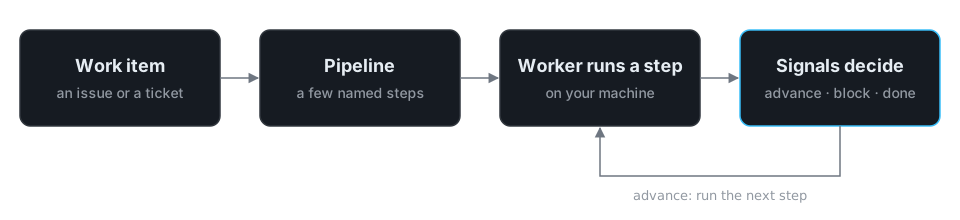
Boboddy runs AI agents over your backlog, on your machines. You describe a pipeline — a few steps, each one an agent with a prompt and a rule for what counts as done — and a worker on your laptop or CI box runs it against each work item that arrives, pausing for a human when the rules say so.
## You’ll need
[Section titled “You’ll need”](#youll-need)
* A git repository with a remote — see [Installation](/boboddy/getting-started/installation/#requirements).
* Node.js or Bun — see [Installation](/boboddy/getting-started/installation/#requirements).
* Claude Code, Codex, or GitHub Copilot, or an API key from any AI provider — see [Installation](/boboddy/getting-started/installation/#requirements).
## Where to go next
[Section titled “Where to go next”](#where-to-go-next)
[Quickstart](/boboddy/getting-started/quickstart/)Ten minutes to a running pipeline.
[Core concepts](/boboddy/getting-started/concepts/)The dozen words the rest of the docs assume.
[CLI reference](/boboddy/reference/cli/)Every boboddy command and flag.
## Start now
[Section titled “Start now”](#start-now)
```bash
npm i -g @boboddy/cli && boboddy init
```
# Quickstart
> From boboddy init to a running pipeline in one terminal session
Have your assistant drive
Using Claude Code, Codex, or Copilot? Paste this page’s URL and say *follow the Boboddy quickstart in this repo*. The docs are published as [`llms-full.txt`](/boboddy/llms-full.txt) for exactly that.
By the end you’ll have a pipeline built around one of your own work items, running on your machine. It takes about ten minutes in one terminal session; the browser only comes in for sign-in, setup the terminal can’t finish, and the pipeline graph.
## Before you start
[Section titled “Before you start”](#before-you-start)
* A git repository with an `origin` remote.
* Node.js or Bun.
* Claude Code, Codex, or GitHub Copilot — or an API key from any AI provider.
Details are in [Installation](/boboddy/getting-started/installation/#requirements). Steps that work inside your code run in a container, so the run may also need Docker — see [Runtime](/boboddy/getting-started/concepts/#runtime).
1. **Install the CLI**
```bash
npm i -g @boboddy/cli
```
Prefer Bun? See [Installation](/boboddy/getting-started/installation/#install-the-cli).
2. **Link your repo**
From anywhere inside your repository:
```bash
boboddy init
```
terminal
```text
◇ Repository: ~/my-repo [0s]
● Remote: git@github.com:you/my-repo.git
● Not signed in to https://app.boboddy.dev. Starting sign-in…
◇ Signed in as you@example.com [14s]
◇ Requirements verified [1s]
◇ No project found for this repository yet [0s]
◇ Create Boboddy project “my-repo” from GitHub you/my-repo?
│ Yes
◇ Created project “my-repo” [4s]
◇ No devcontainer yet [0s]
▲ Boboddy runs every step inside your project's devcontainer, and this repository does not have one yet. Nothing to do: `boboddy pipelines design` will write a `.devcontainer/devcontainer.json` during the session, and your first pipeline run is what verifies it builds.
◇ No AI provider connected yet [0s]
● The pipeline designer runs on OpenCode and connects it to a model the first time it starts — nothing to do now.
◆ Design your first pipeline now?
│ ● Yes / ○ No
```
`init` signs you in, then finds or creates the [project](/boboddy/getting-started/concepts/#project) for this repo. The one decision is `Create Boboddy project … from GitHub?` — say yes, and your issues keep syncing in as work items. If it isn’t asked, `init` opens a pre-filled page in your browser; pick your repo from GitHub there if you can (see [Connect GitHub or Jira](/boboddy/how-to/integrations/)).
The notices need nothing from you. Answer yes to `Design your first pipeline now?`.
3. **Pick a work item**
terminal
```text
┌ Boboddy pipeline designer
● Logs → ~/.boboddy/logs/worker-2026-10-07T15-04-12-123Z.log
◆ Signed in as you@example.com
◇ 3 work item(s) [1s]
◆ What should this pipeline handle? (Ctrl+C to cancel)
│ ● Checkout crashes when a coupon is applied twice (github)
│ ○ Add CSV export to the orders page (github)
│ ○ Flaky test: cart total rounding (github)
│ ○ Search for a different item…
│ ○ + Paste a link/id, or describe a new one…
└
◆ Designing for “Checkout crashes when a coupon is applied twice”
```
The designer builds every pipeline around one real [work item](/boboddy/getting-started/concepts/#work-item) — its interview asks how *this* item should be handled — so pick something typical. Not listed? Search, paste a ticket link, or describe one in a sentence.
4. **Connect your AI tool**
The designer runs on a Boboddy-managed OpenCode runtime that needs its own connection to a model. The first time, it names the AI tools it finds and hands you OpenCode’s provider menu.
terminal
```text
◆ Scaffolded the pipeline builder directory
● Installing pipeline builder dependencies…
◆ Dependencies installed
◇ AI runtime ready [41s]
● Connect an AI provider
● The designer runs on OpenCode, which needs its own connection to a model.
● This is one-time: the same connection runs your pipeline steps later.
● You have Claude Code. In the picker choose "Anthropic" and paste an API key from console.anthropic.com — a Claude Pro/Max subscription can't be reused here.
└ Opening the provider connection…
```
Connect the tool you already have:
| You have | In the menu, pick |
| -------------- | --------------------------------------------------------------------------------------------------------------------------------------------- |
| Claude Code | **Anthropic**, then paste an API key from console.anthropic.com — a Claude Pro/Max subscription can’t be reused here |
| GitHub Copilot | **GitHub Copilot**, then **GitHub.com (Public)** (or **GitHub Enterprise**), and enter the device code at github.com/login/device |
| Codex | **OpenAI**, then **ChatGPT Pro/Plus (browser)** to use your ChatGPT subscription (or **Manually enter API Key**) |
| None of these | Any provider (Anthropic is recommended), then follow the prompts — see OpenCode’s [Connecting providers](https://opencode.ai/docs/providers/) |
It’s one-time: the same connection runs your steps later. Boboddy never reads those tools’ credentials. Already exported a key such as `ANTHROPIC_API_KEY`? This step is skipped.
5. **Talk to the designer**
terminal
```text
┌ Boboddy pipeline designer
● Logs → ~/.boboddy/logs/worker-2026-10-07T15-04-12-123Z.log
◆ AI provider ready (anthropic)
◇ Studio running at http://localhost:51234 [0s]
└ Starting the designer… The graph is in your browser; the designer is in this terminal.
```
Your terminal becomes the [designer](/boboddy/getting-started/concepts/#the-designer), and your browser opens the [studio](/boboddy/getting-started/concepts/#the-studio): a live graph of the pipeline that redraws every time the designer saves a file.
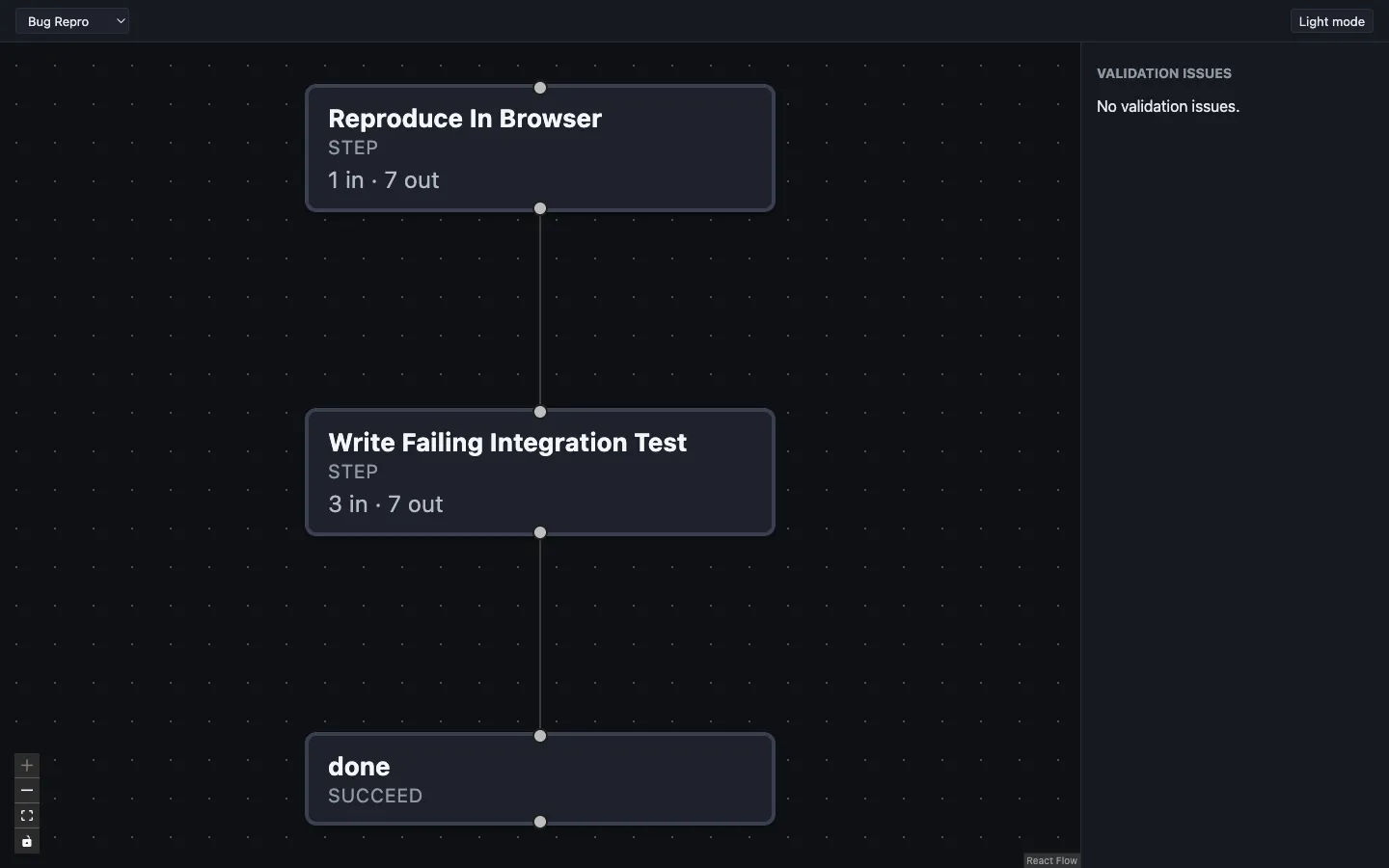
The designer reads your repository first, then interviews you about the item you picked, one question at a time:
* *What should come out the other end?* What you’d want waiting in the morning, and what you’d need to see to trust it.
* *What can the environment reach?* The tools you’d use for this item, step by step. “Nothing but the repository” is a fine answer.
* *What must never be touched?* Production writes, customer data, anything that sends email or charges money.
It proposes two or three ranked designs and builds the one you pick, plus the [default pipeline assignment](/boboddy/getting-started/concepts/#default-pipeline-assignment) that routes new items to it. With no `.devcontainer/devcontainer.json`, it writes one ([Runtime](/boboddy/getting-started/concepts/#runtime)). For a secret it asks only the variable name; you put the value in `.boboddy/.env` ([Secrets](/boboddy/guides/steps/#secrets)).
Finally it typechecks and runs `boboddy pipelines push`, which always asks for permission. Say yes: that’s the moment your pipeline reaches Boboddy. Then quit the designer with `/exit`.
6. **Run it**
As the designer closes, it checks that your pipeline’s first step can actually run, then asks whether to run it on your work item now:
terminal
```text
┌ Run it
● Logs → ~/.boboddy/logs/worker-2026-10-07T15-04-12-123Z.log
◇ First step healthy [1m 48s]
◇ Run your new pipeline on “Checkout crashes when a coupon is applied twice” now?
│ Yes
◇ Run queued [0s]
● A failed run — a step, or the devcontainer build — is something to take back to the designer: run `boboddy pipelines design` again and tell the agent what happened. The edit loop is the repair loop.
└ Starting the worker…
```
Say yes. It queues the run and starts a [worker](/boboddy/getting-started/concepts/#worker) in the same terminal:
terminal
```text
┌ Boboddy worker
● Logs → ~/.boboddy/logs/worker-2026-10-07T15-04-12-123Z.log
● Using source branch: main
● Project · concurrency 1
◆ Worker ready ()
● Claimed 1 step
◇ step starting devcontainer… [0s]
◆ step Running postCreateCommand... · 9s
◇ Step succeeded (2m 26s) [2m 16s]
● Claimed 1 step
◇ step starting devcontainer… [0s]
```
The worker polls until you press Ctrl+C. If the check or a step fails, run `boboddy pipelines design` again and tell the designer what happened. Said no? See [Run a pipeline on any work item](/boboddy/how-to/run-on-a-work-item/).
7. **Watch it in the dashboard**
Open your project in the [dashboard](/boboddy/getting-started/concepts/#dashboard), go to the *Executions* tab, and select the run. The run page shows the pipeline graph and each step’s status. Select a step for its logs and output; its *Evaluation facts* are the [signals](/boboddy/getting-started/concepts/#signal) the step reported.
Signals drive [advancement](/boboddy/getting-started/concepts/#advancement): the run moves on, or — when a `blockWhen` rule matches — stops as *Blocked* until a human steps in. That moment is the core of Boboddy.
## What you have now
[Section titled “What you have now”](#what-you-have-now)
* my-repo/
* .boboddy/
* boboddy.jsonc the project id
* .env.example secret variable names, only if a step needs any
* pipeline-builder/
* `.ts` the pipeline and its steps
* default-pipeline-assignment.ts
* package.json
* …
* .devcontainer/
* devcontainer.json written by the designer if you had none
Commit `.boboddy/` and `.devcontainer/`; the builder’s `.gitignore` already skips `node_modules/`, `push.ts`, and [lockfiles](/boboddy/how-to/commit-your-pipeline/). Never commit `.boboddy/.env`.
## Next
[Section titled “Next”](#next)
* [Change this pipeline](/boboddy/how-to/change-a-pipeline/) — run `boboddy pipelines design` again with another work item; it edits what’s there instead of starting over.
* [Let a step read your repo](/boboddy/how-to/let-a-step-read-your-repo/) — when a step needs your code, it runs in your devcontainer.
* [Automate intake](/boboddy/how-to/integrations/) — connect GitHub or Jira, and route new items with [Default Pipeline Assignment](/boboddy/guides/pipeline-assignment/).
* [Scale workers](/boboddy/guides/workers/) — concurrency, polling, and work branches.
Rather write pipelines by hand? Start from [`boboddy pipelines init`](/boboddy/reference/cli/#boboddy-pipelines-init).
# Core concepts
> The vocabulary the rest of the docs assume
These are the words the rest of the docs use without stopping to explain them. They’re in the order you meet them in the [Quickstart](/boboddy/getting-started/quickstart/).
## Project
[Section titled “Project”](#project)
A project is a repository linked to Boboddy, and the unit that owns your pipelines, work items, and workers. `boboddy init` reads your repository’s `origin` remote and either finds the project that matches it or creates one, then records its id in `.boboddy/boboddy.jsonc` so later commands don’t need it. See [`boboddy init`](/boboddy/reference/cli/#boboddy-init).
## Work item
[Section titled “Work item”](#work-item)
A work item is one thing to do: an issue, a ticket, or a sentence you typed. Work items are synced from GitHub or Jira, or created by hand — the designer creates one for you when you describe a task instead of picking an existing item. **Every pipeline run is a run on one work item**, and every design session is built around one. See [Connect GitHub or Jira](/boboddy/how-to/integrations/).
## Pipeline
[Section titled “Pipeline”](#pipeline)
A pipeline is a map of named states; each state does a step and names what runs next. Besides running a step, a state can branch, fan out, loop, or end the run with `succeed` or `fail`. Pipelines are TypeScript files in `.boboddy/pipeline-builder/`, written with `definePipeline()`. See [Building Pipelines](/boboddy/guides/pipelines/).
## Step
[Section titled “Step”](#step)
A step is the unit of work: an agent prompt, a typed result, and the signals it reports. The agent reads the prompt, does the work, and returns a result that must match the step’s schema. Each step runs on the host or inside your devcontainer — see [Runtime](#runtime) below. See [Defining Steps](/boboddy/guides/steps/).
## Signal
[Section titled “Signal”](#signal)
A signal is a number, string, or boolean extracted from a step’s result, such as a `quality_score` or a `confidence`. Signals are what advancement rules read: a rule can’t look inside the full result, only at the signals the step declares. See [Signals](/boboddy/guides/steps/#signals).
## Advancement
[Section titled “Advancement”](#advancement)
Advancement is what happens after a step finishes. Its state’s `next` and `blockWhen` read the signals and continue, branch, loop, or block for a human. A blocked run stops in the dashboard instead of moving on. See [Pipeline Advancement](/boboddy/guides/pipeline-advancement/).
## Default pipeline assignment
[Section titled “Default pipeline assignment”](#default-pipeline-assignment)
Default pipeline assignment is the set of rules that picks a pipeline for each arriving work item. It lives in `.boboddy/pipeline-builder/default-pipeline-assignment.ts`, and the designer writes one wired to the pipeline it builds. If no rule matches and the default is `skip()`, nothing starts. See [Default Pipeline Assignment](/boboddy/guides/pipeline-assignment/).
## Worker
[Section titled “Worker”](#worker)
A worker is `boboddy work`: a process on your machine that claims step executions, runs the agent, and reports signals back. A step execution is one run of one step for one work item. Nothing runs until a worker is up, and you can run as many as you like, on a laptop or a CI box. See [Running Workers](/boboddy/guides/workers/).
## Runtime
[Section titled “Runtime”](#runtime)
A step’s runtime decides where its agent runs. `Runtime.devcontainer()` is the default: the worker clones your repository and runs the agent inside the container your `.devcontainer/devcontainer.json` describes, which needs Docker. `Runtime.host()` runs the agent on the worker’s machine in an empty scratch directory, with no clone and no Docker — the designer uses it for steps that don’t need your code, such as classification, scoring, and triage.
**A devcontainer is optional to start, and the designer writes one.** If your repository has none, the design session authors `.devcontainer/devcontainer.json` before it writes any pipeline file, from what it read of your repository: version pins, the lockfile’s package manager, `docker-compose.yml` services, and CI install steps. It does not build the image, so your first run is what verifies it — if that run fails early, suspect the container before the pipeline. `boboddy init` only reports a missing devcontainer. A pipeline made only of host steps never needs one. See [Runtime](/boboddy/guides/steps/#runtime), or [Set up a dev container](/boboddy/how-to/devcontainer/) to write one by hand.
## The designer
[Section titled “The designer”](#the-designer)
The designer is `boboddy pipelines design`: an agent session that interviews you about one work item and writes the pipeline files. It runs on a Boboddy-managed OpenCode runtime, using an AI provider you connect once — the same connection your steps use later. When the files typecheck, it pushes them and offers to run the pipeline on that work item. See [`boboddy pipelines design`](/boboddy/reference/cli/#boboddy-pipelines-design-projectid).
## The studio
[Section titled “The studio”](#the-studio)
The studio is a browser tab the designer opens: a live graph of the files it is writing, with validation issues. It is read-only and redraws every time a file changes. You can also open it on its own. See [`boboddy pipelines studio`](/boboddy/reference/cli/#boboddy-pipelines-studio).
## Dashboard
[Section titled “Dashboard”](#dashboard)
The dashboard, at [app.boboddy.dev](https://app.boboddy.dev), is where runs, logs, and traces live. It’s also where you can start a run by hand from a work item’s executions drawer, and where you connect GitHub or Jira under **Project → Settings → Integrations**.
# Installation
> Install the Boboddy CLI
## Requirements
[Section titled “Requirements”](#requirements)
To get through [Quickstart](/boboddy/getting-started/quickstart/)’s first pipeline run, you need:
* **A git repository with an `origin` remote** — `boboddy init` reads the remote to find or create your project
* **Node.js** 18+ or **Bun** 1.3+ (or npm/pnpm/yarn — any one package manager, to install dependencies into `.boboddy/pipeline-builder/`)
* **An AI provider** — the first design session connects one, and the [Quickstart’s provider table](/boboddy/getting-started/quickstart/#connect-your-ai-tool) says which menu entry to pick for Claude Code, Codex, or GitHub Copilot. Or export a provider API key such as `ANTHROPIC_API_KEY` before you start.
* **A Boboddy sign-in** — `boboddy init` signs you in. On a worker machine where you won’t run `init`, use [`boboddy auth login`](/boboddy/reference/cli/#boboddy-auth-login).
* **Docker**, running where the worker runs — for steps on `Runtime.devcontainer()`, the default for steps that work in your code. See [Runtime](/boboddy/getting-started/concepts/#runtime) for which steps need it and where the devcontainer comes from.
You do **not** need OpenCode installed. Boboddy downloads and pins its own runtime the first time it’s needed — a one-time \~100 MB download.
## Install the CLI
[Section titled “Install the CLI”](#install-the-cli)
Install the `@boboddy/cli` package globally via npm. It installs the `boboddy` command:
```bash
npm i -g @boboddy/cli
```
Or with Bun:
```bash
bun add -g @boboddy/cli
```
Verify the installation:
```bash
boboddy --version
```
The npm package ships pre-compiled binaries for macOS, Linux, and Windows — see the full platform table in the [CLI reference](/boboddy/reference/cli/#platform-binaries) if you’re troubleshooting an install.
## Next steps
[Section titled “Next steps”](#next-steps)
`boboddy init` handles signing in to Boboddy and creating your project as part of setup, and the design session it hands off to connects your AI provider, so there’s no separate login step to run first. Run it from anywhere in your repository; head to [Quickstart](/boboddy/getting-started/quickstart/) for the walkthrough.
Already signed in and just need the commands? See the [CLI reference](/boboddy/reference/cli/) for `boboddy auth`, environment variables, and every flag.
# Pipeline Advancement
> Block, branch, loop, and route with the Rule DSL and fan-out cohort advancement
A pipeline has two distinct advancement mechanisms:
* The **`Rule` DSL** — used by a `step` state’s `blockWhen`, a `choice` state’s `choices[].when`, and a `loop` state’s `until`. Conditions are built with `Rule.when(...)` / `Rule.signal(...)` / `Rule.all(...)` / `Rule.any(...)`.
* **Cohort advancement** — used by a `fanOut` state’s `advanceEach`/`advanceAll` and a `parallel` state’s `advanceAll`. These use a fluent, comparator-chain context (`signal(key).eq(value).then(outcome)`), evaluated per-branch and per-cohort.
See [Building Pipelines](/boboddy/guides/pipelines/) for the state shapes themselves.
## The `Rule` DSL
[Section titled “The Rule DSL”](#the-rule-dsl)
```typescript
import { Rule } from "@boboddy/sdk/definitions/pipelines";
Rule.when(signalKey, operator, value); // a bare condition
Rule.signal(signalKey, operator, value); // the same leaf, for nesting in all/any
Rule.all([condition, condition]); // every nested condition must match
Rule.any([condition, condition]); // any nested condition must match
```
`Rule.when` and `Rule.signal` are equivalent leaf conditions — use `Rule.when` on its own, and `Rule.signal` when nesting inside `Rule.all`/`Rule.any`:
```typescript
Rule.any([
Rule.signal("score", "lessThan", 0.3),
Rule.all([
Rule.signal("reviewerApproved", "equal", false),
Rule.signal("autoApproved", "equal", false),
]),
])
```
### Operators
[Section titled “Operators”](#operators)
| Operator | Description |
| ---------------------- | ------------------------ |
| `equal` | Equal to |
| `notEqual` | Not equal to |
| `lessThan` | Less than |
| `lessThanInclusive` | Less than or equal to |
| `greaterThan` | Greater than |
| `greaterThanInclusive` | Greater than or equal to |
| `in` | Value is one of a list |
| `notIn` | Value is not in a list |
| `contains` | Contains a value |
| `doesNotContain` | Does not contain a value |
Caution
No condition’s signal argument is type-checked. A typo in `Rule.when("confidnce", ...)` compiles cleanly and only fails at execution time — re-read every signal key against the step’s declared `signals` by eye.
### Computed signals
[Section titled “Computed signals”](#computed-signals)
Aggregate several raw signals into a derived value inline with the `Computed` namespace, passed where a plain signal key would go:
```typescript
Rule.signal(
Computed.average(["quality_score", "security_score"]),
"greaterThanInclusive",
7,
)
```
| Factory | Description | Input signal types |
| -------------------------------- | --------------------------------------------------- | ------------------ |
| `Computed.average(keys)` | Arithmetic mean of the input signals | `number` |
| `Computed.weightedAverage(keys)` | Weighted mean (pass weights via a later configJson) | `number` |
| `Computed.sum(keys)` | Sum of the input signals | `number` |
| `Computed.min(keys)` | Minimum value across the input signals | `number` |
| `Computed.max(keys)` | Maximum value across the input signals | `number` |
| `Computed.count(keys)` | Count of truthy or present signal values | `any` |
| `Computed.booleanAny(keys)` | `true` if any input signal is truthy | `boolean` |
| `Computed.booleanAll(keys)` | `true` only if all input signals are truthy | `boolean` |
Each factory requires **at least two** signal keys, passed as an array. Identical calls are deduplicated into a single computed-signal definition at build time.
## Blocking a step: `blockWhen`
[Section titled “Blocking a step: blockWhen”](#blocking-a-step-blockwhen)
A single-condition “pause for human review” gate on a `step` state:
```typescript
{
kind: "step",
step: triageStep,
blockWhen: Rule.when("confidence", "lessThan", 7),
next: "writeFixPlan",
}
```
When `blockWhen`’s condition matches, the run **blocks** in the dashboard instead of advancing to `next`. Read it as “block when this is true” — the inverse of writing a “continue when” condition. If your business rule is “continue only when reproduced and confidence ≥ 0.8”, write `blockWhen` as the negation:
```typescript
blockWhen: Rule.any([
Rule.signal("reproduced", "equal", false),
Rule.signal("confidence", "lessThan", 0.8),
]),
```
## Branching: `choice`
[Section titled “Branching: choice”](#branching-choice)
A `choice` state holds the whole routing table in one place:
```typescript
routeBySeverity: {
kind: "choice",
choices: [
{ when: Rule.when("severity", "equal", "critical"), next: "pageOncall" },
],
default: "fanOutFiles",
}
```
Each `choices[]` entry pairs a `Rule` condition with the state to run when it matches; the first matching entry wins. `default` is the fallback when no `choices[]` entry matches. Both `choices[].next` and `default` must name another state **in the same pipeline** — a `choice` cannot route to a different pipeline and cannot block directly. To route conditionally to one of several pipelines, point each `choice` branch at its own small `step` state that does the routing (see [Routing to another pipeline](#routing-to-another-pipeline)).
## Looping: `until`
[Section titled “Looping: until”](#looping-until)
A `loop` state’s `until` is a `Rule` condition tested after each iteration; matching exits the loop via `next`, while hitting `maxIterations` first exits via `onExhausted`:
```typescript
refineUntilPasses: {
kind: "loop",
step: refineStep,
maxIterations: 5,
until: Rule.when("passesLint", "equal", true),
next: "publish",
onExhausted: "escalateToHuman",
}
```
## Routing to another pipeline
[Section titled “Routing to another pipeline”](#routing-to-another-pipeline)
A `step`/`fanOut`/`parallel`/loop-exit’s `next` can target a different pipeline instead of a state key:
```typescript
next: { routeToPipeline: "triage-pipeline" }
```
`routeToPipeline` must name a pipeline that already exists on the server or is in the same push batch — push validates it and throws otherwise. A `choice` branch can never target `routeToPipeline` directly (see [Branching](#branching-choice)).
## Fan-out cohort advancement: `advanceEach` / `advanceAll`
[Section titled “Fan-out cohort advancement: advanceEach / advanceAll”](#fan-out-cohort-advancement-advanceeach--advanceall)
A [fan-out](/boboddy/guides/pipelines/#fan-out-parallel-branches) (`kind: "fanOut"`) runs a step as N parallel branches, and needs two advancement decisions instead of one: each branch’s own outcome (`advanceEach`), then the whole cohort’s outcome once every branch has settled (`advanceAll`). A `parallel` state only has `advanceAll`, evaluated the same way. Both are restricted to a narrower `"continue" | "block"` outcome domain — no routing, since a branch or cohort can’t redirect the pipeline to a different one.
```typescript
fanOutReviewers: {
kind: "fanOut",
step: reviewStep,
over: "reviewer_count",
advanceEach: ({ signal }) => ({
default: "continue",
rules: [signal("passed").eq(false).then("block")],
}),
advanceAll: ({ branchOutcomes }) => ({
default: "block",
rules: [branchOutcomes.every("continue").then("continue")],
}),
next: "report",
}
```
### `advanceEach` — one branch’s own outcome
[Section titled “advanceEach — one branch’s own outcome”](#advanceeach--one-branchs-own-outcome)
Evaluated per-branch against that branch’s own signals. The callback context provides `signal(key)`, `stepSignals.`, `all(...)`, and `any(...)` — no computed-signal factories (`Computed.average`, etc.), since core has no mechanism yet to resolve a computed signal against a fan-out branch’s policy.
```typescript
advanceEach: ({ signal, all }) => ({
default: "continue",
rules: [
all(signal("confidence").lt(0.5), signal("passed").eq(false)).then("block"),
],
}),
```
`signal(key)` / `stepSignals.` return a comparator-bound ref — chain `.eq()`, `.ne()`, `.gt()`, `.gte()`, `.lt()`, `.lte()`, `.in()`, `.notIn()`, `.contains()`, `.doesNotContain()`, then `.then(outcome)` to finalize as a rule (`outcome` is `"continue" | "block"`).
### `advanceAll` — the whole cohort’s outcome
[Section titled “advanceAll — the whole cohort’s outcome”](#advanceall--the-whole-cohorts-outcome)
Evaluated once per cohort, after every branch has resolved to an outcome. The callback context provides `branchOutcomes`, `stepSignalsList`, `all(...)`, and `any(...)`.
#### `branchOutcomes`
[Section titled “branchOutcomes”](#branchoutcomes)
| Method | Description |
| ----------------- | ------------------------------------------------------------------- |
| `.total()` | The cohort’s total branch count (fact `branchCount`) |
| `.count(outcome)` | A single outcome’s count across the cohort (fact `${outcome}Count`) |
| `.every(outcome)` | `true` iff every branch resolved to this outcome |
| `.some(outcome)` | `true` iff at least one branch resolved to this outcome |
`outcome` is one of `"continue" | "block" | "error" | "abandoned"` — the 4-value branch outcome classification (`error`/`abandoned` cover branches that failed or never ran, and can’t be produced by `advanceEach` itself). `.total()` and `.count()` return a comparator ref — chain a comparator (`.eq`, `.gt`, `.gte`, etc.) and `.then(outcome)` to finalize. `.every()`/`.some()` are already booleans — go straight to `.then(outcome)`.
```typescript
advanceAll: ({ branchOutcomes, all }) => ({
default: "block",
rules: [
all(
branchOutcomes.total().gte(1),
branchOutcomes.count("block").eq(0),
).then("continue"),
branchOutcomes.some("error").then("block"),
],
}),
```
#### `stepSignalsList`
[Section titled “stepSignalsList”](#stepsignalslist)
Aggregates a signal across every branch in the cohort. Seed with `.pluck(signalKey)`, optionally reshape with `.filter(operator, value)` / `.sortBy(direction?)` / `.unique()`, then finalize with exactly one reducer:
| Reducer | Description |
| --------------- | -------------------------------------------------- |
| `.count()` | Number of values |
| `.sum()` | Sum of numeric values |
| `.avg()` | Arithmetic mean of numeric values |
| `.min()` | Minimum value |
| `.max()` | Maximum value |
| `.booleanAll()` | `true` only if every value is truthy |
| `.booleanAny()` | `true` if any value is truthy |
| `.join(sep?)` | Joins values into a string (default separator `,`) |
| `.first()` | The first value |
| `.last()` | The last value |
Each reducer returns a comparator ref — chain a comparator and `.then(outcome)` the same as `branchOutcomes`.
```typescript
advanceAll: ({ stepSignalsList }) => ({
default: "continue",
rules: [
stepSignalsList
.pluck("confidence")
.filter("greaterThanInclusive", 0.5)
.unique()
.count()
.lt(1)
.then("block"),
],
}),
```
## Multi-step pipeline example
[Section titled “Multi-step pipeline example”](#multi-step-pipeline-example)
```typescript
import { definePipeline, Rule } from "@boboddy/sdk/definitions/pipelines";
import { z } from "zod";
import { reviewCodeStep, refactorStep, verifyStep } from "./steps";
export default definePipeline({
key: "full-review",
name: "Full Code Review Pipeline",
status: "active",
input: z.object({ code: z.string() }),
startAt: "review",
states: {
review: {
kind: "step",
step: reviewCodeStep,
input: (ctx) => ({ code: ctx.pipelineInput("code") }),
blockWhen: Rule.when("clarity_score", "lessThanInclusive", 6),
next: "refactor",
},
refactor: {
kind: "step",
step: refactorStep,
input: (ctx) => ({
code: ctx.pipelineInput("code"),
suggestions: ctx.output("review"),
}),
timeout: 60,
next: "verify",
},
verify: {
kind: "step",
step: verifyStep,
input: (ctx) => ({
original: ctx.pipelineInput("code"),
refactoredScore: ctx.signal("review", "clarity_score"),
}),
next: "done",
},
done: { kind: "succeed" },
},
});
```
# Default Pipeline Assignment
> Route incoming work items to the right pipeline automatically with default-pipeline-assignment.ts
The default pipeline assignment controls which pipeline is automatically started when a new work item arrives in a project. It lives in a reserved file — `.boboddy/pipeline-builder/default-pipeline-assignment.ts` — that is managed separately from regular pipeline definitions.
## File location and authoring
[Section titled “File location and authoring”](#file-location-and-authoring)
`boboddy pipelines design` writes one wired to the pipeline it builds; `boboddy pipelines init` scaffolds an example for hand-authoring (see [which to use](/boboddy/reference/cli/#boboddy-pipelines-init)). `boboddy pipelines pull` writes or removes the file based on the server configuration. `boboddy pipelines push` syncs it back to the server when it is present.
```typescript
import { defaultPipelineAssignment } from "@boboddy/sdk/definitions/pipelines";
import bugTriage from "./bug-triage";
import regressionReview from "./regression-review";
export default defaultPipelineAssignment(({ workItem, any, assign, skip }) => ({
default: assign(bugTriage),
rules: [
any(
workItem.field("status").eq("resolved"),
workItem.field("status").eq("manual support"),
).then(skip()),
workItem.title.contains("[urgent]").then(assign(bugTriage)),
workItem.field("issueType").eq("bug").then(assign(bugTriage)),
workItem.field("labels").contains("regression").then(assign(regressionReview)),
],
}));
```
The callback receives a context object; everything needed is destructured from it. Only `defaultPipelineAssignment` needs to be imported from the SDK.
## `default`
[Section titled “default”](#default)
The outcome when no rule matches. Use `assign(pipeline)` to start a specific pipeline, or `skip()` to do nothing.
```typescript
default: assign(bugTriage) // always start bugTriage when no rule matches
default: skip() // do nothing when no rule matches
```
## `rules`
[Section titled “rules”](#rules)
An ordered list of rules evaluated against each incoming work item. The first matching rule wins; unmatched items fall through to `default`.
Each rule is a condition chained with `.then(outcome)`:
```typescript
workItem.field("issueType").eq("bug").then(assign(bugTriage))
workItem.field("labels").contains("regression").then(assign(regressionReview))
workItem.field("status").eq("resolved").then(skip())
```
## Work item properties
[Section titled “Work item properties”](#work-item-properties)
`workItem` also exposes every top-level work-item property directly, in addition to `workItem.field(name)` for the platform-specific `fields` bag. Each property returns the same kind of comparator ref as `workItem.field(name)`:
```typescript
workItem.platform.eq("github").then(assign(githubTriage))
workItem.title.contains("[urgent]").then(assign(urgentTriage))
```
| Property | Type |
| ------------------ | ------------------------------------------------------ |
| `id` | `string` |
| `projectId` | `string` |
| `platform` | the platform literal union (e.g. `"github"`, `"jira"`) |
| `platformId` | `string \| null` |
| `platformKey` | `string` |
| `url` | `string \| null` |
| `title` | `string` |
| `description` | `string \| null` |
| `sourceCreatedAt` | `string \| null` |
| `sourceUpdatedAt` | `string \| null` |
| `createdByUserId` | `string \| null` |
| `parentWorkItemId` | `string \| null` |
| `createdAt` | `string \| null` |
| `updatedAt` | `string \| null` |
Note
The date-like fields (`sourceCreatedAt`, `sourceUpdatedAt`, `createdAt`, `updatedAt`) are ISO date **strings** (or `null`), not `Date` objects — compare them with string values, not `.gt(someDate)`.
## Context helpers
[Section titled “Context helpers”](#context-helpers)
| Helper | Description |
| ---------------------- | ------------------------------------------------------------------------------------------------------------------------------------------------------- |
| `workItem.` | Access a top-level work item property (`title`, `platform`, `url`, etc. — see [Work item properties](#work-item-properties)). Returns a comparator ref. |
| `workItem.field(name)` | Access a work item field by name. Returns a comparator ref. |
| `context.isNew` | `true` when the work item is being created for the first time. Returns a comparator ref. |
| `assign(pipeline)` | Outcome: start the given pipeline. Accepts the `PipelineDefinitionSpec` a `definePipeline()` file default-exports. |
| `skip()` | Outcome: do not assign any pipeline. |
| `all(...refs)` | All nested conditions must match. |
| `any(...refs)` | Any nested condition must match. |
## Comparators
[Section titled “Comparators”](#comparators)
The same comparators available in advancement policies work here:
`.eq(v)` · `.ne(v)` · `.gt(n)` · `.gte(n)` · `.lt(n)` · `.lte(n)` · `.in(values)` · `.notIn(values)` · `.contains(v)` · `.doesNotContain(v)`
Not every comparator applies to every field — `.gt`/`.gte`/`.lt`/`.lte` only exist on numeric fields, so e.g. `workItem.title.gt(...)` is a compile error rather than just bad practice.
## Grouping
[Section titled “Grouping”](#grouping)
```typescript
rules: [
all(
workItem.field("issueType").eq("bug"),
workItem.field("priority").eq("high"),
).then(assign(bugTriage)),
any(
workItem.field("status").eq("resolved"),
workItem.field("status").eq("closed"),
).then(skip()),
]
```
## Push and pull behaviour
[Section titled “Push and pull behaviour”](#push-and-pull-behaviour)
* **push** — if `default-pipeline-assignment.ts` is present, its policy is synced to the server after pipelines are pushed. If the file is absent, the server configuration is left unchanged.
* **pull** — if the project has an assignment configured, `default-pipeline-assignment.ts` is written. If no assignment is configured, any existing file is removed.
* Pull fails with a clear error if the server contains rules that were not authored with the SDK fluent API and therefore cannot be reconstructed.
## Typed field names with `WorkItemFieldName`
[Section titled “Typed field names with WorkItemFieldName”](#typed-field-names-with-workitemfieldname)
`workItem.field(name)` is untyped by default — `fields` keys are platform- and project-dependent (Jira custom field labels, GitHub keys, etc.), so there’s no static schema to check `name` against.
`boboddy pipelines pull` also writes `work-item-fields.ts`: a `WorkItemFieldName` union of field names observed for this project as of the last pull. Pass it as `field`’s type parameter to get compile-time validation and autocomplete on a known field name, while `workItem.field(name)` (no type argument) keeps working exactly as before:
```typescript
import type { WorkItemFieldName } from "./work-item-fields";
workItem.field("issueType").eq("bug")
```
`WorkItemFieldName` is a best-effort snapshot, not an authoritative schema — new custom fields can appear on the platform side at any time, so `workItem.field(name)` (untyped) remains the safe default for fields you expect to see for the first time.
`field` also accepts a second, optional type parameter that types the comparator value for a known-shaped custom field, independent of the name-typing above:
```typescript
workItem.field("storyPoints").gte(3)
```
The two type parameters are independent and optional — supply just the first, just the second (`field(...)`), both, or neither.
# Building Pipelines
> Wire steps into a flat, named-state graph with typed bindings and pipeline-level input
A **pipeline** is a flat map of named **states**. Each state says what work it does (if any) and what runs after it — there’s no separate ordering to keep in sync; the graph is entirely derived from each state’s own forward pointer (`next`, or a `choice`/`loop` state’s own routing fields).
See the [Pipeline Graph catalog entry](/boboddy/catalog/pipeline-graph/) for an interactive view of what a compiled pipeline’s node/edge graph looks like.
## Basic pipeline
[Section titled “Basic pipeline”](#basic-pipeline)
Define a pipeline with `definePipeline()`. `startAt` names the entry state, and `states` is an object keyed by each state’s own unique key — that object key *is* the state’s identity; there’s no separate `key` field to keep in sync with it.
```typescript
import { definePipeline } from "@boboddy/sdk/definitions/pipelines";
import { reviewCodeStep } from "./steps";
export default definePipeline({
key: "code-quality-pipeline",
name: "Code Quality Pipeline",
status: "active",
startAt: "review",
states: {
review: {
kind: "step",
step: reviewCodeStep,
input: (ctx) => ({
title: ctx.workItem.title,
code: ctx.workItem.description,
}),
next: "done",
},
done: { kind: "succeed" },
},
});
```
Every path through the pipeline ends at a `succeed` or `fail` state (`{ kind: "succeed" }` / `{ kind: "fail" }`), or hands off to a different pipeline entirely — see [Routing to another pipeline](#routing-to-another-pipeline).
## Scaffold pipeline definitions
[Section titled “Scaffold pipeline definitions”](#scaffold-pipeline-definitions)
Pipeline files live in `.boboddy/pipeline-builder/`. To edit what’s already on the server by hand, the loop is [`boboddy pipelines pull`](/boboddy/reference/cli/#boboddy-pipelines-pull-projectid) → install dependencies → `npm run typecheck` → [`boboddy pipelines push`](/boboddy/reference/cli/#boboddy-pipelines-push-projectid). To start from nothing, see [`boboddy pipelines init`](/boboddy/reference/cli/#boboddy-pipelines-init) for when to use `design` instead.
## `definePipeline()` options
[Section titled “definePipeline() options”](#definepipeline-options)
| Field | Type | Required | Description |
| ------------- | --------------------- | -------- | --------------------------------------------------------------------------- |
| `key` | `string` | Yes | Unique identifier for this pipeline |
| `name` | `string` | No | Human-readable display name (defaults to `key`) |
| `version` | `number` | No | Version number (defaults to 1) |
| `description` | `string` | No | Brief description |
| `status` | `"draft" \| "active"` | No | Draft pipelines are not executed |
| `input` | `ZodType` | No | Schema for the pipeline’s own input, read via `ctx.pipelineInput(path)` |
| `startAt` | `string` | Yes | The entry state’s key. Must not name a `choice`, `succeed`, or `fail` state |
| `states` | `Record` | Yes | Every state in the pipeline, keyed by its unique state key |
## States
[Section titled “States”](#states)
Eight state kinds cover every pipeline shape. `step` and `choice` cover most pipelines; the rest exist for fan-out, concurrency, repetition, and forking.
| Kind | What it does | Exits |
| ---------- | -------------------------------------------------------------------------- | ------------------------------------------- |
| `step` | Runs one step, with an optional `blockWhen` gate | `next` |
| `choice` | Routes to one of several states by condition | `choices[].next` / `default` |
| `fanOut` | Runs one step once per item in an array signal | `next`, after the whole cohort resolves |
| `parallel` | Runs several named, single-step branches concurrently | `next`, after every branch is terminal |
| `loop` | Repeats one step until a condition matches or an iteration cap is hit | `next` (matched) or `onExhausted` (cap hit) |
| `split` | Forks into every named branch, unconditionally — no join, no reconvergence | `branches`, all firing at once |
| `succeed` | Terminal — this run finished successfully | none |
| `fail` | Terminal — this run finished unsuccessfully | none |
`blockWhen`, `choice`’s `when`, and `loop`’s `until` all use the `Rule` DSL — see [Pipeline Advancement](/boboddy/guides/pipeline-advancement/).
### `step`
[Section titled “step”](#step)
```typescript
review: {
kind: "step",
step: reviewCodeStep,
input: (ctx) => ({ code: ctx.workItem.description }),
timeout: 120,
next: "done",
}
```
| Field | Type | Required | Description |
| ----------- | ------------------------------- | -------- | -------------------------------------------------------- |
| `step` | step definition | Yes | The step to run, from `defineStep()` or `codeStep()` |
| `input` | `(ctx) => bindings` | No | Input bindings — see [Bindings](#bindings) |
| `timeout` | `number \| null` | No | Caps how long a worker can spend on the step, in seconds |
| `blockWhen` | `RuleCondition` | No | Pause for human review when this condition matches |
| `next` | `string \| { routeToPipeline }` | Yes | The state that runs after this one succeeds |
There’s no separate `.advance()` call: `next` (plus the optional `blockWhen`) *is* the advancement logic for a plain step.
### `succeed` / `fail`
[Section titled “succeed / fail”](#succeed--fail)
```typescript
done: { kind: "succeed" }
```
No fields besides `kind`. Every pipeline needs at least one reachable terminal state.
## Bindings
[Section titled “Bindings”](#bindings)
Every state that does work (`step`, `fanOut`, a `parallel` branch, `loop`) gets its input from exactly one place: that state’s own `input` mapper, called with a context object offering every binding source. There is **no pipeline-level “inject into every step” layer** — if two states need the same value, both mappers ask for it explicitly.
`workItemTitle` and `workItemDescription` are bound automatically on every state; you never declare them yourself. Beyond that, the `input` mapper’s `ctx` offers:
### `ctx.workItem` — work item fields
[Section titled “ctx.workItem — work item fields”](#ctxworkitem--work-item-fields)
```typescript
input: (ctx) => ({
title: ctx.workItem.title,
body: ctx.workItem.description,
team: ctx.workItem.field("Team"),
})
```
`ctx.workItem.title` / `ctx.workItem.description` read the work item directly. `ctx.workItem.field(name)` reads a named custom field.
### `ctx.pipelineInput(path)` — the pipeline’s own input
[Section titled “ctx.pipelineInput(path) — the pipeline’s own input”](#ctxpipelineinputpath--the-pipelines-own-input)
Only useful if `definePipeline({ input: z.object({...}) })` declares a schema; omit `input` entirely if the pipeline takes none.
```typescript
export default definePipeline({
key: "ticket-analyzer",
name: "Ticket Analyzer",
input: z.object({ storyPoints: z.number().nullable() }),
startAt: "analyze",
states: {
analyze: {
kind: "step",
step: analyzeStep,
input: (ctx) => ({ storyPoints: ctx.pipelineInput("storyPoints") }),
next: "done",
},
done: { kind: "succeed" },
},
});
```
### `ctx.signal(nodeKey, signalKey)` — an earlier state’s signal
[Section titled “ctx.signal(nodeKey, signalKey) — an earlier state’s signal”](#ctxsignalnodekey-signalkey--an-earlier-states-signal)
Addressed by that **state’s own key**, not the step’s key — two states can run the same step.
```typescript
input: (ctx) => ({
previousScore: ctx.signal("review", "clarity_score"),
})
```
### `ctx.output(nodeKey)` — an earlier state’s whole output
[Section titled “ctx.output(nodeKey) — an earlier state’s whole output”](#ctxoutputnodekey--an-earlier-states-whole-output)
```typescript
input: (ctx) => ({ reviewResult: ctx.output("review") })
```
### `ctx.literal(value)` — a hardcoded constant
[Section titled “ctx.literal(value) — a hardcoded constant”](#ctxliteralvalue--a-hardcoded-constant)
```typescript
input: (ctx) => ({ model: ctx.literal("gpt-4o") })
```
### `ctx.signalsList(nodeKey)` — a fan-out’s whole cohort
[Section titled “ctx.signalsList(nodeKey) — a fan-out’s whole cohort”](#ctxsignalslistnodekey--a-fan-outs-whole-cohort)
Available from any state after a [fan-out](#fan-out-parallel-branches)’s cohort resolves, even non-adjacent ones. Resolves to every terminal branch’s signals, aggregated server-side.
```typescript
input: (ctx) => ({ reviews: ctx.signalsList("fanOutReviewers") })
```
### `ctx.item` — the current fan-out branch’s own item
[Section titled “ctx.item — the current fan-out branch’s own item”](#ctxitem--the-current-fan-out-branchs-own-item)
`fanOut` branches only — see [Fan-out](#fan-out-parallel-branches).
Caution
No condition’s signal argument is type-checked. `blockWhen`, a `choice` branch’s `when`, and a `loop`’s `until` all take a bare string signal key with no connection back to any particular step’s declared signals — a typo compiles cleanly and fails only at execution time. This is looser than `ctx.signal(nodeKey, "key")` bindings, which the compiler does check against the reachable state keys.
## Plugins in pipeline steps
[Section titled “Plugins in pipeline steps”](#plugins-in-pipeline-steps)
Opencode plugins are configured on the `defineStep()` itself, not on a state’s `input` option. When that step runs inside a pipeline, Boboddy merges the step’s `plugins` array into the generated Opencode config for that execution.
Use plain package names for default plugin loading:
```typescript
import { defineStep } from "@boboddy/sdk/definitions/steps";
export const reviewCodeStep = defineStep({
key: "review-code",
name: "Review Code",
agentPrompt: "Review the submitted code.",
plugins: ["opencode-wakatime", "opencode-helicone-session"],
});
```
If a plugin needs configuration, use the tuple form `[packageName, options]`:
```typescript
plugins: [
"opencode-wakatime",
["@my-org/plugin", { project: "platform" }],
]
```
Plugin entries are deduplicated by package name when Boboddy combines your baseline Opencode config with the step-specific plugins.
## Timeouts
[Section titled “Timeouts”](#timeouts)
Set `timeout` on a `step`/`fanOut`/`loop` state to cap how long a worker can spend on it, in seconds:
```typescript
heavyAnalysis: {
kind: "step",
step: heavyAnalysisStep,
input: (ctx) => ({ payload: ctx.pipelineInput("payload") }),
timeout: 120,
next: "done",
}
```
## Fan-out: parallel branches
[Section titled “Fan-out: parallel branches”](#fan-out-parallel-branches)
A `fanOut` state runs one step once for every item in an array signal — think “review each of the N reviewers” or “process each of the N files” — instead of the single fixed execution a `step` state gives you. It always compiles to a `fanOut` node paired with a `cohortGate` node immediately after it.
```typescript
import { definePipeline } from "@boboddy/sdk/definitions/pipelines";
export default definePipeline({
key: "code-review",
name: "Code Review",
startAt: "triage",
states: {
triage: { kind: "step", step: triageStep, next: "fanOutReviewers" },
fanOutReviewers: {
kind: "fanOut",
step: reviewStep,
over: "reviewer_count",
maxConcurrency: 4,
advanceEach: () => ({ default: "continue" }),
advanceAll: (ctx) => ({
default: "block",
rules: [ctx.branchOutcomes.every("continue").then("continue")],
}),
next: "report",
},
report: {
kind: "step",
step: reportStep,
input: (ctx) => ({ reviews: ctx.signalsList("fanOutReviewers") }),
next: "done",
},
done: { kind: "succeed" },
},
});
```
`over`’s resolved signal shape decides the branch mode. A number-typed signal (like `reviewer_count` above) resolves a fixed branch count, with no `ctx.item` in the `input` mapper. An array-typed signal resolves branch count from the array’s length and makes `ctx.item` — the array’s element type — available to every branch’s `input` mapper:
```typescript
fanOutAssignees: {
kind: "fanOut",
step: assigneeReviewStep,
over: "analyze.assigneeIds", // an array-typed signal — the "stateKey.signalKey" form is documentation only
input: (ctx) => ({
assigneeId: ctx.item,
ticketTitle: ctx.workItem.title,
}),
advanceEach: () => ({ default: "continue" }),
advanceAll: () => ({ default: "continue" }),
next: "done",
}
```
### `FanOutState`
[Section titled “FanOutState”](#fanoutstate)
| Field | Type | Required | Description |
| ---------------- | ------------------- | -------- | ----------------------------------------------------------------------------------------------------- |
| `step` | step definition | Yes | The step to run once per item |
| `over` | `string` | Yes | Signal whose value determines branch count (and, if array-typed, each branch’s `ctx.item`) at runtime |
| `maxConcurrency` | `number \| null` | No | Caps how many branches release to the claim pool up front |
| `input` | `(ctx) => bindings` | No | Input bindings; same context as a `step` state’s mapper, plus `ctx.item` |
| `timeout` | `number \| null` | No | Per-branch timeout in seconds |
| `advanceEach` | `(ctx) => result` | Yes | Every branch’s own continue/block decision, evaluated against that branch’s own signals |
| `advanceAll` | `(ctx) => result` | Yes | The whole cohort’s continue/block decision, once every branch has settled |
| `next` | `string` | Yes | The state that runs once the whole cohort resolves |
See [Pipeline Advancement](/boboddy/guides/pipeline-advancement/#fan-out-cohort-advancement-advanceeach--advanceall) for the full `advanceEach`/`advanceAll` callback contexts.
## Parallel branches
[Section titled “Parallel branches”](#parallel-branches)
A `parallel` state runs several **named, single-step** branches concurrently — unlike `fanOut`, the branch count is fixed at author time and each branch can run a different step.
```typescript
gather: {
kind: "parallel",
branches: {
reviewA: { step: reviewStep, input: (ctx) => ({ code: ctx.workItem.description }) },
reviewB: { step: reviewStep, input: (ctx) => ({ code: ctx.workItem.description }) },
},
advanceAll: (ctx) => ({
default: "block",
rules: [ctx.branchOutcomes.every("continue").then("continue")],
}),
next: "done",
}
```
| Field | Type | Required | Description |
| ------------ | -------------------------------------------- | -------- | -------------------------------------------------------------- |
| `branches` | `Record` | Yes | Named branches; requires at least one |
| `advanceAll` | `(ctx) => result` | No | Defaults to “continue iff every branch continued” when omitted |
| `next` | `string` | Yes | The state that runs once every branch is terminal |
## Loop
[Section titled “Loop”](#loop)
A `loop` state repeats one step until an `until` condition matches or `maxIterations` is hit.
```typescript
refineUntilPasses: {
kind: "loop",
step: refineStep,
maxIterations: 5,
until: Rule.when("passesLint", "equal", true),
next: "publish",
onExhausted: "escalateToHuman",
}
```
| Field | Type | Required | Description |
| --------------- | ------------------- | -------- | ----------------------------------------------------------------- |
| `step` | step definition | Yes | The step to repeat |
| `maxIterations` | `number` | Yes | Iteration cap |
| `input` | `(ctx) => bindings` | No | Input bindings, evaluated fresh on every iteration |
| `timeout` | `number \| null` | No | Per-iteration timeout in seconds |
| `until` | `RuleCondition` | Yes | Tested after each iteration; matching exits the loop successfully |
| `next` | `string` | Yes | The state that runs when `until` matches |
| `onExhausted` | `string` | Yes | The state that runs when `maxIterations` is hit first |
## Branching: `choice`
[Section titled “Branching: choice”](#branching-choice)
A `choice` state routes to the first state in the same pipeline whose condition matches, or to its `default` — see [Branching: `choice`](/boboddy/guides/pipeline-advancement/#branching-choice).
## Split: unconditional fork
[Section titled “Split: unconditional fork”](#split-unconditional-fork)
A `split` state forks into every named branch at once — unlike `choice`, there’s no condition and no single winner. Each branch is an ordinary, independent chain of states (any kind, any depth) that runs to its own terminal state; there’s no `next` on the `split` itself and no join back into a shared continuation. Reach for it when one step’s output needs to kick off more than one independent thing — for example, firing a notification and recording evidence off the same review step, where the notification is a dead end but evidence-recording needs to keep going into the rest of the pipeline:
```typescript
reviewComplete: {
kind: "split",
branches: ["notifyChannel", "recordEvidence"],
},
notifyChannel: {
kind: "step",
step: notifyStep,
input: (ctx) => ({ channel: ctx.workItem.field("Channel") }),
next: "notified",
},
notified: { kind: "succeed" },
recordEvidence: {
kind: "step",
step: recordEvidenceStep,
input: (ctx) => ({ reviewOutcome: ctx.output("review") }),
next: "done",
},
done: { kind: "succeed" },
```
| Field | Type | Required | Description |
| ---------- | ---------- | -------- | ------------------------------------------------------------------------------------ |
| `branches` | `string[]` | Yes | Every target state key; each starts its own independent chain. At least two required |
The pipeline run only completes once every branch — recursively, through any nested `split`s — reaches its own `succeed`/`fail`; no chain is cancelled early just because a sibling finished first. If any branch fails, the whole run is reported failed, even if a faster sibling branch already succeeded.
No two branches may reconverge on the same state, directly or several hops downstream — push validates this and rejects the definition, since `split` has no join to safely absorb it.
## Routing to another pipeline
[Section titled “Routing to another pipeline”](#routing-to-another-pipeline)
A `next` can be `{ routeToPipeline: "" }` instead of a state key, handing the run off to a different pipeline — see [Routing to another pipeline](/boboddy/guides/pipeline-advancement/#routing-to-another-pipeline).
## See also
[Section titled “See also”](#see-also)
* [Pipeline Advancement](/boboddy/guides/pipeline-advancement/) — `blockWhen`, `choice`, the `Rule`/`Computed` DSL, and fan-out cohort advancement.
* [Default Pipeline Assignment](/boboddy/guides/pipeline-assignment/) — routing incoming work items to a pipeline automatically.
# Defining Steps
> Create reusable, versioned computation units with typed inputs, outputs, and signals
A **step** is the atomic unit of work in Boboddy. Each step has a typed input schema, a result schema, an agent prompt, and optionally a set of **signals** extracted from its output.
## Basic step
[Section titled “Basic step”](#basic-step)
```typescript
import { defineStep } from "@boboddy/sdk";
import { z } from "zod";
export const summarizeStep = defineStep({
key: "summarize-text",
name: "Summarize Text",
agentPrompt: "Summarize the provided text concisely.",
additionalInput: z.object({
text: z.string(),
}),
result: z.object({
summary: z.string(),
}),
status: "active",
});
```
The agent is automatically given the step’s input as default context — the full input JSON is injected into the prompt when the step runs. You do **not** need to interpolate fields like `input.text` into `agentPrompt` for the agent to see them. Referencing input fields (see [Prompt context](#prompt-context)) is optional and only inlines a specific value into your instructions.
## `defineStep` options
[Section titled “defineStep options”](#definestep-options)
| Field | Type | Required | Description |
| ----------------- | --------------------------------- | -------- | --------------------------------------------------------------------------------------------------------------------------------------------------------------- |
| `key` | `string` | Yes | Unique identifier for this step within the project |
| `name` | `string` | Yes | Human-readable display name |
| `version` | `number` | No | Version number (defaults to 1) |
| `description` | `string` | No | Brief description shown in the UI |
| `agentPrompt` | `string \| ((context) => string)` | Yes | AI prompt given to the worker agent when executing this step |
| `additionalInput` | `ZodType` | No | Zod schema for the step’s additional input fields; bound in the pipeline mapper |
| `result` | `ZodType` | No | Zod schema for the step’s output |
| `signals` | `Signal[]` | No | Values to extract from the result for pipeline advancement logic |
| `mcpServers` | `OpenCodeMcpServers` | No | MCP server configurations for tool-using agents |
| `healthChecks` | `HealthCheck[]` | No | Real tool calls forced against the environment before the agent is prompted |
| `plugins` | `OpenCodePluginEntry[]` | No | Opencode plugins merged into the generated config when this step runs |
| `features` | `StepFeature[]` | No | Built-in feature plugins that extend the result schema, signals, and prompt |
| `status` | `"draft" \| "active"` | No | Draft steps are not executed; defaults to `"active"` |
| `environment` | `{ runtime?, vars?, repo? }` | No | Where the step runs, which environment variables it gets, and what it does to your repository. Declare it before `agentPrompt`. See [Environment](#environment) |
## Prompt context
[Section titled “Prompt context”](#prompt-context)
`agentPrompt` can be a raw string, but the recommended form is a function that receives a typed prompt context. This gives autocomplete for step input fields and supported runtime variables.
```typescript
export const browserReproStep = defineStep({
key: "browser-repro",
name: "Browser Repro",
additionalInput: z.object({
title: z.string(),
}),
agentPrompt: ({ input, env, boboddy }) => `
Open ${env.BASE_URL}.
Investigate the issue titled ${input.title}.
Save traces and screenshots to ${boboddy.artifactsDir}.
`,
});
```
Available scopes:
| Scope | Use for |
| --------- | ------------------------------------------------------------------ |
| `input` | Fields from `additionalInput` and any pipeline-bound step input |
| `env` | The worker’s environment, or the step’s `environment.vars` (below) |
| `boboddy` | Boboddy-provided runtime values |
Boboddy currently provides `boboddy.artifactsDir`, which points to the directory whose contents will be uploaded as step artifacts after the run.
The function form compiles to the same template syntax Boboddy stores internally, such as `{{input.title}}` and `{{env.BASE_URL}}`. Existing raw tokens still work, but new steps should prefer scoped variables.
In a step that does not declare [`environment.vars`](#environment-variables), `env` is the worker’s environment: `.boboddy/.env` merged over the worker’s `process.env`. Once a step declares `vars`, the prompt’s `env` is **strict** — only the declared, non-secret keys, and nothing else from the worker.
## Environment
[Section titled “Environment”](#environment)
`environment` describes how a step runs: **where** it runs (`runtime`), **which environment variables** it gets (`vars`), and **what it does to your repository** (`repo`). It is accepted by `defineStep()` and [`codeStep()`](#code-steps), and every field is optional.
```typescript
import { defineStep, Runtime, Env } from "@boboddy/sdk";
import { z } from "zod";
export const buildFrontend = defineStep({
key: "build-frontend",
name: "Build Frontend",
additionalInput: z.object({ targetUrl: z.string() }),
environment: {
runtime: Runtime.devcontainer({
config: ".devcontainer/frontend/devcontainer.json",
}),
vars: ({ input }) => ({
TARGET_URL: input.targetUrl,
PROFILER_TOKEN: Env.inherit({ secret: true }),
}),
},
agentPrompt: ({ env }) => `Build the frontend and profile ${env.TARGET_URL}.`,
});
```
| Field | Type | Default |
| --------------------- | -------------------------------------------------------------------------------------------- | ------------------------------------------------------- |
| `environment.runtime` | `Runtime.devcontainer({ config? })` or `Runtime.host()` | `Runtime.devcontainer()` |
| `environment.vars` | `({ input }) => Record` | none |
| `environment.repo` | `Repo.readWrite()`, `Repo.readOnly()` or `Repo.none()`, or `({ input, result }) => RepoSpec` | The runtime’s default (see [Repo access](#repo-access)) |
Caution
Declare `environment` **before** `agentPrompt`. TypeScript infers the keys declared in `vars` into the prompt’s `env`, so `environment` has to come first in the object for `agentPrompt`’s `env` to be typed from it.
### Runtime
[Section titled “Runtime”](#runtime)
`runtime` controls whether a step gets a checkout of your repository, and which container it runs in.
| Runtime | What the worker sets up | Use for |
| ------------------------ | ---------------------------------------------------------------------------------------------------------------------------------------------- | ------------------------------------------------------------------------------------------- |
| `Runtime.devcontainer()` | Clones your repository and launches your devcontainer; the agent runs **inside** that container. This is the default. | Steps that read, run, or modify your code. |
| `Runtime.host()` | No clone and no dev container. The agent runs on the worker host against a temporary empty directory with only the prompt and its bound input. | Prompt-only steps: research, summarization, drafting, classification, or routing decisions. |
```typescript
import { defineStep, Runtime } from "@boboddy/sdk";
import { z } from "zod";
export const classifyStep = defineStep({
key: "classify-ticket",
name: "Classify Ticket",
environment: { runtime: Runtime.host() },
additionalInput: z.object({ title: z.string(), body: z.string() }),
result: z.object({ category: z.string() }),
agentPrompt: ({ input }) =>
`Classify this ticket into a single category:\n\n${input.title}\n${input.body}`,
});
```
`Runtime.host()` steps are faster and cheaper because they skip the clone and container startup, and they run even for projects without a dev container. Everything else works the same: bound input, `agentPrompt`, `result`, `signals`, and `mcpServers` all behave identically. Because there is no checkout, the agent has no access to your repository files; if a step needs to read or change your code, keep the default `Runtime.devcontainer()`. `Runtime.host()` takes no options, so a host step cannot name a devcontainer config.
See [Running Workers](/boboddy/guides/workers/) for how each runtime is executed.
#### Selecting a devcontainer config
[Section titled “Selecting a devcontainer config”](#selecting-a-devcontainer-config)
By default the worker launches `.devcontainer/devcontainer.json`, falling back to `devcontainer.json` at the repository root. A repository can keep more than one config (a frontend image, a perf image, a CI image); pass `config` to pick one for a step:
```typescript
environment: {
runtime: Runtime.devcontainer({
config: ".devcontainer/frontend/devcontainer.json",
}),
},
```
`config` is the **full repo-relative path** to the file. There is no name shorthand.
* The file name must be `devcontainer.json` or `.devcontainer.json`. This is the devcontainer CLI’s own rule for `--config`.
* The path must be relative to the repository root: no leading `/`, no drive letter, no backslashes, and no `..` segment. A leading `./` is stripped. It can be at most 255 characters.
* These rules are checked when you define the step (`Runtime.devcontainer` throws), by `boboddy pipelines push` validation, by the server (a `422`), and again by the worker before launch.
An explicit `config` has **no fallback**. The worker does not go looking for another config if yours is missing, because that would run the step in a different container than the one you chose. If the file does not exist, the step fails before the container launches:
```plaintext
Devcontainer config ".devcontainer/frontend/devcontainer.json" not found in the cloned repository (branch "main")
```
The error names the path and the branch it was looked up on.
The config comes from the branch the step is based on
The worker reads the config from the checkout the step starts from. For the first step in a pipeline that is your base branch (see [Base branch](/boboddy/guides/workers/#base-branch)); for a later step it is the work branch of the nearest earlier step that produced one. So an earlier step can add, change, or remove a config that a later step selects. The config must exist on that branch, not only on your default branch.
The worker patches the config it launches (to add mounts, ports, and `containerEnv`). That patched file is **not** committed to the step’s work branch, wherever it lives. See [Set up a dev container](/boboddy/how-to/devcontainer/#multiple-configs) for writing an alternate config.
#### Runtime for code steps
[Section titled “Runtime for code steps”](#runtime-for-code-steps)
[`codeStep()`](#code-steps) takes the same `environment`, with one restriction: **`Runtime.host()` is not supported**. A code step runs code from your repository, and the host runtime has no clone, so the entrypoint could never be found. This is a type error on `codeStep`, and `boboddy pipelines push` validation rejects a hand-built spec that does it.
A code step runs in a **managed runtime** by default: a small container the worker supplies, so the step does not boot your project’s devcontainer to run a plain function. The worker owns the image, the generated config and the dependency install; your repository holds nothing for it. Pick one with `Runtime.managed.()`, or opt out with `Runtime.devcontainer()` to run in your project’s devcontainer (or the config it selects) instead.
```typescript
import { codeStep, Runtime } from "@boboddy/sdk/definitions/steps";
export const lookupCriteria = codeStep({
key: "lookup-criteria",
name: "Lookup Criteria",
environment: { runtime: Runtime.managed.node24() },
fn: lookupCriteriaFn,
});
export const needsProjectToolchain = codeStep({
key: "needs-project-toolchain",
name: "Needs Project Toolchain",
environment: { runtime: Runtime.devcontainer() },
fn: needsProjectToolchainFn,
});
```
| Identifier | Image | Runtime | Install, run in `.boboddy/pipeline-builder` |
| ---------- | ----------------------- | ------- | ------------------------------------------------------------------------------------------------------------------------------------------------------------------------------------------------------------------------------------------------- |
| `bun1` | `oven/bun:1.4.0-debian` | Bun 1.x | `bun install --production`, whichever lockfile is present or none |
| `node24` | `node:24-bookworm-slim` | Node 24 | `npm install --omit=dev --no-audit --no-fund` for `package-lock.json`, `yarn.lock` or no lockfile; `corepack pnpm install --prod` for `pnpm-lock.yaml`; `bun.lock` or `bun.lockb` is not read by npm, so it installs without it and logs a notice |
`bun1` is the default: omit `runtime` and you get `Runtime.managed.bun1()`. An identifier is the runtime plus its major line. Within a line the worker floats minor and patch versions, so a worker upgrade can move the image under your step. A new major is a new identifier.
How the install works:
* Each image contains one runtime: `bun1` has Bun and no Node, `node24` has Node and no Bun. The worker runs the step with the runtime the identifier names.
* The install runs on every execution, before your function. A failing install fails the step.
* When several lockfiles are present, the first of `bun.lock`, `bun.lockb`, `pnpm-lock.yaml`, `yarn.lock`, `package-lock.json` decides.
* With no lockfile the install is a plain install, never a frozen one. The pipeline-builder scaffold gitignores lockfiles, so a fresh clone usually has none.
* A lockfile the install generates, where your repository had none, is deleted afterwards.
* A `Repo.readWrite()` step never commits the install’s output (`node_modules`, `bun.lock` and `package-lock.json` under `.boboddy/pipeline-builder`), even in a repository that does not gitignore them.
Runtime-specific behavior to know about:
* **`bun1` skips dependency `postinstall` scripts** unless the package is listed in `trustedDependencies` in `.boboddy/pipeline-builder/package.json`. `node24` runs them. A dependency that needs a native build or a binary download can install cleanly on `bun1` and then fail when it is imported or run.
* **`node24` does not resolve extensionless relative imports.** `import { x } from "./helpers"` fails with `ERR_MODULE_NOT_FOUND`; write `./helpers.ts`, or use `bun1`.
* **A code step’s working directory is the workspace** (the repository root in the container), not the image’s default directory. This applies to every code step, including ones on `Runtime.devcontainer()`.
Behavior change for existing `Runtime.devcontainer()` code steps
Before managed runtimes, a code step’s working directory was whatever the container image set (for example `/home/bun/app` or `/`), so relative paths in `fn` behaved differently per image. It is now always the workspace. A step that relied on the old directory needs updating.
Existing steps are unchanged until re-pushed
The default applies when a step is pushed. A code step already pushed keeps running in your project’s devcontainer until you push it again with `boboddy pipelines push`. To keep one on the devcontainer after a re-push, set `runtime: Runtime.devcontainer()` explicitly.
Managed runtimes are for code steps only. `defineStep()` rejects them (a type error, and push validation) because an agent step needs your project’s toolchain. A managed step has no `config`, and `repo` follows the usual rules: `Repo.readWrite()` (the default) or `Repo.readOnly()`.
With `Runtime.devcontainer()` the runner script executes in your container. A container selected with a non-default `config` must provide a JavaScript runtime for it: the runner uses `bun` if it is on `PATH`, otherwise `node`. That is up to the author of the config.
### Repo access
[Section titled “Repo access”](#repo-access)
`repo` controls what the worker does with the repository clone: whether the step gets a [work branch](/boboddy/guides/workers/#work-branches), and whether its changes are committed and pushed. Pick one of three modes:
| Mode | What the worker does | Use for |
| ------------------ | --------------------------------------------------------------------------------------------------------------------------------------- | ---------------------------------------------------- |
| `Repo.readWrite()` | Creates a work branch, then commits the agent’s changes and pushes the branch when the step succeeds. This is the devcontainer default. | Steps that change code. |
| `Repo.readOnly()` | Clones and checks out the base branch, but creates no work branch, commits nothing, pushes nothing, and reports no `workBranch`. | Steps that only read code: triage, analysis, review. |
| `Repo.none()` | No repository. The worker does not clone, branch, commit, or push. This is the `Runtime.host()` default. | Prompt-only steps on `Runtime.host()`. |
Which modes a runtime accepts, and its default:
| Runtime | `readWrite` | `readOnly` | `none` | Default |
| ------------------------ | --------------------- | --------------------- | ----------------------------------------------- | ----------- |
| `Runtime.devcontainer()` | Yes | Yes | No: the config is read from the clone | `readWrite` |
| `Runtime.managed.()` | Yes | Yes | No: the worker writes its config into the clone | `readWrite` |
| `Runtime.host()` | No: there is no clone | No: there is no clone | Yes | `none` |
A pair the runtime does not accept is a type error where TypeScript can express it. `boboddy pipelines push` validation and the server (a `422`) reject it otherwise. A step that omits `repo` gets its runtime’s default, so `Repo.readWrite()` on a devcontainer step and `Repo.none()` on a host step are redundant. [`codeStep()`](#code-steps) accepts `repo` with the same rules.
```typescript
import { defineStep, Repo } from "@boboddy/sdk";
import { z } from "zod";
export const triage = defineStep({
key: "triage",
name: "Triage",
environment: { repo: Repo.readOnly() },
agentPrompt: "Find the code behind this report and summarize it.",
});
export const implement = defineStep({
key: "implement",
name: "Implement",
additionalInput: z.object({ title: z.string() }),
result: z.object({ summary: z.string() }),
environment: {
repo: ({ result }) =>
Repo.readWrite({ message: `fix: ${result.summary}` }),
},
agentPrompt: ({ input }) => `Fix: ${input.title}`,
});
```
#### `Repo.readWrite` options
[Section titled “Repo.readWrite options”](#reporeadwrite-options)
| Option | Type | Default | Description |
| --------------- | ------------------ | --------------------------------- | ----------------------------------------------------------------------------------- |
| `message` | `string` | `boboddy: step ` | The commit message, rendered from the step’s input and result |
| `onPushFailure` | `"fail" \| "warn"` | `"fail"` | Whether a failed push fails the step (`"fail"`) or is logged and ignored (`"warn"`) |
**Commit message.** `repo` is a function of `{ input, result }`, the same way `vars` is a function of `{ input }`: both are typed from the step’s `additionalInput` and `result`, and a template literal built from them (`` `fix: ${result.summary}` ``) becomes a `{{result.summary}}` token that the worker renders when the step finishes. Write the string with a prefix before the interpolation, since a bare `` `${result.summary}` `` trips a lint rule. A static `Repo.readWrite({ message: "fix: {{result.summary}}" })` is the same thing, and the common case when the message needs no tokens.
* Only `{{input.…}}` and `{{result.…}}` tokens are allowed. `{{env.…}}` is rejected, so an environment value can never reach git history.
* The template is one line and at most 500 characters.
* The rendered text carries agent output, so the worker reduces it to a safe subject: whitespace runs collapse to one space, control characters are stripped, and the subject is cut to 200 characters. If nothing is left (an empty template, or tokens that render empty), the message is `boboddy: step `.
* The same message is used for the superproject commit and for each submodule commit.
**Push failure.** By default a failed push of the work branch, or of a submodule’s copy of it, fails the step with a message naming the branch and the underlying git error. See [Work branches](/boboddy/guides/workers/#work-branches) for the behavior change this made and the consequences.
#### `readOnly` is a policy, not a sandbox
[Section titled “readOnly is a policy, not a sandbox”](#readonly-is-a-policy-not-a-sandbox)
`Repo.readOnly()` tells the worker not to publish anything. It does not mount the repository read-only and does not revert edits, so an agent can still write files in its workspace. Those edits live and die with the workspace, which is deleted after the step. The guarantee you can rely on is the observable one: no branch appears on your remote and no `workBranch` is reported for the step.
A read-only step checks out the same base branch a `readWrite` step would be created off. Because it produces no work branch, later steps skip it: they are created off the nearest earlier step that did produce one. See [Base branch](/boboddy/guides/workers/#base-branch).
### Environment variables
[Section titled “Environment variables”](#environment-variables)
`vars` declares the environment variables a step needs. It is a function of `{ input }` that runs once at definition time against the same input proxy `agentPrompt` uses.
```typescript
import { defineStep, Env } from "@boboddy/sdk";
import { z } from "zod";
export const accountInvestigation = defineStep({
key: "account-investigation",
name: "Account Investigation",
additionalInput: z.object({ accountId: z.string(), tenant: z.string() }),
environment: {
vars: ({ input }) => ({
WAREHOUSE_URL: "https://warehouse.internal",
ACCOUNT_ID: input.accountId,
TENANT_API_KEY: Env.value({ value: `${input.tenant}-key`, secret: true }),
WAREHOUSE_TOKEN: Env.inherit({ secret: true }),
DB_PASSWORD: Env.inherit({ from: "STAGING_DB_PASSWORD", secret: true }),
LOG_LEVEL: Env.inherit({ optional: true, default: "info" }),
}),
},
agentPrompt: ({ env }) =>
`Query ${env.WAREHOUSE_URL} for account ${env.ACCOUNT_ID}.`,
});
```
#### The three forms
[Section titled “The three forms”](#the-three-forms)
| Form | Source | Stored in the definition | Masked in logs |
| ------------------------------------------------------ | --------------------------------------------------------------------------------------- | ------------------------ | -------------- |
| A bare string | The literal, which may interpolate `input` | The template, plaintext | No |
| `Env.value({ value, secret? })` | Same, with an explicit secret flag | The template, plaintext | When `secret` |
| `Env.inherit({ from?, secret?, optional?, default? })` | The **worker**. The name defaults to the key; `from` reads a differently named variable | The name only | When `secret` |
`Env.inherit` fails the step before it starts if the variable is missing from the worker, unless it is `optional` (the variable is omitted) or has a `default`. A variable set to an empty string counts as set.
Note
`Env.inherit` reads from the **worker** — `.boboddy/.env` first, then the worker’s `process.env` — not from the devcontainer’s `containerEnv`. A variable that exists only in `containerEnv` is not visible to it.
#### Precedence
[Section titled “Precedence”](#precedence)
When the same name could come from more than one place, the first match wins:
1. The step’s own `value` (a bare string or `Env.value`).
2. The worker’s `.boboddy/.env` (`inherit`).
3. The worker’s `process.env` (`inherit`).
4. The `inherit` `default`.
The step wins over the devcontainer’s `containerEnv` as well. A single entry is either a `value` or an `inherit`, so in practice 2–4 apply to `inherit` entries and 1 to everything else.
#### Per-runtime behaviour
[Section titled “Per-runtime behaviour”](#per-runtime-behaviour)
Resolution happens once, in the worker, before anything launches. Only injection differs by [runtime](#runtime):
| | `Runtime.devcontainer()` (container) | `Runtime.host()` (host process) |
| ---------- | ---------------------------------------------------------------- | ------------------------------------------------------------------------------------------------------------------------------ |
| `value` | Passed to the OpenCode process with `docker exec -e` | Merged into the OpenCode process’s environment |
| `inherit` | The only way a worker value reaches the container | The host process already inherits the worker’s `process.env`; `inherit` adds `.boboddy/.env`, preflight, renaming, and masking |
| `secret` | Masked in logs | Masked in logs |
| Code steps | `docker exec -e` on the runner; the function reads `process.env` | Passed to the runner process’s environment; the function reads `process.env` |
Step `vars` also feed MCP `{env:VAR}` substitution (see [Secrets](#secrets)), because OpenCode reads it from its own process environment — this works for the generated `OPENCODE_CONFIG_CONTENT` as well as for config files (verified on OpenCode 1.18.11).
#### Rules and limits
[Section titled “Rules and limits”](#rules-and-limits)
* Keys must match `/^[A-Z_][A-Z0-9_]*$/`. At most 64 variables per step; each value at most 4096 characters.
* Reserved names are rejected (at push validation and by the server): `BOBODDY_*`, `HOME`, `XDG_CONFIG_HOME`, `XDG_DATA_HOME`, `OPENCODE_CONFIG_CONTENT`, and `npm_config_cache`.
* `Env.inherit` cannot read worker variables whose name starts with `BOBODDY_` (case-insensitive) — they carry the worker’s own credentials. This is rejected by definition validation when you push, by the server with a `422`, and again by the worker.
* A `secret` `value` must contain an `{{input.…}}` token; a static secret would be stored in plaintext. Use `Env.inherit({ secret: true })` instead.
* A `secret` `inherit` cannot carry a `default`, for the same reason.
* A bare static string on a key that looks like a credential (`/SECRET|TOKEN|PASSWORD|PASSWD|API_?KEY|PRIVATE/i`) is rejected at definition time. If the value is not actually secret, opt out with `Env.value({ value, unsafeAllowStatic: true })`; the flag is never serialized.
#### Caveats
[Section titled “Caveats”](#caveats)
* **`value` is stored in plaintext**, in the step definition, and is visible in the API and the UI. Anything secret belongs in `Env.inherit`.
* **Inputs are stored in the database.** A secret `value` that interpolates `{{input.…}}` is only as private as that input is.
* **Masking applies to logs only.** Registered secrets are redacted from the shipped log feed; they are not hidden from the agent or from your code. Values shorter than 4 characters (`MIN_MASKABLE_LENGTH`) are never masked.
* **A secret is not isolated from the agent.** The agent process has the variable in its environment and can read or print it.
* **Failure messages are not log-masked.** The code-step runner redacts step env values from its exec error message, but for an AI step, if starting OpenCode in a container fails, the error can include the `-e KEY=VALUE` arguments. This is a known limitation, tracked as a follow-up. It does not apply to code steps, which never start OpenCode. A code step’s own stdout/stderr is likewise included, unmasked, in its failure message, so avoid printing secrets.
* **Prompts see declared, non-secret keys only.** `env.X` for a secret is a type error, and a raw `{{env.X}}` token for it renders empty. Optional entries without a `default` are typed `string | undefined`.
#### Pulling steps
[Section titled “Pulling steps”](#pulling-steps)
`boboddy pipelines pull` writes a step’s `environment` back into `steps.ts`, before `agentPrompt`. A host step is written as `runtime: Runtime.host()`, a step with a selected config as `runtime: Runtime.devcontainer({ config })`, and a step on the default devcontainer omits `runtime`. `vars` is written inside `environment`, and so is `repo`, but only when it differs from the runtime’s default: `Repo.readOnly()` for a read-only step, and `Repo.readWrite(...)` for a read-write step with a custom `message` or `onPushFailure: "warn"` (the function form when the message uses `input` or `result` tokens). `Runtime`, `Env` and `Repo` are imported only when needed. A static, non-secret value on a credential-looking name round-trips as `Env.value({ value, unsafeAllowStatic: true })`.
See [Running Workers](/boboddy/guides/workers/#step-environment-variables) for how the worker resolves and injects these, and [`Runtime`](/boboddy/reference/sdk/#runtime), [`Env`](/boboddy/reference/sdk/#env) and [`Repo`](/boboddy/reference/sdk/#repo) in the SDK reference.
## Signals
[Section titled “Signals”](#signals)
Signals are scalar values (numbers, strings, booleans) extracted from the step result. They drive pipeline advancement policies — e.g., “only advance to the next step if `clarity_score` is above 7”.
```typescript
export const reviewStep = defineStep({
key: "code-review",
name: "Code Review",
result: z.object({
feedback: z.string(),
quality: z.number(),
security: z.number(),
}),
signals: [
{
sourcePath: "quality",
key: "quality_score",
type: "number",
required: true,
},
{
sourcePath: "security",
key: "security_score",
type: "number",
required: true,
},
],
// ...
});
```
### Signal options
[Section titled “Signal options”](#signal-options)
| Field | Type | Description |
| ------------ | ----------------------------------- | ------------------------------------------------------------------ |
| `sourcePath` | `string` | Dot-notation path into the result object (e.g., `"metrics.score"`) |
| `key` | `string` | Signal name used in pipeline advancement rules |
| `type` | `"number" \| "string" \| "boolean"` | Expected type |
| `required` | `boolean` | If true, a missing value causes the execution to fail |
## Computed signals
[Section titled “Computed signals”](#computed-signals)
Computed signals aggregate multiple raw signals into a single derived value.
```typescript
computedSignals: [
{
key: 'average_score',
type: 'average',
inputSignalKeys: ['quality_score', 'security_score'],
},
],
```
## MCP servers
[Section titled “MCP servers”](#mcp-servers)
Steps can be given access to MCP (Model Context Protocol) servers, giving the agent tools like database access, browser automation, or custom APIs. `mcpServers` is a record keyed by server name. Each value is one of three shapes: a **local** server, a **remote** server, or an **enabled override**.
### Local servers
[Section titled “Local servers”](#local-servers)
A local server is launched as a subprocess. `command` is an **array** — the executable followed by its arguments (there is no separate `args` field).
```typescript
mcpServers: {
postgres: {
type: "local",
command: ["uvx", "postgres-mcp", "--access-mode=restricted"],
environment: { DATABASE_URI: "{env:DATABASE_URI}" },
enabled: true,
},
},
```
| Field | Type | Required | Description |
| ------------- | ------------------------ | -------- | ---------------------------------------------------------------- |
| `type` | `"local"` | Yes | Marks a locally launched server |
| `command` | `string[]` | Yes | Executable plus arguments; must have at least one entry |
| `environment` | `Record` | No | Environment variables. `{env:VAR}` interpolates a worker env var |
| `enabled` | `boolean` | No | Set `false` to define but disable the server |
| `timeout` | `number` | No | Startup/request timeout in milliseconds |
### Remote servers
[Section titled “Remote servers”](#remote-servers)
A remote server is reached over HTTP.
```typescript
mcpServers: {
docs: {
type: "remote",
url: "https://mcp.example.com/sse",
headers: { Authorization: "Bearer {env:MCP_TOKEN}" },
enabled: true,
},
},
```
| Field | Type | Required | Description |
| --------- | ------------------------ | -------- | ---------------------------------------------------------------------------------------- |
| `type` | `"remote"` | Yes | Marks a remote HTTP server |
| `url` | `string` | Yes | Server URL |
| `headers` | `Record` | No | Extra request headers |
| `oauth` | `object \| false` | No | OAuth config (`clientId`, `clientSecret`, `scope`, `redirectUri`), or `false` to disable |
| `enabled` | `boolean` | No | Set `false` to define but disable the server |
| `timeout` | `number` | No | Request timeout in milliseconds |
### Enabled override
[Section titled “Enabled override”](#enabled-override)
To toggle an inherited server without redefining it, pass just `enabled`:
```typescript
mcpServers: {
postgres: { enabled: false },
},
```
### Secrets
[Section titled “Secrets”](#secrets)
Never put a secret value directly in a step definition — it’s pushed to the server and rendered in the UI. Reference it as `{env:VAR}` in `environment` or `headers` instead, as shown above. `{env:VAR}` is resolved by OpenCode at execution time from the environment of the OpenCode process, which depends on the [runtime](#runtime):
* **`Runtime.devcontainer()`**: your project’s `.boboddy/.env` is merged into the container’s environment, so `{env:VAR}` finds those values. Variables you set yourself in `devcontainer.json` `containerEnv` win over `.boboddy/.env`.
* **`Runtime.host()`**: OpenCode runs on the worker host with the worker’s `process.env`. `.boboddy/.env` is **not** part of it.
With either runtime, a variable the step declares in [`environment.vars`](#environment-variables) is also visible to `{env:VAR}` — for example `environment: { vars: () => ({ DATABASE_URI: Env.inherit({ secret: true }) }) }` makes `.boboddy/.env`’s `DATABASE_URI` available to the MCP server with both runtimes, masks it in logs, and fails the step up front if it is missing.
`.boboddy/.env` is a plain dotenv file at your repository root that you create and manage yourself; Boboddy never writes it and never uploads it. Commit `.boboddy/.env.example` (variable names only, no values) so teammates know what to set, and make sure `.boboddy/.env` itself stays out of version control.
If a `pipeline-designer` session (see the [Quickstart](/boboddy/getting-started/quickstart/)) adds an MCP server that needs a secret, it writes the variable name to `.boboddy/.env.example` for you and tells you which ones to fill in — it never asks for or writes the real value.
### Tools already available to every step
[Section titled “Tools already available to every step”](#tools-already-available-to-every-step)
If your project already has a `.opencode/opencode.json` (or `.jsonc`) or `.opencode/tools/` at the repository root, whatever it declares loads for every devcontainer step automatically — you don’t need to repeat it in `mcpServers`. Reserve a step’s own `mcpServers` for servers that step needs and the project doesn’t already provide.
## Health checks
[Section titled “Health checks”](#health-checks)
Steps can declare `healthChecks` — real tool calls Boboddy forces against the launched environment (MCP servers, plugin tools, standalone tools) **before the agent is prompted**. A broken tool fails the step immediately instead of quietly wasting an agent turn discovering it.
```typescript
export const browserStep = defineStep({
key: "browser-repro",
name: "Browser Repro",
mcpServers: {
playwright: {
type: "local",
command: ["npx", "-y", "@playwright/mcp"],
enabled: true,
},
},
healthChecks: [
{ mcp: "playwright", tool: "browser_navigate", args: { url: "about:blank" } },
],
agentPrompt: "Reproduce the reported bug.",
});
```
`tool` is a bare tool name when `mcp` names one of the step’s own `mcpServers` keys (resolved to `${mcp}_${tool}` at runtime, matching OpenCode’s MCP tool-naming convention); otherwise it’s a flat plugin/standalone/built-in tool id.
| Field | Type | Required | Description |
| ------------- | ------------------------- | -------- | ------------------------------------------------------------------------------------------------------------------------------------ |
| `tool` | `string` | Yes | Tool name to call. Bare name when `mcp` is set, otherwise a flat tool id |
| `mcp` | `string` | No | One of the step’s declared `mcpServers` keys |
| `name` | `string` | No | Human-readable label shown in logs/UI. Defaults to the resolved tool id |
| `args` | `Record` | No | Arguments passed to the tool call |
| `severity` | `"required" \| "warn"` | No | `"required"` (default) fails the step immediately if the check fails; `"warn"` is advisory — reported but never fails the step |
| `timeoutMs` | `number` | No | How long to wait for the forced call before failing it as a timeout. Defaults to `15000` |
| `serialGroup` | `string` | No | Checks sharing the same value run one at a time, in declaration order. See [Running checks in parallel](#running-checks-in-parallel) |
### Running checks in parallel
[Section titled “Running checks in parallel”](#running-checks-in-parallel)
By default, every declared check runs in its own parallel lane — a step with several health checks isn’t slowed down by running them one after another. `required` checks all run before any `warn` check, and the first `required` failure stops every check that hasn’t started yet (a check already in flight still finishes and reports its real outcome).
Give two or more checks the same `serialGroup` value to force them to run one at a time, in declaration order, when they contend over the same underlying resource — e.g. two checks against the same database connection:
```typescript
healthChecks: [
{ mcp: "postgres", tool: "list_schemas", serialGroup: "db" },
{ mcp: "postgres", tool: "list_tables", serialGroup: "db" },
{ mcp: "playwright", tool: "browser_navigate", args: { url: "about:blank" } },
],
```
The two `postgres` checks run serially against each other, while the `playwright` check — no `serialGroup` — runs concurrently with them.
Caution
No secrets in `args`. Health check arguments are persisted in the database, returned by the API, and rendered in the UI, with no interpolation mechanism. Put a secret in the MCP server’s `environment`/`headers` instead, referenced as `{env:VAR}` — see [Secrets](#secrets).
## Plugins
[Section titled “Plugins”](#plugins)
Attach Opencode plugins to a step with `plugins`. When the step runs, Boboddy merges these into the generated Opencode config for that execution. Use plain package names, or the `[packageName, options]` tuple form when a plugin needs configuration.
```typescript
export const investigateStep = defineStep({
key: "bad-data-investigation",
name: "Bad Data Investigation",
agentPrompt: "Investigate the reported data issue.",
plugins: ["@datadog/opencode-plugin"],
});
```
Plugin entries are deduplicated by package name when Boboddy combines your baseline Opencode config with the step-specific plugins.
## Features
[Section titled “Features”](#features)
`features` adds built-in **feature plugins** to a step. Each feature extends the step’s `result` schema, appends signals, and injects supporting text into the prompt — so you get a consistent, typed convention without hand-writing the schema, signals, and instructions yourself.
```typescript
import { defineStep, Features } from "@boboddy/sdk/definitions/steps";
export const reproStep = defineStep({
key: "browser-reproduction",
name: "Browser Reproduction",
agentPrompt: "Reproduce the reported bug.",
result: z.object({ reproduced: z.boolean() }),
features: [Features.notifications()],
});
```
### `Features.notifications()`
[Section titled “Features.notifications()”](#featuresnotifications)
Adds a `$boboddy_notifications_v1` array to the result and a matching (optional) signal, plus prompt text instructing the agent how to surface messages for humans. Use it whenever a step may need to escalate a question, report a block, or flag a warning.
Each notification item has:
| Field | Type | Required | Description |
| ------------------- | ----------------------------------------------------------------------------------- | -------- | ---------------------------------------------------------------------------------- |
| `kind` | `"feedback_request" \| "status_update" \| "blocked" \| "result_ready" \| "warning"` | Yes | The kind of notification |
| `title` | `string` | Yes | Short, human-readable title |
| `body` | `string` | Yes | Notification details |
| `priority` | `"low" \| "normal" \| "high" \| "urgent"` | Yes | How important the notification is |
| `suggestedChannels` | `("in_app" \| "work_item_platform_comment" \| "email" \| "slack")[]` | No | Channels the agent suggests; the platform policy decides the final channels |
| `payload` | `Record` | No | Kind-specific data. For `feedback_request`: `{ category, urgency, suggestedKey? }` |
The feature contributes a single signal, `$boboddy_notifications_v1` (type `array`, not required), so downstream advancement rules can react to emitted notifications.
### `Features.feedbackRequests()`
[Section titled “Features.feedbackRequests()”](#featuresfeedbackrequests)
A real specialization of `Features.notifications()`, not an alias — it narrows every emitted item to `kind: "feedback_request"` (in both the pushed JSON Schema and the prompt section), backed by the same `$boboddy_notifications_v1` signal. Use it when a step’s primary escalation path is asking the project team clarifying questions.
### Building notifications at runtime — `Notify`
[Section titled “Building notifications at runtime — Notify”](#building-notifications-at-runtime--notify)
`Features.notifications()` wires the schema/signal for you, but composing a well-formed `NotificationItem` by hand still requires knowing the exact field names and the `$boboddy_notifications_v1` key. `Notify` is a separate, flat namespace of builder functions (the same shape as `Rule`/`Computed` in `@boboddy/sdk/definitions/pipelines`) for constructing a notification result value directly — most useful in a [code step](#code-steps), where there’s no agent to follow the prompt instructions. It’s deliberately separate from `Features`: `Features.*` is only ever something you attach via `features: [...]`; `Notify.*` is only ever something you call to build a value.
```typescript
Notify.inApp(title, body, priority, options?);
```
Returns `{ $boboddy_notifications_v1: [item] }` — return it directly if the notification is the step’s whole result, or spread it into a larger result object. `options` accepts `kind` (defaults to `"status_update"`) and `payload`.
`inApp` is the only channel with dedicated sugar, because it’s the only channel the platform actually delivers today — `work_item_platform_comment`, `email`, and `slack` suggestions are accepted by the schema but currently have no delivery adapter, so they’ll always end up as a failed delivery rather than a silent no-op. To suggest one of those anyway (e.g. once its adapter ships), use `Notify.create({ ..., suggestedChannels: [...] })` directly — `suggestedChannels` is always just a suggestion the platform’s notification policy decides on, never a delivery guarantee, which is why it isn’t hidden behind a same-looking function per channel.
`Notify.feedbackRequest(question, category, urgency, suggestedKey?)` is the value-builder counterpart to `Features.feedbackRequests()`. `Notify.merge(...)` combines fragments from more than one `Notify.*` call into a single result.
```typescript
import { codeStep, Features, Notify } from "@boboddy/sdk/definitions/steps";
export const notifyBlocked = codeStep({
key: "notify-blocked",
name: "Notify Blocked",
features: [Features.notifications()],
fn: () =>
Notify.inApp(
"Build failed",
"The build failed after 3 retries — needs a human look.",
"high",
),
});
```
### Reading notifications back out — `NotificationSignal`
[Section titled “Reading notifications back out — NotificationSignal”](#reading-notifications-back-out--notificationsignal)
`NotificationSignal.key` is the raw `$boboddy_notifications_v1` signal key, and `NotificationSignal.find(signals)` parses a step execution’s signals array back into `NotificationItem[]` (or `undefined` if none were emitted or the value doesn’t parse).
## Versioning
[Section titled “Versioning”](#versioning)
Increment `version` when you make a breaking change to a step’s schema or prompt. Old executions referencing version 1 continue using the v1 definition; new executions pick up v2.
```typescript
export const reviewStep = defineStep({
key: "code-review",
version: 2,
// ...
});
```
## Code steps
[Section titled “Code steps”](#code-steps)
`codeStep()` defines a step whose implementation is a plain function instead of an LLM prompt. It plugs into a pipeline state’s `step` field exactly like `defineStep()`’s output — use it for deterministic work (aggregation, formatting, calling an internal API) that doesn’t need an agent.
```typescript
import { codeStep } from "@boboddy/sdk/definitions/steps";
import { z } from "zod";
export const sumScores = codeStep({
key: "sum-scores",
name: "Sum Scores",
inputSchema: z.object({ scores: z.array(z.number()) }),
resultSchema: z.object({ total: z.number() }),
fn: ({ scores }) => ({ total: scores.reduce((a, b) => a + b, 0) }),
signals: [{ sourcePath: "total", key: "total", type: "number" }],
status: "active",
});
```
`fn` can be an inline function, and the step can be exported by name, embedded in a pipeline’s `states`, or both. Boboddy records only the module’s `sourceFile` at push time, relative to the repo root (e.g. `.boboddy/pipeline-builder/sum-scores.ts`). At run time the worker imports `sourceFile` from the checked-out repo and finds the step in it by `key`, so the file must exist and be committed on whatever branch the pipeline execution runs against. Closures and module-level helpers work because the whole module is imported.
```typescript
export default definePipeline({
key: "scoring",
startAt: "sum",
states: {
sum: {
kind: "step",
step: codeStep({
key: "inline-only",
name: "Inline only",
resultSchema: z.object({ ok: z.boolean() }),
fn: () => ({ ok: true }),
}),
next: "done",
},
done: { kind: "succeed" },
},
});
```
The `key` is the step’s identity, and `version` is not part of the lookup. Pushing fails if two code steps share a `key` but differ in `version`, or if two files define the same `key` with different `fn`s. If a module holds more than one distinct `fn` under one `key`, the step fails at run time.
The worker resolves the step with `@boboddy/sdk/code-step-lookup` from the SDK installed in `.boboddy/pipeline-builder/node_modules`, not the version used to push. If that SDK is too old to ship it, the step fails with `the installed @boboddy/sdk is too old for inline code steps; upgrade it`, followed by the installed version (for example `installed version: 0.6.0`). Upgrade `@boboddy/sdk` in `.boboddy/pipeline-builder` (and commit the updated `package.json` and lockfile) to fix it.
During a run the worker writes a temporary `.code-step-runner-.mjs` next to `sourceFile` and removes it afterwards.
Unlike `defineStep`’s `signals`, `codeStep`’s `type` is required on every signal rather than inferred from `resultSchema`. See [`codeStep(options)`](/boboddy/reference/sdk/#codestepoptions) for the full option table.
`codeStep()` also accepts [`features`](#features) — only each feature’s result-schema extension and signals apply (there’s no prompt to append to on a code step). See [Building notifications at runtime — `Notify`](#building-notifications-at-runtime--notify) for the `Features.notifications()` + `Notify` + code-step pairing.
`codeStep()` also accepts [`environment`](#environment), with the same `vars` forms and rules as `defineStep()` and a `runtime` of `Runtime.managed.()` (the default, `bun1`) or `Runtime.devcontainer()` (see [Runtime for code steps](#runtime-for-code-steps)). It takes `repo` with the same rules too (see [Repo access](#repo-access)): a code step that edits files is committed and pushed like an agent step, unless it uses `Repo.readOnly()`. There is no typed env argument to `fn`: the function reads the resolved variables from `process.env`.
A code step never starts OpenCode. The worker launches the step’s container (a managed runtime, or your devcontainer), runs the entrypoint, and reads the findings file the runner wrote, so a code step needs no AI provider credentials, and none (nor your host `auth.json`) are placed in its container. Boboddy does not inject the OpenCode runtime mount, published port or host-gateway run args into its devcontainer, and writes no `.opencode/` files into the workspace. Those injections are what reject `docker-compose`-based devcontainer configs for AI steps, so a code step is not subject to that restriction. If the runner finishes without writing its findings file, the step fails immediately.
## Pushing steps
[Section titled “Pushing steps”](#pushing-steps)
Steps are pushed together with pipeline definitions using a single command from `.boboddy/pipeline-builder/`:
```bash
boboddy pipelines push
```
This pushes all steps exported from `steps.ts` (and any steps embedded in pipeline files) before pushing the pipeline definitions. The `key` + `version` pair uniquely identifies each step definition on the server.
# Running Workers
> Use boboddy work to claim and execute step jobs from the server
A **worker** is a long-running process that polls the Boboddy server for pending step executions, claims them under a time-limited lease, executes them using a local Docker environment, and reports results back.
## Start a worker
[Section titled “Start a worker”](#start-a-worker)
```bash
boboddy work
```
By default the worker runs continuously, polling your project’s step queue every 5 seconds. When a poll finds nothing to claim, the interval doubles, up to once a minute, and drops back to 5 seconds as soon as it claims work.
If your current directory contains `.boboddy/boboddy.jsonc`, the project ID is read automatically. Otherwise pass it explicitly:
```bash
boboddy work
```
## Worker flags
[Section titled “Worker flags”](#worker-flags)
Flags are in the [CLI reference](/boboddy/reference/cli/#boboddy-work-projectid).
## How execution works
[Section titled “How execution works”](#how-execution-works)
1. **Poll** — The worker calls the server to claim a batch of pending step executions.
2. **Claim** — Each claimed execution is assigned a lease. The worker sends heartbeats to extend the lease while processing.
3. **Environment setup** — For `Runtime.devcontainer()` steps (the default), the worker clones your repository and launches a single Docker runtime from your devcontainer config: `.devcontainer/devcontainer.json` unless the step selects another with [`Runtime.devcontainer({ config })`](#devcontainer-config). Before bringing the container up, it injects mounts for a pinned, Boboddy-managed OpenCode runtime payload and a session-scoped agent home. For `Runtime.host()` steps, this is skipped entirely — see [Runtime](/boboddy/guides/steps/#runtime). [Code steps](/boboddy/guides/steps/#code-steps) default to a worker-supplied [managed runtime](#managed-runtimes) instead of your devcontainer.
4. **Agent startup** — For `Runtime.devcontainer()` steps, OpenCode runs **inside that same devcontainer** (same environment as your workspace), launched by absolute path from the mounted runtime payload — never the project’s Node or a global `opencode`. There is no separate AI container, cross-container network, or MCP-host bridge. For `Runtime.host()` steps, the same Boboddy-managed OpenCode runtime runs **directly on the worker host** against a temporary empty directory — no Docker, no clone.
5. **Agent execution** — The step is handed to the in-container OpenCode agent with the step’s prompt, input payload, and any configured MCP servers. Provider access is resolved through a normalized contract (currently `direct` mode: an explicit provider base URL + token, with your local OpenCode config as a fallback source).
6. **Signal extraction** — The agent’s structured output is parsed; signals are extracted per the step’s `signals` definition.
7. **Report** — The worker marks the execution complete (or failed) and posts output + signals back to the server.
8. **Cleanup** — The Docker environment is torn down (unless `--preserve-runtime-on-complete` is set).
### Devcontainer config
[Section titled “Devcontainer config”](#devcontainer-config)
A step selects a non-default devcontainer config with `Runtime.devcontainer({ config })`, where `config` is the full repo-relative path to the file. The worker resolves it in the clone, on the branch the step is based on, before the container launches. An explicit config has **no fallback**: if it is missing, the step fails without launching anything, and the failure names the path and that branch:
```plaintext
Devcontainer config ".devcontainer/frontend/devcontainer.json" not found in the cloned repository (branch "boboddy/build-frontend-1234")
```
The branch in the message is the one the step was created off: your base branch for the first write step (see [Base branch](#base-branch)), or the work branch of the nearest earlier step that produced one for a later step. If a step expects a config that an earlier step is supposed to add, check that branch. A config path that resolves outside the clone (for example through a symlink) is rejected with `... resolves outside the cloned repository`. A `--dry-run` for the step resolves the same config, so a wrong path shows up in the dry-run report.
The worker patches the config it launches (mounts, ports, and `containerEnv`), and does not commit that patched file to the step’s work branch. See [Selecting a devcontainer config](/boboddy/guides/steps/#selecting-a-devcontainer-config) and [Multiple configs](/boboddy/how-to/devcontainer/#multiple-configs).
### Managed runtimes
[Section titled “Managed runtimes”](#managed-runtimes)
A [code step](/boboddy/guides/steps/#code-steps) runs in a managed runtime (`Runtime.managed.()`, default `bun1`) unless it opts into `Runtime.devcontainer()`. The worker still clones your repository, but it launches its own container instead of your devcontainer config. For each run it:
1. Looks up the identifier in its registry for the image (`oven/bun:1.4.0-debian` for `bun1`, `node:24-bookworm-slim` for `node24`).
2. Picks the dependency install from the lockfile in the clone’s `.boboddy/pipeline-builder` (see [Runtime for code steps](/boboddy/guides/steps/#runtime-for-code-steps)).
3. Writes a generated `devcontainer.json` to `.boboddy/managed-devcontainers//devcontainer.json` **inside the clone**, and launches from it.
That directory exists only in the clone for the run. It is excluded from work-branch commits and is never committed to your repository. It holds a devcontainer config that names an image, not an image, and it is unrelated to the host-side `~/.boboddy/runtimes/` directory where the worker caches the OpenCode runtime payload.
A worker only knows the identifiers its version ships. If a step names one it does not know, for example because the step was pushed with a newer SDK than the worker’s CLI, the step fails before anything launches, and the failure names the identifier and the ones the worker supports:
```plaintext
Managed runtime "node26" is not supported by this worker. Supported managed runtimes: bun1, node24. Upgrade the Boboddy CLI to a version that supports it.
```
Upgrade the CLI on the worker host to fix it. Because image tags move with the worker version, a worker upgrade can also change the runtime under every managed code step.
## Work branches
[Section titled “Work branches”](#work-branches)
For devcontainer steps that use [`Repo.readWrite()`](/boboddy/guides/steps/#repo-access) (the default), the worker creates a dedicated git branch for each step execution right after cloning, commits the agent’s changes to it, and pushes it. What a step does with the repository is set by its `repo` option: see [Read-only steps](#read-only-steps) and [Commit message and push failures](#commit-message-and-push-failures) below.
Branches are named `/-`. The prefix defaults to `boboddy`. To use your own prefix, add `branchPrefix` to the repo’s `.boboddy/boboddy.jsonc`:
```jsonc
{
"projectId": "your-project-id",
"branchPrefix": "myteam"
}
```
With the config above, a step keyed `build` produces a branch like `myteam/build-`.
Notes:
* The prefix is sanitized to a valid git ref (whitespace and unsafe characters become `-`). If it is missing, empty, or sanitizes to nothing, the worker falls back to `boboddy`.
* The prefix is read from the cloned repo’s config on disk, so it lives alongside the code it applies to.
### Read-only steps
[Section titled “Read-only steps”](#read-only-steps)
A step with `Repo.readOnly()` still clones the repo and checks out its base branch (see [Base branch](#base-branch)), but the worker creates no work branch, commits nothing, and pushes nothing. The execution reports no work branch, so no branches pile up on your remote for steps that only read code. Edits the agent makes stay in the workspace and are discarded with it. This is a policy, not a sandbox: the repository is not mounted read-only.
A step with `Repo.none()` (the `Runtime.host()` default) never clones, so none of this applies to it.
### Commit message and push failures
[Section titled “Commit message and push failures”](#commit-message-and-push-failures)
The commit message defaults to `boboddy: step `. A step sets its own with `Repo.readWrite({ message })`, rendered from the step’s input and the result the agent submitted. The rendered subject is single-line, at most 200 characters, and falls back to the default when empty. The same message is used for submodule commits. See [Repo access](/boboddy/guides/steps/#repo-access) for the token rules.
Behavior change: a failed push now fails the step
Previously the worker logged a failed push and carried on, so a step could finish green with its work pushed nowhere. Now a failed push of the work branch, or of a submodule’s work branch, **fails the step** with a message that names the branch and carries the git error, for example `Failed to push work branch "boboddy/build-1234": `. This applies to every `readWrite` step, including steps that never wrote a `repo`. Existing steps get `onPushFailure: "fail"` recorded when the database is migrated.
The step fails before it is reported complete, so the result the agent submitted is **discarded** along with the push. A rerun repeats the agent run.
To keep the old behavior for a step whose work is expendable, opt out:
```typescript
environment: {
repo: Repo.readWrite({ onPushFailure: "warn" }),
},
```
With `"warn"` the failure is logged and the step finishes as before, except that it reports **no work branch**: the branch is not on the remote, so a later step does not build on it (see [Base branch](#base-branch)) and its work is not handed on. A submodule whose push failed is still left out of the superproject commit, so the superproject never records a commit that cannot be fetched.
`readOnly` and `none` steps never push, so they are not affected.
### Base branch
[Section titled “Base branch”](#base-branch)
The worker always clones the repo’s default branch, then creates the step’s work branch off a **base branch**:
* **Later steps in a pipeline** are created off the work branch of the nearest earlier step, in the same pipeline run attempt, that produced one. The server hands this branch to the worker, and it takes precedence over `--source-branch` and the configured base.
* **The first write step** in a pipeline (nothing upstream produced a branch) and **standalone steps** are created off a base branch resolved with the following precedence:
1. **Your current local branch.** `boboddy work` resolves the branch you’re on in the directory you ran it from and checks it out immediately after clone — so the devcontainer config and everything the step runs against comes from the branch you’re actually working on, not the repo’s default branch. Before proceeding, the CLI verifies your current branch exists on `origin` and is in exact sync with it (not just an ancestor/descendant); if it isn’t pushed, has diverged, or doesn’t exist on `origin` at all, the command fails fast with a message telling you what to do — it never auto-pushes on your behalf. Use `--source-branch ` to target a different branch instead (e.g. from CI, or a colleague’s branch) — an override only needs to exist on `origin`, not be checked out locally. `--dry-run` performs the same resolution and checks.
2. **A configured base branch**, when your current branch can’t be resolved (e.g. `boboddy work` isn’t run from inside a git checkout, or `HEAD` is detached). Set `baseWorkBranch` in the repo’s `.boboddy/boboddy.jsonc`:
```jsonc
{
"projectId": "your-project-id",
"baseWorkBranch": "develop"
}
```
You can override the configured value per worker with the `BOBODDY_BASE_WORK_BRANCH` env var in `.boboddy/.env`. The env var takes precedence over the jsonc field.
3. **The repo’s cloned default branch**, when neither of the above applies.
How the predecessor is chosen:
| Situation | Base |
| ------------------------------------------------------------------------------------------------- | --------------------------------------------------------------------------------------------------------- |
| Earlier step wrote a work branch | That branch |
| Earlier step is `readOnly` or `none` (no work branch), or a decision (choice, split, cohort gate) | Skipped: the walk continues to that node’s predecessors |
| Earlier step failed or is otherwise unsatisfied | Ignored; only satisfied runs count. A rerun’s inherited satisfied runs keep their branch |
| Loop iteration after the first | The previous iteration’s branch, when it wrote one |
| Node after a loop | The last iteration that wrote a branch |
| Branches of a `parallel` or `fanOut` node | All share the fork point’s base |
| Node after a join where more than one branch wrote a work branch | No single base: falls back to the source branch, configured base, then default; the server logs a warning |
| Nothing upstream wrote a branch | The precedence above |
| Earlier step used `onPushFailure: "warn"` and its push failed | It reported no branch, so it is treated as if it produced none |
If the resolved base branch cannot be fetched/checked out (for example it was deleted from the remote between steps), the step fails.
## Git cache
[Section titled “Git cache”](#git-cache)
To avoid a full network clone for every step, the worker keeps a local bare mirror of your repo on the worker machine and clones each step’s workspace from it. The mirror is refreshed from your real remote before each clone, and the workspace’s `origin` is still your real remote, so pushes behave exactly as before. If the cache can’t be used for any reason (offline, a repo URL that embeds a password or token, a lock timeout), the worker logs `git-cache: falling back to plain clone ()` in the step log and does a normal clone.
| Env var | Description | Default |
| ----------------------- | -------------------------------------------------------------- | ---------------------- |
| `BOBODDY_GIT_CACHE` | `on` or `off`. Any other value stops the worker with an error. | `on` |
| `BOBODDY_GIT_CACHE_DIR` | Absolute path of the directory that holds the mirrors | `~/.boboddy/git-cache` |
Both can be set in the environment or in `.boboddy/.env` (the latter wins). There is no size limit; it is always safe to delete the cache directory, and it is rebuilt on demand.
Only your repo itself is cached. Submodules are not touched. When the cache is on, the worker passes `BOBODDY_GIT_CACHE_DIR` to the host-side environment of your devcontainer’s `initializeCommand`, so a script in your repo can opt in to reusing the mirrors. Such a script must tolerate a missing mirror and treat the cache as read-only.
## Step environment variables
[Section titled “Step environment variables”](#step-environment-variables)
A step can declare the environment variables it needs with [`environment.vars`](/boboddy/guides/steps/#environment-variables). The worker handles them in three stages:
1. **Resolution.** Right after claiming an execution and fetching its definition, and before anything launches, the worker resolves the declared variables into one set of values. `value` entries are rendered against the run’s input. `inherit` entries are read from the worker’s environment: `.boboddy/.env` merged over the worker’s `process.env`, then the entry’s `default`. A variable set to an empty string counts as set.
2. **Injection.** The resolved values are passed to the agent and to code steps. With `Runtime.devcontainer()` they are added to the in-container OpenCode process (and a code step’s runner) as `docker exec -e` arguments, so they override the devcontainer’s `containerEnv`. With `Runtime.host()` they are merged into the host process’s environment. Only variable names are logged, never values.
3. **Masking.** Values of `secret` entries are registered with the log masker before any runtime log is shipped. Values shorter than 4 characters are not masked.
Because the lookup happens on the worker, an `inherit` variable has to be set where the worker runs — in `.boboddy/.env` or the worker’s environment — not in `devcontainer.json`.
### Missing required variables
[Section titled “Missing required variables”](#missing-required-variables)
If a required `inherit` variable (not `optional`, no `default`) is undefined on the worker, the step fails during the preflight, before the workspace is cloned or any container starts. The failure message lists **all** the missing names at once, each as `NAME` or `FROM (for NAME)` when `from` renames it, and never any values:
```plaintext
Step declares required environment variables that are not set on the worker: WAREHOUSE_TOKEN, STAGING_DB_PASSWORD (for DB_PASSWORD). Set them in .boboddy/.env or the worker's environment, or mark them optional.
```
Set the variables, or mark them `optional` or give them a `default`, and re-run. `inherit` also cannot read `BOBODDY_*` variables; such a definition is rejected when you push, by the server, and by the worker.
### Dry runs
[Section titled “Dry runs”](#dry-runs)
`boboddy work --dry-run --step-id ` (or `--pipeline-id `) resolves and injects the step’s env into the rehearsal environment, so a missing variable shows up as a launch error in the dry-run report. A dry run has no run input, so `{{input.…}}` templates render as empty strings. With `--global-only` there is no step, hence no step env.
## Environment requirements
[Section titled “Environment requirements”](#environment-requirements)
Docker, an AI provider, and a Boboddy sign-in are listed in [Installation](/boboddy/getting-started/installation/#requirements); which steps need Docker and a devcontainer is under [Runtime](/boboddy/getting-started/concepts/#runtime). For a worker on a CI box, see [Authentication](#authentication).
## Single-job mode
[Section titled “Single-job mode”](#single-job-mode)
For debugging or CI use cases, run a specific work item:
```bash
boboddy work --work-item-id --once --preserve-runtime-on-complete
```
This claims the specified item, runs it once, and keeps the container alive so you can inspect the execution environment.
## Clean up Docker networks
[Section titled “Clean up Docker networks”](#clean-up-docker-networks)
Newer single-container runs no longer create per-session Docker networks. This command remains as a maintenance utility to remove any unused Boboddy runtime networks left over from older runs:
```bash
boboddy runtime cleanup-networks
boboddy runtime cleanup-networks --verbose
```
## Authentication
[Section titled “Authentication”](#authentication)
Workers use credentials stored in `~/.boboddy/auth.jsonc`. If running in CI, set the `BOBODDY_BASE_URL` environment variable and ensure credentials are available (e.g., via a secret injected at `~/.boboddy/auth.jsonc`).
# Change the pipeline you built
> Re-run the designer on another work item to tweak a pipeline, route items to it, or add a new one
```bash
boboddy pipelines design --work-item-id
```
Run the designer again, from anywhere in your repository, on a work item the current pipeline handles badly — or leave off `--work-item-id` and pick one (see [Choosing a work item](/boboddy/reference/cli/#choosing-a-work-item)). It’s the same command you used on day one. It doesn’t start over; it edits what’s there.
## What the designer reads first
[Section titled “What the designer reads first”](#what-the-designer-reads-first)
Before it asks you anything, the designer reads every definition in `.boboddy/pipeline-builder/`, summarizes each pipeline in a line, and notes where they already overlap the item you picked. If the last session’s [post-push dry run](/boboddy/reference/cli/#dry-runs) failed, it raises that first and fixes it before anything else.
It only reads the local files. If a teammate pushed definitions that aren’t in your checkout, pull them first with [`boboddy pipelines pull`](/boboddy/reference/cli/#boboddy-pipelines-pull-projectid).
## Agree on the size of the change
[Section titled “Agree on the size of the change”](#agree-on-the-size-of-the-change)
Before it touches a file, the designer states one verdict and waits for your yes:
| Verdict | What changes |
| ---------------- | -------------------------------------------------------------------------------------------------------------- |
| **tweak** | An existing pipeline: its prompts, a gate, an added step |
| **route** | `default-pipeline-assignment.ts`, or a `route(...)` outcome, so items like this one reach an existing pipeline |
| **new pipeline** | A new file, for a class of work item that needs a genuinely different shape |
It prefers them in that order, and a pipeline that would duplicate most of an existing one’s steps counts as a tweak or a route. If you disagree, say so — it takes your verdict over its own. Details: [Edit sessions](/boboddy/reference/cli/#edit-sessions).
## Watch it change
[Section titled “Watch it change”](#watch-it-change)
The [studio](/boboddy/reference/cli/#the-studio) opens again and redraws the graph each time the designer saves a file, with the same validation issues `boboddy pipelines push` would report. When the definitions typecheck, the designer pushes them — `push` always asks first.
## Fix a run that failed
[Section titled “Fix a run that failed”](#fix-a-run-that-failed)
The edit loop is the repair loop. When a step fails or the devcontainer won’t build, run `boboddy pipelines design` again and tell the designer what happened — paste the error or point it at the run in the dashboard. See [The run offer](/boboddy/reference/cli/#the-run-offer).
## Edit by hand instead
[Section titled “Edit by hand instead”](#edit-by-hand-instead)
The files are plain TypeScript. Edit them in your editor, run `npm run typecheck` (or your package manager’s equivalent) inside `.boboddy/pipeline-builder/`, then:
```bash
boboddy pipelines push
```
For what you can write, see [Defining Steps](/boboddy/guides/steps/), [Building Pipelines](/boboddy/guides/pipelines/), and [Default Pipeline Assignment](/boboddy/guides/pipeline-assignment/). Then [commit your changes](/boboddy/how-to/commit-your-pipeline/).
# Commit and share your pipeline
> What to commit under .boboddy/ and .devcontainer/, what stays out and why, and how teammates pick it up
```bash
git add .boboddy .devcontainer
git commit -m "Add Boboddy pipeline"
```
Your pipeline and step definitions are source code. Commit them, and review changes to them in pull requests like any other file.
## What’s in `.boboddy/`
[Section titled “What’s in .boboddy/”](#whats-in-boboddy)
* my-repo/
* .boboddy/
* boboddy.jsonc the project id — commit
* .env.example secret variable names, no values — commit
* .env your real secret values — **never commit**
* pipeline-builder/
* `.ts` one file per pipeline — commit
* default-pipeline-assignment.ts — commit
* package.json, tsconfig.json, .gitignore — commit
* node\_modules/ ignored
* …
* push.ts ignored
* bun.lock ignored, like every lockfile
* .devcontainer/
* devcontainer.json commit, if your steps use it
## What’s ignored, and why
[Section titled “What’s ignored, and why”](#whats-ignored-and-why)
`.boboddy/pipeline-builder/.gitignore` is written for you and leaves out generated files only:
| Ignored | Why |
| ----------------------------------------------------------------------------- | ------------------------------------------------------------------------------------------------------------------------------------------------------------- |
| `node_modules/` | Installed dependencies |
| Lockfiles (`bun.lock`, `package-lock.json`, `pnpm-lock.yaml`, `yarn.lock`, …) | `boboddy pipelines push` picks its runtime from whichever lockfile it finds here, so a committed one would force every teammate onto the same package manager |
| `push.ts` | Regenerated by every `boboddy pipelines push` |
| `work-item-fields.ts` | Pulled from the platform |
| `.run-offer-gate-failure.json` | A failed post-push dry run, read and deleted by your next design session |
The [studio](/boboddy/reference/cli/#the-studio) also leaves a helper, `.boboddy-studio-collect.mjs`, in that directory. It isn’t a definition and the `.gitignore` doesn’t list it yet; leave it out of your commit.
## Secrets: `.env.example` vs `.env`
[Section titled “Secrets: .env.example vs .env”](#secrets-envexample-vs-env)
`.boboddy/.env.example` exists only if a step needs a secret. The designer writes the variable names there, never values — commit it so teammates know what to set. `.boboddy/.env` holds the real values; you create it, Boboddy never writes or uploads it, and nothing ignores it for you. Add it to your repository’s `.gitignore`:
```gitignore
.boboddy/.env
```
Which runtime reads it: [Secrets](/boboddy/guides/steps/#secrets).
## When a teammate picks it up
[Section titled “When a teammate picks it up”](#when-a-teammate-picks-it-up)
They get the definitions from git. Then, from the repository root:
1. Sign in with [`boboddy auth login`](/boboddy/reference/cli/#boboddy-auth-login). The committed `boboddy.jsonc` already names the project.
2. Copy `.boboddy/.env.example` to `.boboddy/.env` and fill in the values.
3. Install the builder’s dependencies with their own package manager — `npm install` (or bun/pnpm/yarn) inside `.boboddy/pipeline-builder/`. `boboddy pipelines design` does this for them.
To change the pipeline, they [re-run the designer](/boboddy/how-to/change-a-pipeline/) or edit the files and push. If the server has definitions that never made it into git, bring them in with [`boboddy pipelines pull`](/boboddy/reference/cli/#boboddy-pipelines-pull-projectid). It asks before overwriting files and writes its own layout (one `steps.ts`, one file per pipeline), so review the diff before you commit it.
# Give a step an MCP server
> Ask the designer to wire a tool into a step, keep its secret out of the definition, and check it connects
```bash
boboddy pipelines design
```
Name the tool when the designer asks how you’d work the item — “I’d check the error in Sentry, then query the read replica.” Each tool you name either already loads, or becomes an MCP server on the step that needs it.
## Already in `.opencode/`? Nothing to do
[Section titled “Already in .opencode/? Nothing to do”](#already-in-opencode-nothing-to-do)
If your repository root has `.opencode/opencode.json` (or `.jsonc`) or `.opencode/tools/`, the designer reads it first. Whatever it declares already loads for every devcontainer step, so the designer says so and doesn’t redeclare it. See [Tools already available to every step](/boboddy/guides/steps/#tools-already-available-to-every-step).
## Otherwise, the designer adds it to the step
[Section titled “Otherwise, the designer adds it to the step”](#otherwise-the-designer-adds-it-to-the-step)
It asks how the step reaches the tool — a launch command, a package, or a URL — and writes it into that step’s `mcpServers`:
```typescript
mcpServers: {
postgres: {
type: "local",
command: ["uvx", "postgres-mcp", "--access-mode=restricted"],
environment: { DATABASE_URI: "{env:DATABASE_URI}" },
},
},
```
Local, remote, and override shapes: [MCP servers](/boboddy/guides/steps/#mcp-servers).
## Secrets: you give it a name, never a value
[Section titled “Secrets: you give it a name, never a value”](#secrets-you-give-it-a-name-never-a-value)
When the server needs a token, password, or connection string, the designer asks only for the **environment variable name** it should come from, and proposes one if you don’t have a convention. Then it:
1. references the variable as `{env:VAR}` in the server’s `environment` or `headers` — never the value, because definitions are pushed to the server and shown in the dashboard;
2. adds `VAR=` to `.boboddy/.env.example`;
3. names every variable it added when the session ends.
Your part:
```bash
cp .boboddy/.env.example .boboddy/.env
```
Fill in the real values in `.boboddy/.env`. The designer never writes that file, and no step that uses the variable will work until you do. Keep it out of git — see [Commit and share your pipeline](/boboddy/how-to/commit-your-pipeline/#secrets-envexample-vs-env).
Where `{env:VAR}` is resolved depends on the step’s runtime: a devcontainer step gets `.boboddy/.env`, a host step gets the worker’s own environment. See [Secrets](/boboddy/guides/steps/#secrets).
## Check it connects
[Section titled “Check it connects”](#check-it-connects)
After the push, dry-run the step:
```bash
boboddy work --dry-run
```
Pick the step when asked. The dry run launches its environment, starts its MCP servers, and runs any [health checks](/boboddy/guides/steps/#health-checks) it declares, then reports what connected — without running the step. The designer’s own post-push check covers only the pipeline’s first step; see [Dry runs](/boboddy/reference/cli/#dry-runs).
# Set up a dev container
> Generate a minimal .devcontainer/devcontainer.json for your project using an AI prompt
`boboddy work` spins up a single Docker container from your project’s `.devcontainer/devcontainer.json` for every step execution, and runs the OpenCode agent **inside that same container** (from a Boboddy-managed mounted runtime payload). So your devcontainer is the one and only runtime — it must contain the language toolchain your steps need, but it does **not** need OpenCode installed; Boboddy mounts and launches its own pinned OpenCode runtime.
This page provides a prompt you can paste into any AI coding assistant (Claude, Copilot, etc.) to generate a minimal, project-appropriate devcontainer config.
You probably don’t need this page
A design session writes this file for you when it’s missing, and host-only pipelines never need one — see [Runtime](/boboddy/getting-started/concepts/#runtime). This page is for writing one by hand, or for understanding what the agent produced.
## AI prompt
[Section titled “AI prompt”](#ai-prompt)
Prefer a design session. If you want to generate one outside Boboddy instead, copy the prompt below and run it in your project’s root directory. The AI will inspect your codebase and output a `.devcontainer/devcontainer.json` (and a `Dockerfile` if needed).
`````plaintext
You are helping me create a minimal `.devcontainer/devcontainer.json` for this project so it can be used as a Boboddy worker execution environment.
**Your goal:** produce the smallest devcontainer config that gives the execution environment everything it needs — nothing more.
**Step 1 — Analyse the codebase**
Examine the following files (read whichever exist):
- `package.json` / `bun.lock` / `yarn.lock` / `pnpm-lock.yaml` — runtime, package manager, scripts
- `Dockerfile` / `docker-compose.yml` — existing base image choices
- `.nvmrc` / `.node-version` / `.tool-versions` — pinned runtimes
- `pyproject.toml` / `requirements.txt` / `Pipfile` — Python deps
- `go.mod` — Go version
- `Cargo.toml` — Rust toolchain
- `*.sln` / `*.csproj` — .NET version
- Any CI config (`.github/workflows/`, `.circleci/`, etc.) — look for `uses: actions/setup-*` or `apt-get install` lines
**Step 2 — Determine the environment**
From your analysis, identify:
1. **Primary runtime** and its minimum required version (e.g. Node 20, Python 3.11, Go 1.22)
2. **Package manager** (npm / yarn / pnpm / bun / pip / cargo / go)
3. **System packages** genuinely required at runtime (not just for local dev convenience)
4. **Any secrets or environment variables** the code reads — note them as comments; do not hardcode values
**Step 3 — Choose a base**
- Prefer an official [Dev Container base image](https://mcr.microsoft.com/en-us/artifact/mar/devcontainers/) that matches the primary runtime.
- If the project already has a `Dockerfile`, use it as the base (`"build": { "dockerfile": "../Dockerfile" }`).
- Only write a custom `Dockerfile` if no suitable base image exists.
**Step 4 — Write the config**
Output:
1. `.devcontainer/devcontainer.json` — include only the fields you actually need:
- `name` — short human-readable name
- `image` or `build` — base image or Dockerfile path
- `features` — Dev Container Features for any additional tooling (e.g. git, docker-in-docker). Use the `ghcr.io/devcontainers/features/` namespace. Omit features already present in the base image.
- `containerEnv` — environment variables that must be set (use placeholder values like `"${localEnv:MY_SECRET}"` for secrets)
- `onCreateCommand` — dependency install command if needed (e.g. `npm ci`, `pip install -r requirements.txt`)
- `remoteUser` — set to a non-root user if the base image provides one
2. If you wrote a custom `Dockerfile`, output it as `.devcontainer/Dockerfile`.
**Rules:**
- Do NOT include VS Code-specific fields (`customizations`, `extensions`, `settings`) — this container is used for headless agent execution, not interactive development.
- Do NOT add tools "just in case" — every layer adds startup latency.
- Do NOT hard-code secret values.
- If the project needs to run Docker commands (e.g. it builds or runs containers itself), prefer the `docker-outside-of-docker` feature (`ghcr.io/devcontainers/features/docker-outside-of-docker`) over `docker-in-docker` — it mounts the host Docker socket rather than running a nested daemon, which is faster and uses less memory.
- Prefer `onCreateCommand` for install steps over baking dependencies into a custom image, unless the install is very slow.
- Add a short comment above each non-obvious field explaining why it is there.
Output the file(s) using code fences with the file path as the language identifier, for example:
````.devcontainer/devcontainer.json
{ ... }
````
After the file output, add a **"Why"** section (plain prose, ≤ 150 words) explaining your base image choice and any non-obvious decisions.
`````
## What to do with the output
[Section titled “What to do with the output”](#what-to-do-with-the-output)
1. Create a `.devcontainer/` directory at your project root if it doesn’t exist.
2. Write the generated `devcontainer.json` (and optional `Dockerfile`) into that directory.
3. Commit both files.
4. Test locally by running `boboddy work --once` — the worker will pull the image and report any missing tools in its logs.
## Multiple configs
[Section titled “Multiple configs”](#multiple-configs)
A repository can keep more than one devcontainer config, for example a frontend image, a performance-testing image, or a CI image:
```plaintext
.devcontainer/
devcontainer.json # default
frontend/devcontainer.json
perf/devcontainer.json
```
Steps use the default config unless they select another. The default is `.devcontainer/devcontainer.json`, then `devcontainer.json` at the repository root. To run a step in a different config, pass its full repo-relative path to `Runtime.devcontainer`:
```typescript
import { defineStep, Runtime } from "@boboddy/sdk";
export const buildFrontend = defineStep({
key: "build-frontend",
name: "Build Frontend",
environment: {
runtime: Runtime.devcontainer({
config: ".devcontainer/frontend/devcontainer.json",
}),
},
agentPrompt: "Build the frontend.",
});
```
Things to know when you write an alternate config:
* The file must be named `devcontainer.json` or `.devcontainer.json`, in any directory of the repository. The `config` value is the full path, not a name.
* There is no fallback. If the file is missing on the branch the step starts from, the step fails and names the path and branch. A later step in a pipeline starts from the work branch of the nearest earlier step that produced one, so that branch must contain the config (see [Base branch](/boboddy/guides/workers/#base-branch)). See [Selecting a devcontainer config](/boboddy/guides/steps/#selecting-a-devcontainer-config).
* The workspace is still mounted from the repository root, whichever directory the config lives in. A relative `build.dockerfile` or `build.context` in a nested config resolves against **the config file’s directory**, not the repository root.
* A `workspaceFolder` that differs from `/workspaces/` does not move the mount unless the config also sets `workspaceMount`. Keep `workspaceFolder` under the mount, or set `workspaceMount`, or the agent’s working directory will not exist in the container.
* A `codeStep` runs in a worker-supplied [managed runtime](/boboddy/guides/steps/#runtime-for-code-steps) by default, which needs no devcontainer config. A code step that opts into `Runtime.devcontainer({ config })` runs its runner script inside the selected container, so that alternate config must provide a JavaScript runtime (`bun` or `node`) and the pipeline-builder dependencies.
## Troubleshooting
[Section titled “Troubleshooting”](#troubleshooting)
| Symptom | Likely cause |
| ------------------------------------------------------------------------------ | ------------------------------------------------------------------------------------------------------------------------------------------------------------------------- |
| `boboddy work` fails with “image not found” | Base image name is wrong or private — check `docker pull ` manually |
| Agent can’t find the package manager | Add an `onCreateCommand` to install deps, or use a `features` entry |
| Container starts but step fails with missing binary | A system package or runtime tool is absent — add it via `features` or a custom `Dockerfile` |
| Step fails with `Devcontainer config "..." not found in the cloned repository` | The path in `Runtime.devcontainer({ config })` does not exist on the branch the step starts from. Check the path and that the file is committed and pushed to that branch |
| Execution is slow | The `onCreateCommand` runs on every job; move stable deps into the image |
# Connect GitHub or Jira
> Connect GitHub or Jira so incoming issues become work items automatically
An integration keeps work items flowing into a project without anyone creating them by hand. Connect one from **Project → Settings → Integrations** — every project has this panel, however it was created, so you can link one later even if you started with a manually-created project.
GitHub is the recommended path: issue changes reach Boboddy instantly, in the background, for as long as the integration is connected. Jira works too, but only syncs when you ask it to.
## GitHub
[Section titled “GitHub”](#github)
Connecting GitHub installs a GitHub App on your account or organization, rather than an OAuth login — you’ll be sent to GitHub to approve it, choosing **All repositories** or **Selected repositories** on GitHub’s own installation screen. Boboddy then lets you pick which of the repos that installation covers to link into this project.
Once linked, GitHub sends Boboddy a webhook whenever an issue changes, so work items update within seconds:
| | |
| --------------- | ----------------------------------------------------------------------------------------------------------------------------------------------------- |
| Cadence | Instant, via webhooks — an issue being opened, edited, closed, reopened, labeled, unlabeled, assigned, or unassigned updates its work item right away |
| Backstop | A daily sync catches anything a webhook missed |
| First sync | Looks back 180 days |
| What’s ingested | Issues only — pull requests are filtered out |
Each GitHub issue maps to a work item like this:
| Work item field | Source |
| ----------------------------------- | ------------------------------------------------------------------------------- |
| `title` | Issue title |
| `description` | Issue body (or a placeholder if empty) |
| `url` | Issue URL |
| `fields.state` | `open` / `closed` — GitHub issues have no separate status or issue-type concept |
| `fields.labels`, `fields.assignees` | Issue labels and assignees |
No repos to pick from?
If the installation was granted access to zero repos (or not the one you wanted), add it on GitHub’s side first — from the installation’s settings, or by reconnecting and choosing more repos — then connect again.
## Jira
[Section titled “Jira”](#jira)
Connecting Jira takes a base URL, an email, and one or more project keys — there’s no install flow or app to authorize. Because of that, it’s **manual only**: every sync prompts for an API key, which is used once and never stored, and nothing syncs on a schedule. If you want work items to keep arriving without you clicking anything, GitHub is the integration that does that — Jira is better suited to an occasional pull.
Jira issues carry more structure than GitHub’s, since Jira has real status/issue-type fields:
| Work item field | Source |
| ------------------------------------------------------ | -------------------------------------------------------------- |
| `title` | Issue summary |
| `description` | Issue description (converted from Jira’s rich-text format) |
| `url` | Issue URL |
| `fields.status`, `fields.issueType`, `fields.priority` | Jira’s own fields |
| `fields.*` (custom) | Any Jira custom fields, resolved to their human-readable names |
## Choosing between them
[Section titled “Choosing between them”](#choosing-between-them)
| | GitHub | Jira |
| ------------------------------- | ----------------------------------- | ----------------------------------------------------- |
| Setup | Install a GitHub App | Enter base URL, email, project keys |
| Sync | Automatic and instant, via webhooks | Manual — click “Sync now”, re-enter API key each time |
| Status/issue-type on work items | No (open/closed only) | Yes |
Nothing stops you connecting both to the same project — issues from either land as work items and route through the same [default pipeline assignment](/boboddy/guides/pipeline-assignment/).
# Let a step work inside your repo
> Move a step off the host runtime so it gets a clone of your repository inside your devcontainer
```bash
boboddy pipelines design
```
Tell the designer which step needs your code, and what it should do with it — read it, run the tests, or change it.
## Where a step runs
[Section titled “Where a step runs”](#where-a-step-runs)
Every step has a [runtime](/boboddy/getting-started/concepts/#runtime):
* **`Runtime.devcontainer()`** — the default. The worker clones your repository and runs the agent inside your devcontainer.
* **`Runtime.host()`** — no clone and no Docker. The designer picks it for steps that only need the work item: classification, scoring, triage of the ticket text.
So a step that can’t see your code is a host step. Your first pipeline may have none, some, or only host steps, depending on what the designer built for that work item. Open the pipeline file and look for `runtime: Runtime.host()` to see which.
## Move the step into the devcontainer
[Section titled “Move the step into the devcontainer”](#move-the-step-into-the-devcontainer)
In an [edit session](/boboddy/how-to/change-a-pipeline/), ask for the change — it’s a **tweak**. The designer removes the step’s `Runtime.host()`, so it falls back to `Runtime.devcontainer()`, and rewrites its prompt to use the code. By hand it’s the same edit:
```typescript
import { defineStep, Repo } from "@boboddy/sdk";
export const triage = defineStep({
key: "triage",
name: "Triage",
environment: { repo: Repo.readOnly() },
agentPrompt: "Find the code behind this report and summarize it.",
});
```
Add `repo: Repo.readOnly()`, as here, when the step only reads code; leave `repo` off when it changes code, and its work is committed to a work branch. See [Repo access](/boboddy/guides/steps/#repo-access).
If the repository has no `.devcontainer/devcontainer.json`, the designer writes one in the same session, before it touches the pipeline. It doesn’t build it. To write or adjust one yourself, see [Set up a dev container](/boboddy/how-to/devcontainer/); for a different config per step, see [Selecting a devcontainer config](/boboddy/guides/steps/#selecting-a-devcontainer-config).
## What you need from here
[Section titled “What you need from here”](#what-you-need-from-here)
* **Docker**, running wherever `boboddy work` runs. Host steps never needed it; devcontainer steps do.
* **The config on your remote.** The worker reads it from the clone, so commit and push `.devcontainer/` on the branch you run from (see [Source branch](/boboddy/reference/cli/#source-branch)).
* **Secrets move too.** A devcontainer step reads `.boboddy/.env`; a host step reads the worker’s environment. See [Secrets](/boboddy/guides/steps/#secrets).
## Verify it
[Section titled “Verify it”](#verify-it)
```bash
boboddy work --dry-run
```
Pick the step when asked. The dry run brings up the same devcontainer and OpenCode runtime a real run would and reports their health, without running the step’s prompt. Because the designer never builds the image, this — or your next real run — is the first time it’s built; if that fails, suspect the container before the pipeline. Flags: [`boboddy work`](/boboddy/reference/cli/#boboddy-work-projectid) and [What a dry run tests](/boboddy/reference/cli/#what-a-dry-run-tests).
# Run a pipeline on any work item
> Queue a run on a work item from the dashboard or the designer's run offer, then let a worker execute it
```bash
boboddy work --work-item-id
```
Running a pipeline takes two things: a **queued run** on the [work item](/boboddy/getting-started/concepts/#work-item), and a [worker](/boboddy/getting-started/concepts/#worker) to execute it. The command above is the second half — it only claims steps already queued for that item. With nothing queued, it just polls. Queue the run first.
## Queue it from the dashboard
[Section titled “Queue it from the dashboard”](#queue-it-from-the-dashboard)
1. Open your project in the [dashboard](/boboddy/getting-started/concepts/#dashboard) and go to the *Work Items* tab.
2. Open the work item and select the *Pipeline executions* button at the top right. A drawer lists the item’s runs so far.
3. Select **New**, pick the pipeline, and select **Create**.
**New** is disabled until the project has a pushed pipeline. Once the run is queued, start a worker with the command above, or plain `boboddy work` to take any queued work in the project.
## Queue it from the CLI
[Section titled “Queue it from the CLI”](#queue-it-from-the-cli)
There is no standalone command that queues a run. The closest is the run offer at the end of a design session: run
```bash
boboddy pipelines design --work-item-id
```
and when the session exits cleanly, it asks whether to run the assigned pipeline on that item. Say yes and it queues the run and starts the worker in the same terminal. Say no and it prints the `boboddy work … --work-item-id` command; nothing is queued, so queue the run from the dashboard before you use it. See [The run offer](/boboddy/reference/cli/#the-run-offer) for every case where no offer appears.
## The worker
[Section titled “The worker”](#the-worker)
`boboddy work` keeps polling until you press Ctrl+C, because later steps queue as earlier ones advance; `--once` polls once, finishes whatever it claimed, and exits. `--work-item-id` scopes it to one item. Every flag: [`boboddy work`](/boboddy/reference/cli/#boboddy-work-projectid). To run several workers, see [Running Workers](/boboddy/guides/workers/).
## Why a new item doesn’t start by itself
[Section titled “Why a new item doesn’t start by itself”](#why-a-new-item-doesnt-start-by-itself)
A [default pipeline assignment](/boboddy/getting-started/concepts/#default-pipeline-assignment) is meant to start the right pipeline on every new work item. Today it is only evaluated for items that arrive through an [integration](/boboddy/how-to/integrations/) sync. Items created by hand — the dashboard’s create form, or a ticket you describe in the designer’s picker — are never routed, so they sit with no run until you queue one as above. This is a known bug, tracked as issue #106, which also covers sync skipping assignment in some configurations. Until it’s fixed, queue runs for hand-created items yourself.
# CLI Reference
> Complete reference for all boboddy CLI commands and flags
## Platform binaries
[Section titled “Platform binaries”](#platform-binaries)
The `@boboddy/cli` npm package ships pre-compiled binaries for:
| Platform | Binary |
| --------------------- | ------------------------- |
| macOS (Apple Silicon) | `boboddy-darwin-arm64` |
| macOS (Intel) | `boboddy-darwin-x64` |
| Linux x64 | `boboddy-linux-x64` |
| Linux ARM64 | `boboddy-linux-arm64` |
| Windows x64 | `boboddy-windows-x64.exe` |
***
## Global flags
[Section titled “Global flags”](#global-flags)
These flags apply to every command:
| Flag | Description |
| ------------------- | ---------------------------------------------------------------------------------------------- |
| `--env-file ` | Env file to load (default `.env` in the current directory); `.boboddy.env` there is loaded too |
| `--verbose`, `-v` | Show full diagnostic logs alongside the UI |
| `--help` | Show help for the current command |
| `--version` | Print the CLI version |
Neither env file overrides a variable that is already set.
`--base-url ` is a per-command flag, accepted by `auth`, `init`, `pipelines design`, `pipelines pull`, `pipelines push`, and `work`. It overrides the API server URL; without it the CLI uses `BOBODDY_BASE_URL`, then `https://app.boboddy.dev`.
***
## `boboddy auth`
[Section titled “boboddy auth”](#boboddy-auth)
Manage authentication credentials. Every `auth` subcommand accepts `--base-url `.
### `boboddy auth login`
[Section titled “boboddy auth login”](#boboddy-auth-login)
Start a device-flow browser login. Opens your browser; credentials are saved to `~/.boboddy/auth.jsonc` on completion.
```bash
boboddy auth login
```
### `boboddy auth logout`
[Section titled “boboddy auth logout”](#boboddy-auth-logout)
Remove stored credentials.
```bash
boboddy auth logout
```
### `boboddy auth status`
[Section titled “boboddy auth status”](#boboddy-auth-status)
Show whether you are currently authenticated.
```bash
boboddy auth status
```
### `boboddy auth whoami`
[Section titled “boboddy auth whoami”](#boboddy-auth-whoami)
Print the email address of the authenticated user.
```bash
boboddy auth whoami
```
***
## `boboddy init`
[Section titled “boboddy init”](#boboddy-init)
Interactive project setup: links this repository to a Boboddy project, reports what the first design session will need, and offers to start it. It writes no pipeline and no analysis of the repo — `pipelines design` does both, and its agent reads the repository itself at the start of a session.
Project root: the nearest directory at or above the current one that contains `.git`, so it runs from any subdirectory. `.boboddy/` is read and written there.
```bash
boboddy init
boboddy init --work-item-id
```
| Flag | Description |
| --------------------- | ----------------------------------------------------------------------------------------------- |
| `--base-url ` | Override the API server URL. Forwarded to `pipelines design` in step 7 |
| `--work-item-id ` | Forwarded to `pipelines design` in step 7: design around this item instead of picking one |
| `--no-studio` | Forwarded to `pipelines design` in step 7: don’t open the [studio](#the-studio) in your browser |
Runs in sequence:
1. Resolves the git repository and prints its root and its `origin` remote URL, before anything else.
* Walks up to the first `.git` entry the way `git rev-parse --show-toplevel` does, so it works from a subdirectory or inside a submodule.
* Any credential embedded in the remote URL is stripped before it is printed.
* Stops if there is no `.git` at or above the current directory, or no `origin` remote.
* If an earlier run left a `.boboddy/` in the subdirectory you ran from, it points it out so you can delete it.
2. Signs you in: runs the device-flow login if you aren’t signed in, or if your saved session is no longer valid. In a non-interactive terminal it stops and asks you to run `boboddy auth login` instead.
3. Selects the project matched by the `origin` remote from step 1. If none matches, it creates one:
* When the remote is a GitHub repository covered by one of **your own** GitHub App installations, it asks to create the project from that repo through the API — no browser — and imports its issues.
* Otherwise it opens your browser to `/projects/new`, pre-filled with the detected repository, and polls every 3 seconds until the project exists. Press **Enter** to check immediately.
* It gives up after 15 minutes. Finish creating the project in the browser and re-run `boboddy init`; it finds the new project and carries on from there.
* In a non-interactive terminal it prints the URL and exits instead.
* The `/projects/new` page defaults to picking the repo from GitHub; take that if it’s offered. A GitHub-linked project keeps syncing issues in as work items; a manually created one syncs nothing until you [connect an integration](/boboddy/how-to/integrations/). Connecting GitHub from that page brings you back to it with your repo still filled in.
4. Writes `.boboddy/boboddy.jsonc` at the repository root with the `projectId` (you can also add an optional `branchPrefix` — see [Work branches](/boboddy/guides/workers/#work-branches)). An existing `.boboddy/boboddy.jsonc` is kept as it is.
5. Checks the repository root for a `.devcontainer/devcontainer.json`; a missing one is a **notice, not an error** (see [Runtime](/boboddy/getting-started/concepts/#runtime)).
6. Checks for an AI provider and reports it — a **notice, not a blocker**. It looks for an OpenCode `auth.json` entry or a recognized provider env var without downloading the runtime. When there is none, `pipelines design` [connects one](#connecting-an-ai-provider) the first time it starts.
7. Asks `Design your first pipeline now?` and, on yes, runs [`pipelines design`](#boboddy-pipelines-design-projectid) in-process with `--base-url`, `--work-item-id`, and `--no-studio` carried through. On no, or in a non-interactive terminal, it prints that command as the next step.
Note
Installations made by other members of a GitHub org aren’t visible to the API path in step 3, so a repo covered only by a teammate’s installation goes through the browser instead.
Re-running `init` on an already-configured project is safe: it re-checks the dev container and the provider and offers the handoff again.
***
## `boboddy pipelines`
[Section titled “boboddy pipelines”](#boboddy-pipelines)
Manage pipeline and step definitions. All step and pipeline authoring lives inside `.boboddy/pipeline-builder/`.
### `boboddy pipelines design [projectId]`
[Section titled “boboddy pipelines design \[projectId\]”](#boboddy-pipelines-design-projectid)
Design pipelines interactively with an AI agent, then push them. This is the recommended way to author pipelines: it heals every missing precondition itself, then hands your terminal to an OpenCode session whose agent interviews you about one work item, writes the definitions, typechecks them, and pushes. When the session ends it offers to run what it built. Re-run it any time; it iterates on what’s there.
Project root: the nearest directory at or above the current one that contains `.git`, so it runs from any subdirectory. `.boboddy/` is read and written there.
```bash
boboddy pipelines design
boboddy pipelines design
```
| Flag | Description |
| --------------------- | ----------------------------------------------------------------------------------------------------------------------------- |
| `--base-url ` | Override the API server URL. `init` forwards its own |
| `--work-item-id ` | Design around this work item and skip the picker — see [Choosing a work item](#choosing-a-work-item). `init` forwards its own |
| `--no-studio` | Don’t open the [studio](#the-studio) in your browser. `init` forwards its own |
#### What happens, in order
[Section titled “What happens, in order”](#what-happens-in-order)
After checking for an [interactive terminal](#terminal-requirements), every step below heals itself. Steps 1–3 can prompt, so they all run before the slow, non-interactive steps 4–6.
1. **Sign in** — runs the device-flow login inline when you have no valid session.
2. **Project** — the positional argument, else `.boboddy/boboddy.jsonc`, else the project matching this repo’s `origin` remote, written to `.boboddy/boboddy.jsonc`. It never creates a project — run `boboddy init`. With no match, or no `origin`, it prompts for an id and uses it for this session only.
3. **Work item** — see [Choosing a work item](#choosing-a-work-item).
4. **Builder directory** — scaffolds `.boboddy/pipeline-builder/` at the project root. Errors if no directory at or above the current one contains `.git`.
5. **Dependencies** — installs them with the package manager matching the directory’s lockfile, else `bun` or `npm` from your `PATH`.
6. **Runtime** — downloads Boboddy’s pinned OpenCode runtime the first time, with progress (see [Installation](/boboddy/getting-started/installation/#requirements)).
7. **AI provider** — see [Connecting an AI provider](#connecting-an-ai-provider).
8. **Studio** — see [The studio](#the-studio).
9. **TUI** — launches the OpenCode TUI in `.boboddy/pipeline-builder/` with an injected `pipeline-designer` agent, seeded with the work item. It reads the repository, interviews you goal-first, proposes 2–3 ranked pipelines, builds the one you pick plus `default-pipeline-assignment.ts`, typechecks, and runs `boboddy pipelines push`.
When you exit the TUI it runs the [post-push dry run](#dry-runs), then [the run offer](#the-run-offer).
#### Choosing a work item
[Section titled “Choosing a work item”](#choosing-a-work-item)
Every session designs around one real work item. `--work-item-id` loads that item and skips the picker; an id that doesn’t resolve in this project is reported and falls through to the picker. The picker lists the project’s 15 most recent items, plus *Search for a different item* (re-queries by keyword) and *Paste a link/id, or describe a new one*. That rung resolves a pasted id or ticket URL to an existing item, and only creates a new one (platform `boboddy`) when nothing matches. With no items yet, it goes straight to that rung. Cancelling stops the session.
#### Connecting an AI provider
[Section titled “Connecting an AI provider”](#connecting-an-ai-provider)
It checks for an OpenCode `auth.json` entry or one of `ANTHROPIC_API_KEY`, `OPENAI_API_KEY`, `GEMINI_API_KEY`, `GOOGLE_GENERATIVE_AI_API_KEY`, `OPENROUTER_API_KEY`, `GROQ_API_KEY`, `XAI_API_KEY`, `DEEPSEEK_API_KEY`. With neither, it names your installed AI tools and their [menu entries](/boboddy/getting-started/quickstart/#connect-your-ai-tool), runs `opencode auth login` for the provisioned runtime inline, and rechecks. Still nothing, and it stops: re-run `design`, or export a key such as `ANTHROPIC_API_KEY` first. The injected config deep-merges over `~/.config/opencode/opencode.json[c]` and omits `model`, so your configured model and provider are used.
#### The studio
[Section titled “The studio”](#the-studio)
After the preflight, just before the TUI takes the terminal, `design` opens the [pipeline studio](#boboddy-pipelines-studio) — a live graph of the definitions as the agent writes them — and tells the agent it is there. It stays up through the run offer and its worker; if it can’t start, `design` warns and carries on without it. `--no-studio` skips it.
#### Dry runs
[Section titled “Dry runs”](#dry-runs)
| | Early | Post-push |
| --------- | --------------------------------------------------------- | --------------------------------------------------------------------------------------------- |
| When | In the session, once the agent has read the repository | After the TUI exits, before the run offer |
| What | `work --dry-run --global-only`: container + OpenCode only | `work --dry-run --pipeline-id `: container, OpenCode, MCP servers, declared health checks |
| Scope | Nothing step-specific — no pipeline is pushed yet | The pipeline’s **first** step only |
| Blocking? | No. Runs in the background; reported near session end | Yes. A failure means no run offer |
A post-push failure can’t be fixed in the same session — the agent has already exited — so it is recorded and surfaces automatically at the start of your next `pipelines design` session, before the interview. See [declared health checks](/boboddy/guides/steps/#health-checks).
#### The run offer
[Section titled “The run offer”](#the-run-offer)
When the session exits cleanly, `design` asks *Run your new pipeline on “\” now?*. On yes it queues a run of the assigned pipeline against that work item and runs the worker in this terminal.
| Situation | What happens |
| ------------------------------------------------------------------------------------------- | --------------------------------------------------------------------------------- |
| Pipeline assigned, any devcontainer it needs present, first step healthy | The confirm appears; accepting queues the run and runs the worker here |
| You decline | Prints `boboddy work --work-item-id ` and notes nothing is queued |
| A step runs in your project’s devcontainer and `.devcontainer/devcontainer.json` is missing | No offer: prints why, plus that same command |
| No pipeline assigned to the project | No offer — the session never got as far as pushing one |
| The pipeline’s first step fails its dry run | No offer: prints why plus the same command; the next `design` session surfaces it |
| The session did not exit cleanly | No offer. A non-zero designer exit code still passes through |
After declining, start a run from the work item in the dashboard and that command picks it up. Before the worker starts, the offer says where a failed run goes: back to `boboddy pipelines design`, to tell the agent what happened. The worker absorbs a failing step or a devcontainer that won’t build into its polling loop, so this is said up front. It keeps polling until you stop it, because later steps queue as earlier ones advance.
#### Edit sessions
[Section titled “Edit sessions”](#edit-sessions)
When definitions already exist, the agent states a change-size verdict and gets your confirmation before it edits a file: **tweak** an existing pipeline, add a **route** in `default-pipeline-assignment.ts`, or create a **new pipeline** — preferred in that order, escalating only when the cheaper change can’t express the difference. A pipeline that would duplicate most of an existing one’s steps is a tweak or a route instead. One confirmed change per session is the norm, not a limit.
#### The devcontainer
[Section titled “The devcontainer”](#the-devcontainer)
With no `.devcontainer/devcontainer.json`, the agent writes one before any pipeline file but never builds it — see [Runtime](/boboddy/getting-started/concepts/#runtime).
#### Permissions
[Section titled “Permissions”](#permissions)
The session is supervised, so shell commands run unattended — the agent needs your own test runner, typecheck, and linter. `boboddy pipelines push` is the exception: it always prompts, because that is when anything reaches the server. Reading and searching are unattended repo-wide, but the agent may only *write* to `.boboddy/pipeline-builder/` and `.devcontainer/`. Every other path — `package.json`, your source, CI config — asks first. Network access and subagents ask too.
#### Terminal requirements
[Section titled “Terminal requirements”](#terminal-requirements)
`design` needs an interactive terminal: it checks for one before anything else and errors out under a pipe, a redirect, or a CI runner, because the TUI owns the terminal for the session.
### `boboddy pipelines init`
[Section titled “boboddy pipelines init”](#boboddy-pipelines-init)
Scaffold `.boboddy/pipeline-builder/` with a starter `package.json`, `tsconfig.json`, and example step and pipeline files, then edit them by hand. Use `boboddy pipelines design` unless you specifically want to author everything yourself.
Project root: the current directory, which must contain `.git`. It does not walk up from a subdirectory.
```bash
boboddy pipelines init
cd .boboddy/pipeline-builder && npm install # or bun/pnpm/yarn install
```
The scaffolded `package.json` includes a `typecheck` script (`tsc -p tsconfig.json`), so `npm run typecheck` in that directory validates your definitions before you push.
The scaffolded `.gitignore` ignores only `node_modules/`, lockfiles, and `push.ts`. **Your pipeline and step definitions are source code — commit and review them.** Lockfiles are deliberately *not* committed: `boboddy pipelines push` picks its runtime from whichever lockfile it finds in that directory, so committing one would force every teammate onto the same package manager.
### `boboddy pipelines studio`
[Section titled “boboddy pipelines studio”](#boboddy-pipelines-studio)
Open a local, read-only, live graph of `.boboddy/pipeline-builder/` in your browser. It starts a server on `localhost`, opens your browser to it, and watches the directory until you press **Ctrl+C**. Every time a file in it changes, the graph re-renders: each pipeline’s states and transitions, a detail panel per node, and the same validation issues `boboddy pipelines push` would report, coloured by severity. A file that fails to load is shown as broken without taking down the other pipelines.
```bash
boboddy pipelines studio
boboddy pipelines studio --port 4400
```
| Flag | Description |
| --------------- | ------------------------------------------------------------ |
| `--port ` | Port to serve the studio on (defaults to a random free port) |
Project root: the current directory, which must contain `.git` or `.boboddy`. It does not walk up from a subdirectory.
Before the server starts it checks:
| Check | If missing |
| ---------------------------- | --------------------------------------------------------------------------------------------------------------------------------------------------------- |
| `.boboddy/pipeline-builder/` | Scaffolds it at the project root, the same starter files as [`pipelines init`](#boboddy-pipelines-init) |
| Dependencies | **Not** installed for you. It stops and prints the command to run inside that directory (`bun install` / `npm install` / `pnpm install` / `yarn install`) |
Note
Unlike `pipelines design`, `pipelines studio` does not install the builder’s dependencies. Run `pipelines design` once, or install them yourself, before opening the studio on a fresh scaffold.
The studio never contacts the Boboddy server and needs no sign-in. It edits nothing: change the definitions in your editor or through `pipelines design`, and the graph follows.
`boboddy pipelines design` opens the studio automatically for the length of its session (`--no-studio` to skip), so you only need this command to look at the graph on its own.
Note
Because it makes no server call, the studio cannot see pipelines that exist only on the server. A `routeToPipeline` target pushed in an earlier session but not present in the local directory is flagged as a `route-target` issue here, even though `pipelines push` would accept it.
### `boboddy pipelines pull [projectId]`
[Section titled “boboddy pipelines pull \[projectId\]”](#boboddy-pipelines-pull-projectid)
Fetch pipeline and step definitions from the server and write them into `.boboddy/pipeline-builder/` as editable TypeScript files. If the directory already contains files you will be prompted before they are overwritten.
```bash
boboddy pipelines pull
boboddy pipelines pull
```
| Flag | Description |
| ------------------ | --------------------------- |
| `--base-url ` | Override the API server URL |
What gets written:
| File | Description |
| -------------------------------- | ----------------------------------------------------------------------------- |
| `package.json` | Declares `@boboddy/sdk` and `zod` dependencies (only on first pull) |
| `tsconfig.json` | TypeScript config scoped to the pipeline-builder package (only on first pull) |
| `.gitignore` | Ignores `node_modules/`, lockfiles, and `push.ts` (only on first pull) |
| `steps.ts` | One `defineStep()` export per step definition (latest version of each key) |
| `.ts` | One pipeline export per pipeline (uses `definePipeline()`) |
| `default-pipeline-assignment.ts` | Project routing policy (written if configured on the server; removed if not) |
After pulling, run `npm install` or `bun install` inside `.boboddy/pipeline-builder/` to install dependencies. Edit the files, run `npm run typecheck` there to validate them, then [`boboddy pipelines push`](#boboddy-pipelines-push-projectid). The files are source code — commit them (see [`pipelines init`](#boboddy-pipelines-init) for what the `.gitignore` leaves out).
### `boboddy pipelines push [projectId]`
[Section titled “boboddy pipelines push \[projectId\]”](#boboddy-pipelines-push-projectid)
Push step and pipeline definitions from `.boboddy/pipeline-builder/` to the server. Steps are pushed first, then pipelines. If `default-pipeline-assignment.ts` is present it is synced to the server last. Absent files are ignored; they do not clear server configuration.
```bash
boboddy pipelines push
boboddy pipelines push
```
| Flag | Description |
| ------------------ | --------------------------- |
| `--base-url ` | Override the API server URL |
***
## `boboddy work [projectId]`
[Section titled “boboddy work \[projectId\]”](#boboddy-work-projectid)
Run a worker that polls for and executes step jobs. A failing step doesn’t stop it — the worker absorbs the failure into its polling loop. To fix the pipeline, run `boboddy pipelines design` again and tell the agent what happened (see [The run offer](#the-run-offer)).
```bash
boboddy work
boboddy work
```
| Flag | Alias | Default | Description |
| -------------------------------- | ----- | ------------------------- | ------------------------------------------------------------------------------------------------------------------------- |
| `--base-url ` | — | `https://app.boboddy.dev` | Override the API server URL |
| `--once` | — | `false` | Poll once and wait for any claimed jobs to finish |
| `--concurrency ` | `-c` | `1` | Max concurrently active jobs (env: `BOBODDY_WORK_CONCURRENCY`) |
| `--batch-size ` | `-b` | value of `--concurrency` | Max step executions claimed per poll |
| `--lease-duration-seconds ` | `-l` | `30` | Seconds a claim lasts before the server can reclaim it; heartbeats extend it (env: `BOBODDY_WORK_LEASE_DURATION_SECONDS`) |
| `--poll-interval-ms ` | `-p` | `5000` | Milliseconds between polls while there is work to claim (env: `BOBODDY_WORK_POLL_INTERVAL_MS`) |
| `--max-poll-interval-ms ` | — | `60000` | Ceiling for the empty-poll backoff — see [Polling backoff](#polling-backoff) (env: `BOBODDY_WORK_MAX_POLL_INTERVAL_MS`) |
| `--worker-id ` | `-w` | auto | Worker identifier used while claiming steps |
| `--work-item-id ` | — | — | Only process step executions for this work item ID |
| `--source-branch ` | — | your current local branch | Branch checked out for the run’s first step — see [Source branch](#source-branch) |
| `--preserve-runtime-on-complete` | `-k` | `false` | Keep runtime containers and workspace after the step (or, with `--dry-run`, after the report) for debugging |
| `--dry-run` | — | `false` | Rehearse a real step’s environment (devcontainer + OpenCode + MCP servers) and report its health instead |
| `--step-id ` | — | — | Dry run only: fetch this step definition’s real MCP servers to test |
| `--global-only` | — | `false` | Dry run only: skip step-specific MCP injection and test whatever is already configured |
| `--pipeline-id ` | — | — | Dry run only: test this pipeline definition’s first step — see [What a dry run tests](#what-a-dry-run-tests) |
#### Polling backoff
[Section titled “Polling backoff”](#polling-backoff)
Each empty poll doubles the interval, starting from `--poll-interval-ms`, up to `--max-poll-interval-ms`; it resets as soon as work is claimed. Set the two equal for a fixed cadence.
#### Source branch
[Section titled “Source branch”](#source-branch)
The default — your current local branch — must exist on `origin` and be in exact sync with it; push it first if it isn’t. A `--source-branch` override only needs to exist on `origin`. Later steps use their own work branches — see [Base branch](/boboddy/guides/workers/#base-branch).
#### What a dry run tests
[Section titled “What a dry run tests”](#what-a-dry-run-tests)
`--pipeline-id` resolves a pipeline to its first step by position — unambiguous, unlike a step id — and wins over `--step-id` and `--global-only`. With none of the three, a project with no step definitions yet is tested as `--global-only`; otherwise an interactive terminal picks a step, and a non-interactive one errors with the available step ids.
***
## `boboddy runtime`
[Section titled “boboddy runtime”](#boboddy-runtime)
Utilities for managing the local execution environment.
### `boboddy runtime cleanup-networks`
[Section titled “boboddy runtime cleanup-networks”](#boboddy-runtime-cleanup-networks)
Remove unused Docker networks created by prior worker runs.
```bash
boboddy runtime cleanup-networks
boboddy runtime cleanup-networks --verbose
```
| Flag | Description |
| ----------- | ------------------------------------------- |
| `--verbose` | Print names of networks as they are removed |
***
## `boboddy hello [name]`
[Section titled “boboddy hello \[name\]”](#boboddy-hello-name)
Print a greeting.
```bash
boboddy hello # Hello, world!
boboddy hello Alice # Hello, Alice!
```
***
## `boboddy report-bug`
[Section titled “boboddy report-bug”](#boboddy-report-bug)
File a bug report against the CLI. By default it opens a prefilled GitHub issue in your browser.
```bash
boboddy report-bug
boboddy report-bug --title "..." --description "..." --no-browser
```
| Flag | Default | Description |
| ---------------------------- | ------- | ------------------------------------------------------------------------- |
| `--title ` | — | Short summary of the bug |
| `--description ` | — | Detailed description |
| `--browser` / `--no-browser` | `true` | Open the prefilled issue in a browser; `--no-browser` prints the URL only |
***
## `boboddy telemetry`
[Section titled “boboddy telemetry”](#boboddy-telemetry)
Manage the CLI’s onboarding-funnel observability reporting. See [Observability](/boboddy/reference/observability/) for what’s collected and why, the `status`/`disable`/`enable` subcommands, and the opt-out environment variables.
***
## Exit codes
[Section titled “Exit codes”](#exit-codes)
| Code | Meaning |
| ----- | ----------------------------------------------------------------------------------------------- |
| `0` | Success |
| `1` | Any failure; the message is on stderr |
| other | `pipelines design` and `pipelines push` pass through a non-zero exit from the TUI / push script |
### Failure codes
[Section titled “Failure codes”](#failure-codes)
When `init`, `pipelines design`, or `pipelines push` fails, the failure is classified with one of these codes — the `code` on the [`cli_command_failed`](/boboddy/reference/observability/) event. The process still exits `1` unless noted above.
| Code | Meaning |
| -------------------------------- | ------------------------------------------------------------------------------------------------------- |
| `not_in_git_repo` | No directory at or above the current one contains `.git` |
| `no_origin_remote` | The repository has no `origin` remote |
| `not_signed_in_noninteractive` | Not signed in, and the terminal can’t run the device login |
| `device_login_expired` | The device-flow login expired or timed out before you approved it |
| `device_login_denied` | You denied the device-flow login in the browser |
| `device_login_failed` | The device-flow login failed for another reason |
| `runtime_download_failed` | The pinned OpenCode runtime could not be downloaded |
| `no_tty` | The command needs an interactive terminal |
| `opencode_login_failed` | `opencode auth login` exited with an error, or closed without connecting a provider |
| `project_handoff_unresolved` | `init` waited 15 minutes and no project for this repo was created |
| `project_handoff_noninteractive` | No project for this repo, and no interactive terminal to hand off to a browser |
| `no_project_id` | `design` couldn’t identify the project and none was entered |
| `no_work_item` | No work item was chosen: the picker or the description prompt was cancelled or left blank |
| `work_item_create_failed` | The server rejected creating the work item you described |
| `no_package_manager` | Neither `bun` nor `npm` is on your `PATH` to install the builder’s dependencies |
| `builder_install_failed` | Installing the builder’s dependencies failed |
| `run_queue_failed` | The run offer could not queue the run |
| `push_failed` | `pipelines push` failed: no builder directory, missing dependencies, or the push script exited non-zero |
| `designer_exited_nonzero` | The designer TUI exited with a non-zero code |
| `unknown` | Anything not classified above |
# Observability
> What the CLI reports, why, and how to opt out
The CLI reports a small set of onboarding milestones so we can see where new users get stuck. Each event carries only the milestone name, an anonymous or account id, and non-identifying properties (for example, whether a project was newly linked or already existed). It **never** includes your access token, email, or name as event data; those are only ever sent, once, via a separate identify call after you sign in, to connect your pre- and post-login events.
Before you’re signed in, events are keyed to a random id generated on first run and stored in `~/.boboddy/config.jsonc` (alongside, not inside, your credentials, which live in `~/.boboddy/auth.jsonc`). Once you sign in, later events switch to your account id, and PostHog links the two so the whole funnel counts toward you.
## Events the CLI sends
[Section titled “Events the CLI sends”](#events-the-cli-sends)
These are every event the CLI reports, and every property each one carries. Nothing else is sent.
| Event | When | Properties |
| -------------------------------- | ------------------------------------------------------------------------------------------------ | ----------------------------------------------------------------------------------------------------------------------------------------- |
| `cli_init_started` | `boboddy init` starts | none |
| `cli_requirements_verified` | `init` confirms you’re signed in and inside a git repository | none |
| `cli_auth_completed` | A browser sign-in (device login) completes | none |
| `cli_project_linked` | `init` links the repository to a project | `linked`: `new` or `existing`; for `new`, `via`: `api` (created by `init` from your GitHub repo) or `browser` (created by you on the web) |
| `cli_provider_connect_started` | `boboddy pipelines design` finds no AI provider connected and hands you OpenCode’s provider menu | `detected`: which AI tools are installed, by name only (`claude`, `codex`, `copilot`; empty when none) |
| `cli_provider_connect_completed` | An AI provider is connected after that menu closes | `providers`: the connected provider names (for example `anthropic`) |
| `cli_designer_launched` | `boboddy pipelines design` hands the terminal to the designer | `providers`: the provider names the session can run on |
| `cli_studio_opened` | The live pipeline graph starts, from `pipelines design` or `pipelines studio` | `via`: `design` or `studio`; `browser_opened`: whether a browser tab was opened automatically |
| `cli_dry_run_passed` | A dry run of a pipeline step passes | `via`: `work` or `pipelines-design` |
| `cli_pipeline_pushed` | `boboddy pipelines push` succeeds | none |
| `cli_run_queued` | The designer’s closing offer queues a run | none |
| `cli_run_offer_skipped` | The designer’s closing offer ends without running | `reason`: `tui_not_clean`, `no_devcontainer`, `no_pipeline`, `dry_run_failed`, or `declined` |
| `cli_command_failed` | A command exits with an error | `command` (for example `init` or `pipelines design`) and `code` (see below) |
Every event also carries `cli_version`, `os`, `arch`, and `cli_key_source` (`baked` for a release binary’s built-in key, `env` for the `POSTHOG_CLI_KEY` override), and nothing else.
`cli_command_failed` sends a fixed `code`, never the error message, because messages can contain local paths or repository URLs. The codes and their meanings are listed under [Failure codes](/boboddy/reference/cli/#failure-codes) in the CLI reference.
## `boboddy telemetry`
[Section titled “boboddy telemetry”](#boboddy-telemetry)
Manage the CLI’s observability reporting.
### `boboddy telemetry status`
[Section titled “boboddy telemetry status”](#boboddy-telemetry-status)
Show whether observability reporting is currently enabled, then where this build’s reporting key comes from:
* `This build reports with its built-in key.` — a release binary.
* `Reporting with the POSTHOG_CLI_KEY override.` — the env var is set and takes precedence over any built-in key.
* `This build has no reporting key, so nothing is sent even while telemetry is enabled.`
The key itself is never printed.
```bash
boboddy telemetry status
```
With `--json`, it writes exactly one line to stdout and nothing else, so it can be piped into `jq`:
```bash
boboddy telemetry status --json
# {"enabled":true,"keySource":"baked","version":"0.7.0"}
```
`keySource` is `baked`, `env`, or `none`. `enabled` is `false` when reporting is turned off, either persistently or with `BOBODDY_TELEMETRY_DISABLED=1`.
### `boboddy telemetry disable`
[Section titled “boboddy telemetry disable”](#boboddy-telemetry-disable)
Turn off observability reporting for every future invocation. Persisted in `~/.boboddy/config.jsonc`.
```bash
boboddy telemetry disable
```
### `boboddy telemetry enable`
[Section titled “boboddy telemetry enable”](#boboddy-telemetry-enable)
Turn observability reporting back on.
```bash
boboddy telemetry enable
```
| Env var | Effect |
| ------------------------------ | ---------------------------------------------------------------------- |
| `BOBODDY_TELEMETRY_DISABLED=1` | Opt out for a single invocation, without persisting anything |
| `BOBODDY_TELEMETRY_DEBUG=1` | Print every observability payload to stderr, in addition to sending it |
# SDK Reference
> TypeScript SDK types, helpers, and API client
You don’t install the SDK yourself to write pipelines. `@boboddy/sdk` is a dependency of `.boboddy/pipeline-builder/package.json`, which [`boboddy pipelines design`](/boboddy/reference/cli/#boboddy-pipelines-design-projectid) scaffolds and installs for you ([`boboddy pipelines init`](/boboddy/reference/cli/#boboddy-pipelines-init) scaffolds it; you run the install). Add it to another package directly only to script against the [API client](#api-client).
See the [Pipeline Graph catalog entry](/boboddy/catalog/pipeline-graph/) for an interactive view of a compiled pipeline’s node/edge graph.
***
## `defineStep(options)`
[Section titled “defineStep(options)”](#definestepoptions)
Define a reusable, versioned step with typed input/output schemas.
```typescript
import { defineStep } from "@boboddy/sdk";
import { z } from "zod";
const myStep = defineStep({
key: "my-step",
name: "My Step",
version: 1,
description: "Does something useful.",
additionalInput: z.object({ text: z.string() }),
result: z.object({ summary: z.string(), score: z.number() }),
signals: [
{
sourcePath: "score",
key: "quality_score",
type: "number",
required: true,
},
],
agentPrompt: ({ input, env, boboddy }) => `
Analyze the provided text from ${input.text}.
Base URL: ${env.BASE_URL}
Write any generated files to ${boboddy.artifactsDir}
Return a summary and quality score.
`,
status: "active",
});
```
### `StepDefinition` options
[Section titled “StepDefinition options”](#stepdefinition-options)
| Field | Type | Required | Description |
| ----------------- | ------------------------------------------------------------------------------------------------------------------------------------------- | -------- | ----------------------------------------------------------------------------------------------------------------------------------------------------------------------------------------- |
| `key` | `string` | Yes | Unique step key within the project |
| `name` | `string` | Yes | Display name |
| `version` | `number` | No | Version (default: `1`) |
| `description` | `string` | No | Short description |
| `agentPrompt` | `string \| ((context) => string)` | Yes | AI instruction given to the executing agent |
| `additionalInput` | `ZodType` | No | Additional input payload schema; fields are bound via the pipeline mapper |
| `result` | `ZodType` | No | Output payload schema |
| `signals` | `Signal[]` | No | Values to extract from the result |
| `mcpServers` | `OpenCodeMcpServers` | No | MCP server configs for tool-using agents |
| `healthChecks` | `HealthCheck[]` | No | Real tool calls forced against the environment before the agent is prompted. See [Health checks](/boboddy/guides/steps/#health-checks) |
| `plugins` | `OpenCodePluginEntry[]` | No | Opencode plugins merged into the step’s execution config |
| `features` | `StepFeature[]` | No | Built-in feature plugins (e.g. `Features.notifications()`) |
| `status` | `"draft" \| "active"` | No | Draft steps are skipped by workers |
| `environment` | `{ runtime?: RuntimeSpec; vars?: ({ input }) => Record; repo?: RepoSpec \| (({ input, result }) => RepoSpec) }` | No | Where the step runs, which environment variables it gets, and what it does to your repository; declare before `agentPrompt`. See [`Runtime`](#runtime), [`Env`](#env) and [`Repo`](#repo) |
### `agentPrompt`
[Section titled “agentPrompt”](#agentprompt)
`agentPrompt` accepts either a raw string or a function that receives a typed prompt context. The function form is recommended because it gives autocomplete for supported prompt variables and keeps prompt tokens consistent with your step schema.
```typescript
const browserReproStep = defineStep({
key: "browser-repro",
name: "Browser Repro",
additionalInput: z.object({
title: z.string(),
description: z.string(),
}),
agentPrompt: ({ input, env, boboddy }) => `
Open ${env.BASE_URL}.
Reproduce the issue described in ${input.title}.
Save traces to ${boboddy.artifactsDir}trace.zip.
`,
});
```
#### Prompt context scopes
[Section titled “Prompt context scopes”](#prompt-context-scopes)
| Scope | Example | Source |
| --------- | ------------------------- | --------------------------------------------------------------------------------------------------------------------------------- |
| `input` | `${input.title}` | Step execution input bound through the pipeline |
| `env` | `${env.BASE_URL}` | The worker’s environment (`.boboddy/.env` over `process.env`); with declared [`environment.vars`](#env), only its non-secret keys |
| `boboddy` | `${boboddy.artifactsDir}` | Boboddy-provided runtime values |
At runtime these become `{{input.title}}`, `{{env.BASE_URL}}`, and `{{boboddy.artifactsDir}}` inside the stored prompt template.
Boboddy currently provides:
* `boboddy.artifactsDir` for files that should be uploaded as step artifacts.
Legacy raw prompt tokens such as `{{title}}` and `{{stepArtifactsDir}}` still resolve, but new steps should prefer the scoped form.
### `Runtime`
[Section titled “Runtime”](#runtime)
`Runtime` builds the `environment.runtime` value: where the step runs. It is exported from `@boboddy/sdk`. Omit `runtime` for the default: `Runtime.devcontainer()` on `defineStep()`, `Runtime.managed.bun1()` on `codeStep()`.
```typescript
import { defineStep, Runtime } from "@boboddy/sdk";
defineStep({
key: "build-frontend",
name: "Build Frontend",
environment: {
runtime: Runtime.devcontainer({
config: ".devcontainer/frontend/devcontainer.json",
}),
},
agentPrompt: "Build the frontend.",
});
defineStep({
key: "summarize",
name: "Summarize",
environment: { runtime: Runtime.host() },
agentPrompt: "Summarize the provided text.",
});
```
```typescript
type RuntimeSpec = DevcontainerRuntimeSpec | HostRuntimeSpec | ManagedRuntimeSpec;
Runtime.devcontainer(opts?: {
config?: string; // full repo-relative path to devcontainer.json or .devcontainer.json
}): DevcontainerRuntimeSpec;
Runtime.host(): HostRuntimeSpec;
```
| Constructor | Behaviour |
| ------------------------ | ----------------------------------------------------------------------------------------------------------------------------------------------------------- |
| `Runtime.devcontainer()` | Clones the repository and runs the step in its devcontainer. Without `config`, the worker uses `.devcontainer/devcontainer.json`, then `devcontainer.json`. |
| `Runtime.host()` | No clone, no container: the step runs on the worker host in an empty temporary directory. Takes no options. |
`config` rules, enforced by `Runtime.devcontainer` (which throws), by definition validation at push, by the server (`422`), and by the worker:
* The base name must be `devcontainer.json` or `.devcontainer.json`.
* Repo-relative: no leading `/`, no drive letter, no backslashes, no `..` segment. A leading `./` is stripped. At most 255 characters.
* There is no fallback search. If the file is missing on the branch the step is based on, the step fails with `Devcontainer config "" not found in the cloned repository (branch "")`. The work branch of the nearest earlier step that produced one can change the config a later step finds (see [Base branch](/boboddy/guides/workers/#base-branch)).
`codeStep()` accepts the same `environment`, but `Runtime.host()` is a type error there and is rejected by validation: a code step runs repo code and needs a workspace. The container a code step’s `config` selects must provide a JavaScript runtime for the runner script.
#### `Runtime.managed`
[Section titled “Runtime.managed”](#runtimemanaged)
`codeStep()` also accepts `Runtime.managed.()`: a container the worker supplies (image, config and dependency install), so the step does not boot your project’s devcontainer. `defineStep()` rejects it. It is the default for `codeStep()`: omit `runtime` and you get `Runtime.managed.bun1()`. Use `Runtime.devcontainer()` to run a code step in your project’s devcontainer instead.
```typescript
import { codeStep, Runtime } from "@boboddy/sdk/definitions/steps";
codeStep({
key: "lookup-criteria",
name: "Lookup Criteria",
environment: { runtime: Runtime.managed.node24() },
fn: lookupCriteriaFn,
});
```
```typescript
type ManagedRuntimeId = "bun1" | "node24";
Runtime.managed: { [K in ManagedRuntimeId]: () => ManagedRuntimeSpec };
```
| Constructor | Image | Behaviour |
| -------------------------- | ----------------------- | --------------------------------------------------------------------------------------------------------------------------------------------------------------------------------------------------------- |
| `Runtime.managed.bun1()` | `oven/bun:1.4.0-debian` | The default for `codeStep()`. Runs `bun install --production` in `.boboddy/pipeline-builder`, then runs the step with Bun. Skips dependency `postinstall` scripts unless listed in `trustedDependencies`. |
| `Runtime.managed.node24()` | `node:24-bookworm-slim` | Runs `npm install --omit=dev` (or `corepack pnpm install --prod` for `pnpm-lock.yaml`), then runs the step with Node 24. Runs `postinstall` scripts. Does not resolve extensionless relative imports. |
`Runtime.managed.nope` is a type error: the identifiers come from `MANAGED_RUNTIME_IDS` in `@boboddy/sdk/managed-runtimes`. A managed step has no `config`. See [Runtime for code steps](/boboddy/guides/steps/#runtime-for-code-steps) for the lockfile handling and runtime differences, and [Running Workers](/boboddy/guides/workers/#managed-runtimes) for the worker side.
The wire form is derived from `runtime`: `executionMode` (`"workspace"` for the devcontainer and managed runtimes, `"no_workspace"` for host), `devcontainerConfigPath` (`config`, or `null`), and `managedRuntime` (the identifier for a managed runtime, otherwise `null`). The path schema is `devcontainerConfigPathSchema` from `@boboddy/sdk/devcontainer-config-path`.
See [Environment](/boboddy/guides/steps/#environment) and [Multiple configs](/boboddy/how-to/devcontainer/#multiple-configs) for the guides.
### `Env`
[Section titled “Env”](#env)
`environment.vars` is a function of `{ input }`, run once at definition time, returning a record of variable name to an `EnvEntry`. Declare `environment` **before** `agentPrompt` so the keys are typed into the prompt’s `env`, which is then strict (declared, non-secret keys only). `Env` is exported from `@boboddy/sdk`.
```typescript
import { defineStep, Env } from "@boboddy/sdk";
import { z } from "zod";
defineStep({
key: "account-investigation",
name: "Account Investigation",
additionalInput: z.object({ tenant: z.string() }),
environment: {
vars: ({ input }) => ({
WAREHOUSE_URL: "https://warehouse.internal",
TENANT_API_KEY: Env.value({ value: `${input.tenant}-key`, secret: true }),
WAREHOUSE_TOKEN: Env.inherit({ secret: true }),
LOG_LEVEL: Env.inherit({ optional: true, default: "info" }),
}),
},
agentPrompt: ({ env }) => `Query ${env.WAREHOUSE_URL}.`,
});
```
```typescript
type EnvEntry = string | EnvValue | EnvInherit;
Env.value(opts: {
value: string; // literal or {{input.…}} template; stored in plaintext
secret?: boolean; // mask in logs; requires an {{input.…}} token in `value`
unsafeAllowStatic?: boolean; // allow a static value on a credential-looking name; never serialized
}): EnvValue;
Env.inherit(opts?: {
from?: string; // worker variable to read; defaults to the key
secret?: boolean; // mask in logs; cannot be combined with `default`
optional?: boolean; // omit instead of failing when the worker has no value
default?: string; // used when the worker has no value; stored in plaintext
}): EnvInherit;
```
`Env.inherit` reads from the worker (`.boboddy/.env`, then `process.env`), not from the devcontainer’s `containerEnv`. A bare string and `Env.value` are stored in the definition in plaintext; `inherit` stores only the name (and `default`). See the [forms table](/boboddy/guides/steps/#the-three-forms) for what is stored and masked.
`secret: true` together with `default` is a type error. Optional entries without a `default` are typed `string | undefined` in the prompt. The key must match `/^[A-Z_][A-Z0-9_]*$/`; `BOBODDY_*`, `HOME`, `XDG_CONFIG_HOME`, `XDG_DATA_HOME`, `OPENCODE_CONFIG_CONTENT`, and `npm_config_cache` are reserved, and `inherit` cannot read `BOBODDY_*` worker variables. A step may declare at most 64 variables of at most 4096 characters each.
Defining a step throws on a static secret, and on a bare static string whose key matches `/SECRET|TOKEN|PASSWORD|PASSWD|API_?KEY|PRIVATE/i`. The wire shape is `envJson`, validated by `envVarsSchema` from `@boboddy/sdk/env-vars`.
See [Environment variables](/boboddy/guides/steps/#environment-variables) for precedence, per-runtime behaviour, and caveats.
### `Repo`
[Section titled “Repo”](#repo)
`Repo` builds the `environment.repo` value: what the worker does with the repository clone. It is exported from `@boboddy/sdk`. Omit `repo` for the runtime’s default.
```typescript
import { defineStep, Repo } from "@boboddy/sdk";
import { z } from "zod";
defineStep({
key: "triage",
name: "Triage",
environment: { repo: Repo.readOnly() },
agentPrompt: "Find the code behind this report.",
});
defineStep({
key: "implement",
name: "Implement",
result: z.object({ summary: z.string() }),
environment: {
repo: ({ result }) =>
Repo.readWrite({
message: `fix: ${result.summary}`,
onPushFailure: "warn",
}),
},
agentPrompt: "Fix the reported bug.",
});
```
```typescript
type RepoSpec = NoneRepoSpec | ReadOnlyRepoSpec | ReadWriteRepoSpec;
Repo.readWrite(opts?: {
message?: string; // {{input.…}} / {{result.…}} tokens; one line, at most 500 characters
onPushFailure?: "fail" | "warn"; // defaults to "fail"
}): ReadWriteRepoSpec;
Repo.readOnly(): ReadOnlyRepoSpec;
Repo.none(): NoneRepoSpec;
```
| Constructor | Behaviour |
| ------------------ | -------------------------------------------------------------------------------------------------------------------------------------------------------------------------------- |
| `Repo.readWrite()` | Creates a work branch, then commits and pushes it when the step succeeds. The default for `Runtime.devcontainer()`. |
| `Repo.readOnly()` | Clones and checks out the base branch. No work branch, no commit, no push, and no `workBranch` reported. A policy, not a sandbox: edits stay in the workspace and are discarded. |
| `Repo.none()` | No repository: no clone, branch, commit or push. The default for `Runtime.host()`. |
Which `repo` each runtime accepts:
| Runtime | `readWrite` | `readOnly` | `none` | Default |
| ------------------------ | ----------- | ---------- | ------ | ----------- |
| `Runtime.devcontainer()` | Yes | Yes | No | `readWrite` |
| `Runtime.managed.()` | Yes | Yes | No | `readWrite` |
| `Runtime.host()` | No | No | Yes | `none` |
A pair the runtime rejects is a type error where TypeScript can express it, and otherwise a validation error at definition time, at push, and from the server (`422`). `codeStep()` accepts `repo` with the same rules.
`repo` can be a function of `{ input, result }`, run once at definition time against the same proxies `agentPrompt` uses, so a template literal built from them becomes a `{{result.…}}` or `{{input.…}}` token that the worker renders. Start the string with a prefix (`` `fix: ${result.summary}` ``): a bare `` `${result.summary}` `` trips a lint rule. A static `message` string with the tokens written out works too.
`message` rules:
* Only `input` and `result` tokens are allowed. `{{env.…}}` is rejected so environment values cannot reach git history.
* The rendered subject has whitespace collapsed and control characters stripped, is truncated to 200 characters, and falls back to `boboddy: step ` when empty.
`onPushFailure` defaults to `"fail"`: a failed push of the work branch or of a submodule fails the step. `"warn"` logs the failure and lets the step finish, but the step reports no work branch, so later steps do not build on it. See [Work branches](/boboddy/guides/workers/#commit-message-and-push-failures) for the behavior change and its consequences.
The wire form is a nested `repo` object, `{ mode: "none" | "readOnly" | "readWrite", message?, onPushFailure? }`. The SDK emits it only when the author wrote a `repo`; the server resolves an omitted one to the runtime’s default and stores it fully resolved (`message` is `null` for the default). The schemas are `repoConfigInputSchema` and `repoConfigSchema`, with `resolveRepoConfig`, from `@boboddy/sdk/repo-config`.
See [Repo access](/boboddy/guides/steps/#repo-access) for the guide.
### `Signal`
[Section titled “Signal”](#signal)
```typescript
type Signal = {
sourcePath: string; // dot-notation path into result, e.g. "metrics.score"
key?: string; // signal name used in advancement rules (defaults to sourcePath)
type?: "number" | "string" | "boolean" | "object" | "array";
required?: boolean; // fail execution if signal is missing
};
```
### `mcpServers`
[Section titled “mcpServers”](#mcpservers)
`mcpServers` is a `Record` where each value is one of three shapes:
```typescript
// Local subprocess server. `command` is [executable, ...args] — no separate `args` field.
type LocalMcpServer = {
type: "local";
command: string[];
environment?: Record; // {env:VAR} interpolates a worker env var
enabled?: boolean;
timeout?: number;
};
// Remote HTTP server.
type RemoteMcpServer = {
type: "remote";
url: string;
headers?: Record;
oauth?:
| { clientId?: string; clientSecret?: string; scope?: string; redirectUri?: string }
| false;
enabled?: boolean;
timeout?: number;
};
// Enabled override — toggle an inherited server without redefining it.
type McpEnabledOverride = { enabled: boolean };
```
See [MCP servers](/boboddy/guides/steps/#mcp-servers) for examples, and [Secrets](/boboddy/guides/steps/#secrets) for how `{env:VAR}` resolves and where the real values live.
### `healthChecks`
[Section titled “healthChecks”](#healthchecks)
```typescript
type HealthCheck = {
tool: string;
mcp?: string; // one of the step's declared mcpServers keys
name?: string; // defaults to the resolved tool id
args?: Record;
severity?: "required" | "warn"; // default: "required"
timeoutMs?: number; // default: 15000
serialGroup?: string; // checks sharing a value run serially, in declaration order
};
```
Every check runs in parallel by default, each in its own lane. Give two or more checks the same `serialGroup` to force them to run one at a time, in declaration order, against each other — while still running concurrently with every other check/group. `required` checks all run before any `warn` check; the first `required` failure stops every check that hasn’t started yet, but one already in flight still finishes and reports its real outcome.
See [Health checks](/boboddy/guides/steps/#health-checks) for a full example and the no-secrets-in-`args` guidance.
### `plugins`
[Section titled “plugins”](#plugins)
`plugins` is an array of Opencode plugin entries merged into the step’s execution config:
```typescript
type OpenCodePluginEntry = string | [packageName: string, options: Record];
```
Entries are deduplicated by package name when combined with the baseline Opencode config.
### `Features`
[Section titled “Features”](#features)
`features` accepts built-in feature plugins from the `Features` namespace (imported from `@boboddy/sdk/definitions/steps`). A feature extends the step’s `result` schema, appends signals, and injects prompt text.
```typescript
import { defineStep, Features } from "@boboddy/sdk/definitions/steps";
const step = defineStep({
key: "repro",
name: "Repro",
agentPrompt: "Reproduce the bug.",
features: [Features.notifications()],
});
```
| Feature | Effect |
| ----------------------------- | --------------------------------------------------------------------------------------------------------------------------------------------------------------------------- |
| `Features.notifications()` | Adds a `$boboddy_notifications_v1` result array + signal (type `array`, not required) and prompt text for emitting user notifications. |
| `Features.feedbackRequests()` | A real specialization of `notifications()` (not an alias): narrows every emitted item to `kind: "feedback_request"`, backed by the same `$boboddy_notifications_v1` signal. |
`Features` is exclusively for `features: [...]` attachment — value construction (`Notify`) and signal reading (`NotificationSignal`) are separate exports, kept apart on purpose so `Features.` autocomplete only ever shows things you attach to a step.
Each notification item is:
```typescript
// Inferred from the same zod schema `resultSchemaJson` is built from —
// there is no independently hand-written type to drift out of sync.
type NotificationItem = {
kind: "feedback_request" | "status_update" | "blocked" | "result_ready" | "warning";
title: string;
body: string;
priority: "low" | "normal" | "high" | "urgent";
suggestedChannels?: ("in_app" | "work_item_platform_comment" | "email" | "slack")[];
payload?: Record; // feedback_request: { category, urgency, suggestedKey? }
};
```
### `NotificationSignal`
[Section titled “NotificationSignal”](#notificationsignal)
`NotificationSignal.key` is the raw `$boboddy_notifications_v1` signal key. `NotificationSignal.find(signals)` parses a step execution’s signals array back into `NotificationItem[] | undefined`.
### `Notify`
[Section titled “Notify”](#notify)
A flat namespace of builder functions for constructing a notification result value at runtime — the same shape as `Rule`/`Computed` in `@boboddy/sdk/definitions/pipelines` — without hand-writing the object shape. Most useful inside a `codeStep()`’s `fn`, where there’s no agent to follow the prompt instructions.
```typescript
Notify.create(item: NotificationItem);
Notify.inApp(title, body, priority, options?);
Notify.feedbackRequest(question, category, urgency, suggestedKey?);
Notify.merge(...fragments);
```
* `create` is the one generic constructor — field names match `NotificationItem` exactly.
* `inApp` is the only channel with dedicated sugar, because `in_app` is the only channel the platform actually delivers today; `work_item_platform_comment`, `email`, and `slack` are accepted by the schema as suggestions but currently have no delivery adapter. Use `Notify.create({ ..., suggestedChannels: [...] })` directly to suggest one of those.
* `feedbackRequest` is the value-builder counterpart to `Features.feedbackRequests()`.
* Each of `create`/`inApp`/`feedbackRequest` returns `{ $boboddy_notifications_v1: [item] }` — return it directly, or spread it into a larger result. `inApp`’s `options` is `{ kind?, payload? }`; `kind` defaults to `"status_update"`.
* `merge(...fragments)` combines multiple builder results into one.
See [Features](/boboddy/guides/steps/#features) for the guide.
***
## `codeStep(options)`
[Section titled “codeStep(options)”](#codestepoptions)
Defines a `kind: "code"` step: a plain function instead of an LLM prompt. Produces the same step shape `defineStep()` does, so it plugs into a `states[key].step` field unchanged.
```typescript
import { codeStep } from "@boboddy/sdk/definitions/steps";
import { z } from "zod";
export const sumScores = codeStep({
key: "sum-scores",
name: "Sum Scores",
inputSchema: z.object({ scores: z.array(z.number()) }),
resultSchema: z.object({ total: z.number() }),
fn: ({ scores }) => ({ total: scores.reduce((a, b) => a + b, 0) }),
signals: [{ sourcePath: "total", key: "total", type: "number" }],
status: "active",
});
```
### `DefineCodeStepInput` options
[Section titled “DefineCodeStepInput options”](#definecodestepinput-options)
| Field | Type | Required | Description |
| -------------- | ----------------------------------------------------------------------------------------------------------------------------------------------------------------------------------------------------- | -------- | -------------------------------------------------------------------------------------------------------------------------------------------------------------------------------------------------------------------------------------------------------------------------------------------------------------------------------------------------------------------------------- |
| `key` | `string` | Yes | Unique step key within the project |
| `name` | `string` | Yes | Display name |
| `version` | `number` | No | Version (default: `1`) |
| `description` | `string` | No | Short description |
| `fn` | `(input) => result \| Promise` | Yes | The step’s implementation; may be inline. The worker imports the module and finds the step by `key`, so the step can be exported by name, embedded in a pipeline, or both. See [Code steps](/boboddy/guides/steps/#code-steps) |
| `inputSchema` | `ZodType` | No | Zod schema for `fn`’s input |
| `resultSchema` | `ZodType` | No | Zod schema for `fn`’s return value |
| `signals` | `CodeStepSignalSpec[]` | No | Values to extract from the result; unlike `defineStep`, `type` is required (not inferred) |
| `features` | `AnyStepFeature[]` | No | Feature plugins from `Features`; only each feature’s result extension and signals apply (no prompt on a code step) |
| `environment` | `{ runtime?: DevcontainerRuntimeSpec \| ManagedRuntimeSpec; vars?: ({ input }) => Record; repo?: DevcontainerRepoSpec \| (({ input, result }) => DevcontainerRepoSpec) }` | No | `runtime` is `Runtime.managed.()` or `Runtime.devcontainer({ config? })`; the default is `Runtime.managed.bun1()`. `Runtime.host()` is not supported. `vars` are environment variables for the runner process, read by `fn` through `process.env`. `repo` is `Repo.readWrite()` (default) or `Repo.readOnly()`. See [`Runtime`](#runtime), [`Env`](#env) and [`Repo`](#repo) |
| `status` | `"draft" \| "active"` | No | Draft steps are not executed; defaults to `"active"` |
`CodeStepSignalSpec` is `{ sourcePath, key?, type: "string" | "number" | "boolean" | "object" | "array", required?, availableWhenResultStatusIn? }`.
***
## `definePipeline(config)`
[Section titled “definePipeline(config)”](#definepipelineconfig)
Define a pipeline as a flat map of named states — see [Building Pipelines](/boboddy/guides/pipelines/) for the full guide.
```typescript
import { definePipeline } from "@boboddy/sdk/definitions/pipelines";
import { z } from "zod";
const myPipeline = definePipeline({
key: "my-pipeline",
name: "My Pipeline",
status: "active",
input: z.object({ text: z.string() }),
startAt: "run",
states: {
run: {
kind: "step",
step: myStep,
input: (ctx) => ({ text: ctx.pipelineInput("text") }),
next: "done",
},
done: { kind: "succeed" },
},
});
```
### `DefinePipelineInput` options
[Section titled “DefinePipelineInput options”](#definepipelineinput-options)
| Field | Type | Required | Description |
| ------------- | ------------------------------- | -------- | -------------------------------------------------------------------------- |
| `key` | `string` | Yes | Unique pipeline key |
| `name` | `string` | No | Display name (default: `key`) |
| `version` | `number` | No | Version (default: `1`) |
| `description` | `string` | No | Short description |
| `status` | `"draft" \| "active"` | No | Draft pipelines are not executed |
| `input` | `ZodType` | No | The pipeline’s own input schema; drives `ctx.pipelineInput(path)`’s typing |
| `startAt` | `string` | Yes | The entry state’s key. Must not name a `choice`/`succeed`/`fail` state |
| `states` | `Record` | Yes | Every state in the pipeline, keyed by its unique state key |
### `PipelineState`
[Section titled “PipelineState”](#pipelinestate)
A discriminated union on `kind`, keyed by each state’s own map key (there is no separate `dependsOn` — every incoming edge is derived from another state’s own forward pointer):
| Kind | Shape |
| ---------- | -------------------------------------------------------------------------------------------------- |
| `step` | `{ kind: "step", step, input?, timeout?, blockWhen?, next }` |
| `choice` | `{ kind: "choice", choices?: [{ when, next }], default? }` |
| `fanOut` | `{ kind: "fanOut", step, over, maxConcurrency?, input?, timeout?, advanceEach, advanceAll, next }` |
| `parallel` | `{ kind: "parallel", branches: Record, advanceAll?, next }` |
| `loop` | `{ kind: "loop", step, maxIterations, input?, timeout?, until, next, onExhausted }` |
| `split` | `{ kind: "split", branches: string[] }` |
| `succeed` | `{ kind: "succeed" }` |
| `fail` | `{ kind: "fail" }` |
`next` on a `step`/`fanOut`/`parallel`/loop-exit accepts either a state key (`string`) or `{ routeToPipeline: string, input?: Record | null }` to hand execution off to a different pipeline. See [States](/boboddy/guides/pipelines/#states) for a field-by-field breakdown of each kind, and [Pipeline Advancement](/boboddy/guides/pipeline-advancement/) for `blockWhen`/`choices[].when`/`until` and `advanceEach`/`advanceAll`.
### `NodeInputCtx` — the `input` mapper’s context
[Section titled “NodeInputCtx — the input mapper’s context”](#nodeinputctx--the-input-mappers-context)
Every `step`/`fanOut`/`parallel`-branch/`loop`’s `input` mapper receives:
| Method | Description |
| ------------------------------------------ | -------------------------------------------------------------------------------------------------------------- |
| `ctx.pipelineInput(path)` | Reads a dot-path out of the pipeline’s own `input` schema |
| `ctx.workItem.` / `.field(name)` | Reads a top-level work-item property (`id`, `platform`, `title`, `url`, etc.) or a `fields`-bag field directly |
| `ctx.signal(nodeKey, signalKey)` | An earlier state’s signal, addressed by that state’s own key |
| `ctx.output(nodeKey)` | An earlier state’s whole result output |
| `ctx.signalsList(nodeKey)` | A fan-out’s whole cohort (every terminal branch’s signals + output) |
| `ctx.literal(value)` | A fixed value that doesn’t come from anywhere at runtime |
| `ctx.item` | **`fanOut` branches only** — the current branch’s own item |
`workItemTitle` and `workItemDescription` are bound automatically on every state; there is no separate pipeline-level default-binding layer — every mapper must supply everything it needs itself.
### `Rule` and `Computed`
[Section titled “Rule and Computed”](#rule-and-computed)
Exported from `@boboddy/sdk/definitions/pipelines`, used by `blockWhen`, a `choice` branch’s `when`, and a `loop`’s `until`:
```typescript
Rule.when(signalKey, operator, value); // bare condition
Rule.signal(signalKey, operator, value); // leaf, for nesting in all/any
Rule.all([condition, condition]);
Rule.any([condition, condition]);
```
`operator` is one of `"equal" | "notEqual" | "lessThan" | "lessThanInclusive" | "greaterThan" | "greaterThanInclusive" | "in" | "notIn" | "contains" | "doesNotContain"`.
`Computed.average` / `.weightedAverage` / `.sum` / `.min` / `.max` / `.count` / `.booleanAny` / `.booleanAll` each take an array of **two or more** signal keys and return a token that can be passed as `Rule.when`/`Rule.signal`’s `signal` argument in place of a bare key. See [Pipeline Advancement](/boboddy/guides/pipeline-advancement/) for the full reference and examples.
***
## Fan-out and parallel cohort advancement
[Section titled “Fan-out and parallel cohort advancement”](#fan-out-and-parallel-cohort-advancement)
A `fanOut` state’s `advanceEach`/`advanceAll` and a `parallel` state’s `advanceAll` use a fluent, comparator-chain context distinct from the `Rule` DSL — see the [Fan-out guide](/boboddy/guides/pipelines/#fan-out-parallel-branches) for the state shapes and a full example.
### `advanceEach` context
[Section titled “advanceEach context”](#advanceeach-context)
Evaluated per-branch against that branch’s own signals:
* **`signal(key)`** / **`stepSignals.`** — the branch’s own signal, typed against the step’s declared signals. Chain a comparator (`.eq`, `.gt`, `.gte`, `.lt`, `.lte`, `.ne`, `.in`, `.notIn`, `.contains`, `.doesNotContain`) then `.then(outcome)`.
* **`all(...refs)` / `any(...refs)`** — group refs; terminate with `.then(outcome)`.
* `outcome` is restricted to `"continue" | "block"` (no routing).
* No computed-signal factories (`Computed.average`, etc.) — core has no mechanism yet to resolve a computed signal for a fan-out branch’s policy.
### `advanceAll` context
[Section titled “advanceAll context”](#advanceall-context)
Evaluated once per cohort, after every branch has settled:
* **`branchOutcomes.total()`** — the cohort’s total branch count (fact `branchCount`). Returns a comparator ref.
* **`branchOutcomes.count(outcome)`** — a single outcome’s count across the cohort (fact `${outcome}Count`). Returns a comparator ref.
* **`branchOutcomes.every(outcome)`** / **`.some(outcome)`** — `true` iff every/any branch resolved to `outcome`. Already a rule leaf — go straight to `.then(outcome)`.
* **`stepSignalsList.pluck(signalKey)`** — seeds an aggregation across every branch’s `signalKey` value. Chain `.filter(operator, value)` / `.sortBy(direction?)` / `.unique()` to reshape, then exactly one reducer: `.count()`, `.sum()`, `.avg()`, `.min()`, `.max()`, `.booleanAll()`, `.booleanAny()`, `.join(separator?)`, `.first()`, or `.last()`. Returns a comparator ref.
* **`all(...refs)` / `any(...refs)`** — group refs; terminate with `.then(outcome)`.
* `outcome` in `.then(outcome)` is restricted to `"continue" | "block"`.
`BranchOutcome` (the `outcome` param to `branchOutcomes.count`/`.every`/`.some`) is `"continue" | "block" | "error" | "abandoned"` — the two additional values cover branches that failed or never ran.
***
## `defaultPipelineAssignment(callback)`
[Section titled “defaultPipelineAssignment(callback)”](#defaultpipelineassignmentcallback)
Define which pipeline is automatically started when a work item arrives. This goes in the reserved file `.boboddy/pipeline-builder/default-pipeline-assignment.ts`.
```typescript
import { defaultPipelineAssignment } from "@boboddy/sdk/definitions/pipelines";
import bugTriage from "./bug-triage";
import regressionReview from "./regression-review";
export default defaultPipelineAssignment(({ workItem, any, assign, skip }) => ({
default: assign(bugTriage),
rules: [
any(
workItem.field("status").eq("resolved"),
workItem.field("status").eq("manual support"),
).then(skip()),
workItem.title.contains("[urgent]").then(assign(bugTriage)),
workItem.field("issueType").eq("bug").then(assign(bugTriage)),
workItem
.field("labels")
.contains("regression")
.then(assign(regressionReview)),
],
}));
```
The callback receives a context object. Only `defaultPipelineAssignment` needs to be imported.
### Callback context
[Section titled “Callback context”](#callback-context)
| Property | Description |
| ---------------------- | ------------------------------------------------------------------------------------------------------- |
| `workItem.` | Comparator ref for a top-level work item property (`id`, `platform`, `title`, `url`, etc.) |
| `workItem.field(name)` | Returns a comparator ref for the named work item field (`fields` bag), typed via `field` |
| `context.isNew` | Comparator ref; `true` when the work item is new |
| `assign(pipeline)` | Outcome: start the given pipeline (`PipelineDefinitionSpec`) |
| `skip()` | Outcome: do not assign any pipeline |
| `all(...refs)` | All nested conditions must match |
| `any(...refs)` | Any nested condition must match |
`workItem`’s top-level properties are `id`, `projectId`, `platform`, `platformId`, `platformKey`, `url`, `title`, `description`, `sourceCreatedAt`, `sourceUpdatedAt`, `createdByUserId`, `parentWorkItemId`, `createdAt`, `updatedAt`. `platform` is typed to the real platform literal union; the date-like fields are ISO strings (or `null`), not `Date` objects. See the [pipeline assignment guide](/boboddy/guides/pipeline-assignment/#work-item-properties) for details.
### Return value shape
[Section titled “Return value shape”](#return-value-shape)
| Field | Type | Description |
| --------- | ------------------------------ | ------------------------------------------------------------ |
| `default` | `AssignOutcome \| SkipOutcome` | Outcome when no rule matches; `assign(pipeline)` or `skip()` |
| `rules` | `AssignmentRule[]` | Ordered rules; first match wins |
### Comparators
[Section titled “Comparators”](#comparators)
All comparators available on advancement `SignalRef`s are also available here: `.eq`, `.ne`, `.gt`, `.gte`, `.lt`, `.lte`, `.in`, `.notIn`, `.contains`, `.doesNotContain`. Not every comparator applies to every field — `.gt`/`.gte`/`.lt`/`.lte` only exist on numeric fields, so e.g. `workItem.title.gt(...)` is a compile error.
***
## API client
[Section titled “API client”](#api-client)
The SDK ships an auto-generated API client built from the OpenAPI spec.
```typescript
import { createBoboddyClient } from "@boboddy/sdk";
const client = createBoboddyClient("https://app.boboddy.dev");
```
Use `createStepDefinitionsClient` for CRUD operations on step definitions:
```typescript
import { createStepDefinitionsClient } from "@boboddy/sdk";
const stepClient = createStepDefinitionsClient("https://app.boboddy.dev");
```
***
## Config helpers
[Section titled “Config helpers”](#config-helpers)
### JSONC parser
[Section titled “JSONC parser”](#jsonc-parser)
Parse `.boboddy/boboddy.jsonc` files (JSON with comments):
```typescript
import { parseJsonc } from "@boboddy/sdk";
const config = parseJsonc(rawString);
```
### Project config
[Section titled “Project config”](#project-config)
Read the Boboddy project config from disk. `readProjectConfig` is exported from `@boboddy/worker` (not the SDK):
```typescript
import { readProjectConfig } from "@boboddy/worker";
const { projectId } = await readProjectConfig();
```
# Catalog
> Interactive, embedded examples of Boboddy's building blocks
The catalog is a growing collection of interactive examples — real Boboddy building blocks rendered directly on the page, not screenshots or static diagrams. Each entry shows one concept in action, alongside the fixture that produced it.
* [Pipeline Graph](/boboddy/catalog/pipeline-graph/) — a compiled pipeline’s node/edge graph, rendered with the same React Flow view used by `boboddy pipelines studio`.
# Pipeline Graph
> A compiled pipeline's node/edge graph, rendered interactively
This is the same graph view `boboddy pipelines studio` renders locally over a live pipeline, embedded here over static, hand-authored fixtures instead of a running server. Each fixture below is authored with `definePipeline()` — the same builder used to write a real pipeline — which compiles down to a `PipelineDefinitionSpec`. That spec is translated into `{nodes, edges}` at build time (`translateSpecToGraph`, `@boboddy/pipeline-studio-ui`’s `"."` export), then rendered client-side by the same `PipelineGraphView` component the studio uses (its `"./view"` export). Drag to pan, scroll to zoom, and use the controls in the bottom-left corner to fit or reset the view.
These examples cover node kinds worth seeing on a graph — a plain linear chain and a `choice` branch so far, with `fanOut`, `parallel`, and `loop` examples still to come.
## Linear chain
[Section titled “Linear chain”](#linear-chain)
The simplest shape: a sequence of steps with no branching, ending in a terminal `succeed` node.
Triage a bug report
Reads the report, analyzes its severity, and writes a summary.
View fixture source
```
import { z } from "zod";
import { defineStep } from "@boboddy/sdk/definitions/steps";
import { definePipeline } from "@boboddy/sdk/definitions/pipelines";
/**
* Linear chain — three sequential steps then a terminal `succeed`. The
* simplest shape a pipeline graph can take: no branching, no fan-out, no
* loop. Authored with `definePipeline()` — the same builder real pipelines
* are written with — rather than the compiled `PipelineDefinitionSpec` wire shape it
* produces. The steps below are illustrative stand-ins, never pushed or
* executed (see `docs/research/pipeline-graph-docs-catalog.md` §7).
*/
const readReportStep = defineStep({
key: "intake-step",
name: "Read report",
agentPrompt: "Read the incoming bug report and extract its key details.",
result: z.object({ reportText: z.string() }),
});
const analyzeSeverityStep = defineStep({
key: "analyze-step",
name: "Analyze severity",
agentPrompt: "Analyze how severe the bug report is.",
result: z.object({ severity: z.string() }),
});
const writeSummaryStep = defineStep({
key: "summarize-step",
name: "Write summary",
agentPrompt: "Write a short summary of the triage outcome.",
result: z.object({ summary: z.string() }),
});
export const linearChainSpec = definePipeline({
key: "catalog-linear-chain",
name: "Triage a bug report",
description: "Reads the report, analyzes its severity, and writes a summary.",
startAt: "intake",
states: {
intake: { kind: "step", step: readReportStep, next: "analyze" },
analyze: { kind: "step", step: analyzeSeverityStep, next: "summarize" },
summarize: { kind: "step", step: writeSummaryStep, next: "done" },
done: { kind: "succeed" },
},
});
```
## Choice
[Section titled “Choice”](#choice)
A `choice` node routes to one of several targets based on its `choices[]` conditions, falling back to `default` when none match.
Route an incident by severity
Classifies an incident, then pages on-call or files a ticket.
View fixture source
```
import { z } from "zod";
import { defineStep } from "@boboddy/sdk/definitions/steps";
import { definePipeline, Rule } from "@boboddy/sdk/definitions/pipelines";
/**
* Choice — one step feeds a routing node with a matched case (`critical`)
* and a `default` fallback, each continuing to its own terminal `succeed`.
* Authored with `definePipeline()` — the same builder real pipelines are
* written with — rather than the compiled `PipelineDefinitionSpec` wire
* shape it produces (see `linear-chain.ts`'s note). A `choice` state's
* `choices[].when` is the routing source of truth; `definePipeline()`
* derives the graph's edges from it.
*/
const classifySeverityStep = defineStep({
key: "classify-step",
name: "Classify severity",
agentPrompt: "Classify the incident's severity.",
result: z.object({ severity: z.string() }),
signals: [{ sourcePath: "severity", key: "severity" }],
});
const pageOncallStep = defineStep({
key: "page-oncall-step",
name: "Page on-call",
agentPrompt: "Page the on-call engineer about this incident.",
result: z.object({ paged: z.boolean() }),
});
const fileTicketStep = defineStep({
key: "file-ticket-step",
name: "File a ticket",
agentPrompt: "File a tracking ticket for this incident.",
result: z.object({ ticketId: z.string() }),
});
export const choiceSpec = definePipeline({
key: "catalog-choice",
name: "Route an incident by severity",
description: "Classifies an incident, then pages on-call or files a ticket.",
startAt: "classify",
states: {
classify: { kind: "step", step: classifySeverityStep, next: "routeBySeverity" },
routeBySeverity: {
kind: "choice",
choices: [
{ when: Rule.when("severity", "equal", "critical"), next: "pageOncall" },
],
default: "fileTicket",
},
pageOncall: { kind: "step", step: pageOncallStep, next: "paged" },
fileTicket: { kind: "step", step: fileTicketStep, next: "ticketed" },
paged: { kind: "succeed" },
ticketed: { kind: "succeed" },
},
});
```